Playing back a tape with digital effects
During playback, you can process a scene using the digital effect flmctions: STILL,
FLASH, LUMI. and TRAIL.
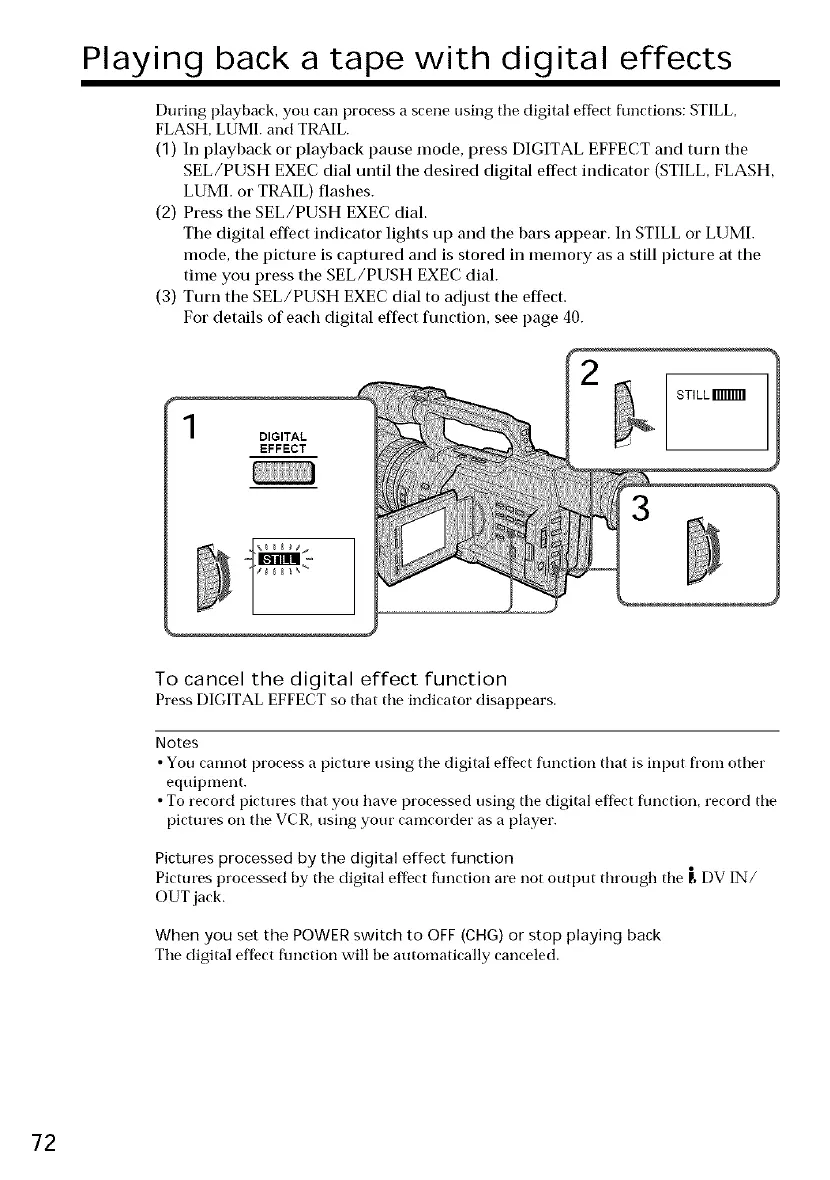
(1) In playback or playback pause mode, press DIGITAL EFFECT and turn the
SEL/PUSH EXEC dial until tile desired digital effect indicator (STILL, FLASH,
LUMI. or TRAIL) flashes.
(2) Press the SEL/PUSH EXEC dial.
Tile digital effect indicator lights up and tile bars appear. In STILL or LUMI.
mode, the picture is captured and is stored in memory as a still picture at tile
time you press the SEL/PUSH EXEC dial.
(3) Turn the SEL/PUSH EXEC dial to adjust the effect.
For details of eacb digital effect function, see page 40.
DIGITAL
EFFECT
_8_ _
2
3
To cancel the digital effect function
Press DIGITAL EFFECT so that the indicator disappears.
Notes
• You cannot process a picture using the digital effect function that is input from other
equipment.
• To record pictures that you have processed using the digital effect flmction, record the
pictures on the VCR, using your camcorder as a player.
Pictures processed by the digital effect function
Pictures processed by the digital effect fimction are not output tln'ough the r, DV IN/
OUT jack.
When you set the POWER switch to OFF (CHG) or stop playing back
The digital effect fimction will be automatically canceled.
72















 To Next Page