Dubbing only desired scenes - Digital
program editing
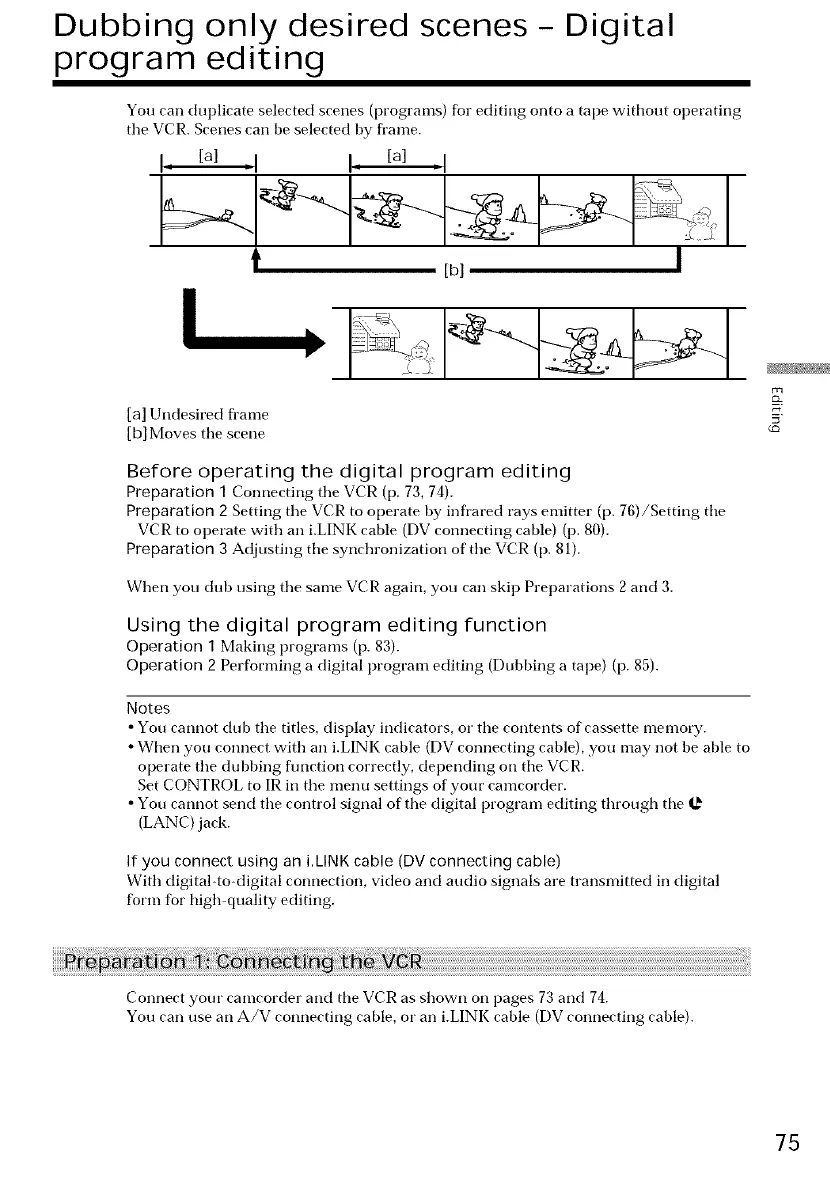
You can duplicate selected scenes (programs) for editing onto a tape without operating
tile VCR. Scenes can be selected by fl'ame.
I, [a] ,I I, [a] <1
[b] l
[a] Undesired fl'ame
[b] Moves tile scene
Before operating the digital program editing
Preparation 1 Connecting tile VCR (p. 73, 74).
Preparation 2 Setting tile VCR to operate by infrared rays emitter (p. 76)/Setting tile
VCR to operate with an i.LINK cable (DV connecting cable) (p. 80).
Preparation 3 Adjusting tile synchronization of the VCR (p. 81).
When you dub using tile same VCR again, you cart skip Preparations 2 and 3.
Using the digital program editing function
Operation 1 Making programs (p. 83).
Operation 2 Performing a digital program editing (Dubbing a tape) (p. 85).
Notes
• You cannot dub tile titles, display indicators, or tile contents of cassette memory.
• When you connect with an i.LINK cable (DV connecting cable), you may not be able to
operate tile dubbing flmction correctly, depending on tile VCR.
Set CONTROL to IR in tile menu settings of your camcorder.
• You cannot send tile control signal of tile digital program editing through tile
(LANC) jack.
If you connect using an i.LINK cable (DV connecting cable)
With digital-to-digital connection, video and audio signals are transmitted in digital
form for high quality editing.
Connect your camcorder and tile VCR as shown on pages 73 and 74.
You cart use an A/V connecting cable, or an i.LINK cable (DV connecting cable).
75















 To Next Page