Dubbing only desired scenes - Digital program editing
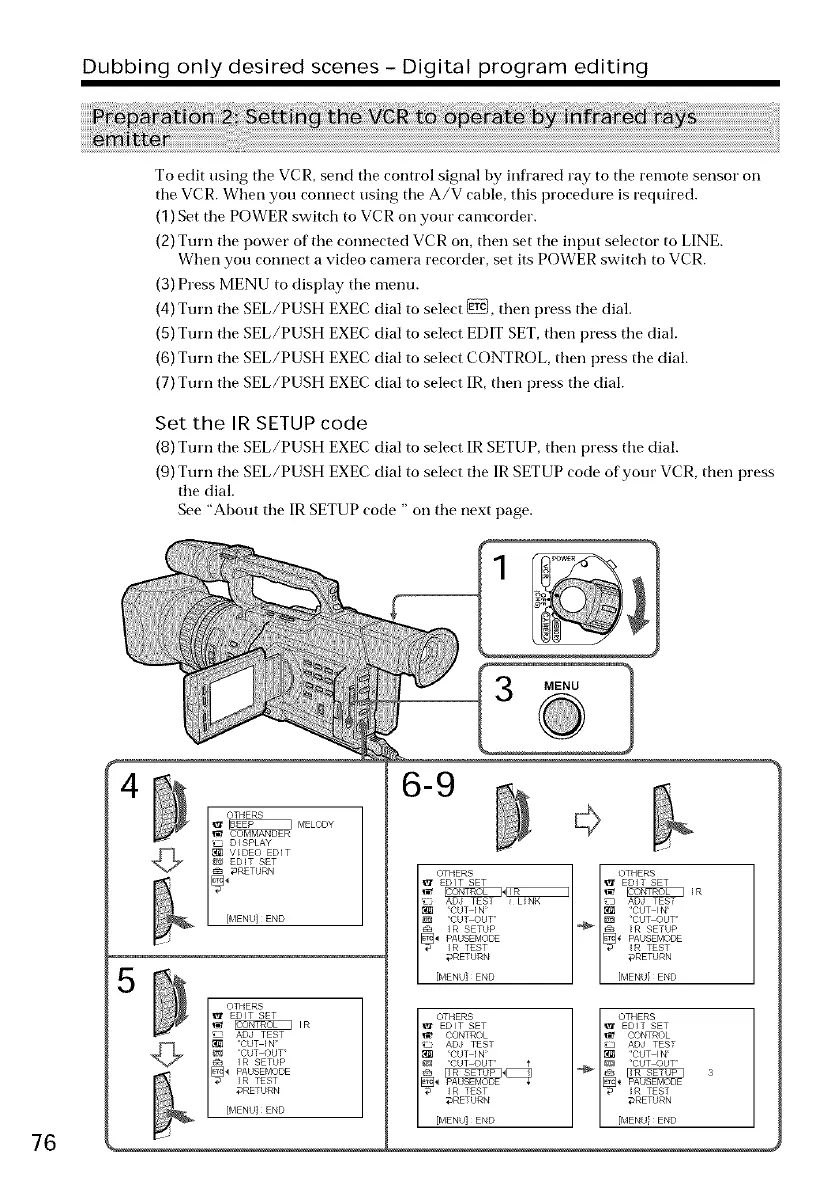
To edit using tile VCR, send tile control signal by infl'ared ray to tile remote sensor on
tile VCR. When you connect using tile A/V cable, this procedure is required.
(1)Set tile POWER switch to VCR on your camcorder.
(2)Turn tile power of tile connected VCR on, then set tile input selector to LINE.
When you connect a video camera recorder, set its POWER switch to VCR.
(3)Press MENU to display tile menu.
(4)Turn tile SEL/PUSH EXEC dial to select _, then press tile dial.
(5)Turn tile SEL/PUSH EXEC dial to select EDIT SET,then press tile dial.
(6)Turn tile SEL/PUSH EXEC dial to select CONTROL then press tile dial.
(7)Turn tile SEL/PUSH EXEC dial to select IR, then press tile dial.
Set the IR SETUP code
(8) Turn tile SEL/PUSH EXEC dial to select IR SETUP, then press tile dial.
(9) Turn the SEL/PUSH EXEC dial to select the IR SETUP code of your VCR, then press
tile dial.
See "About the IR SETUP code " on the next page.
1
MENU
76
4
I THERS_" _ MELODY
_t COMMANDER
IZ_ DISPLAY
_1_ VIDEO EDIT
EDIT SET
aRETURN
blENU END
5
I THERS
EDIT SET
r_ _ m
ADd TEST
CUT OUT
IR SETUP
IR TEST
_RETURN
.i
6-9
OTHERS
EDIT SET
ICONIROL NIR I
£73 ADd TEST i LINK
_4 PAUSEMODE
_] ¸¸CUT IN ¸¸
¸¸CUT OUT ¸¸
IR SETUP '_
IR TEST
_RETURN
[MENU]END















 To Next Page