Using special effects - Digital effect
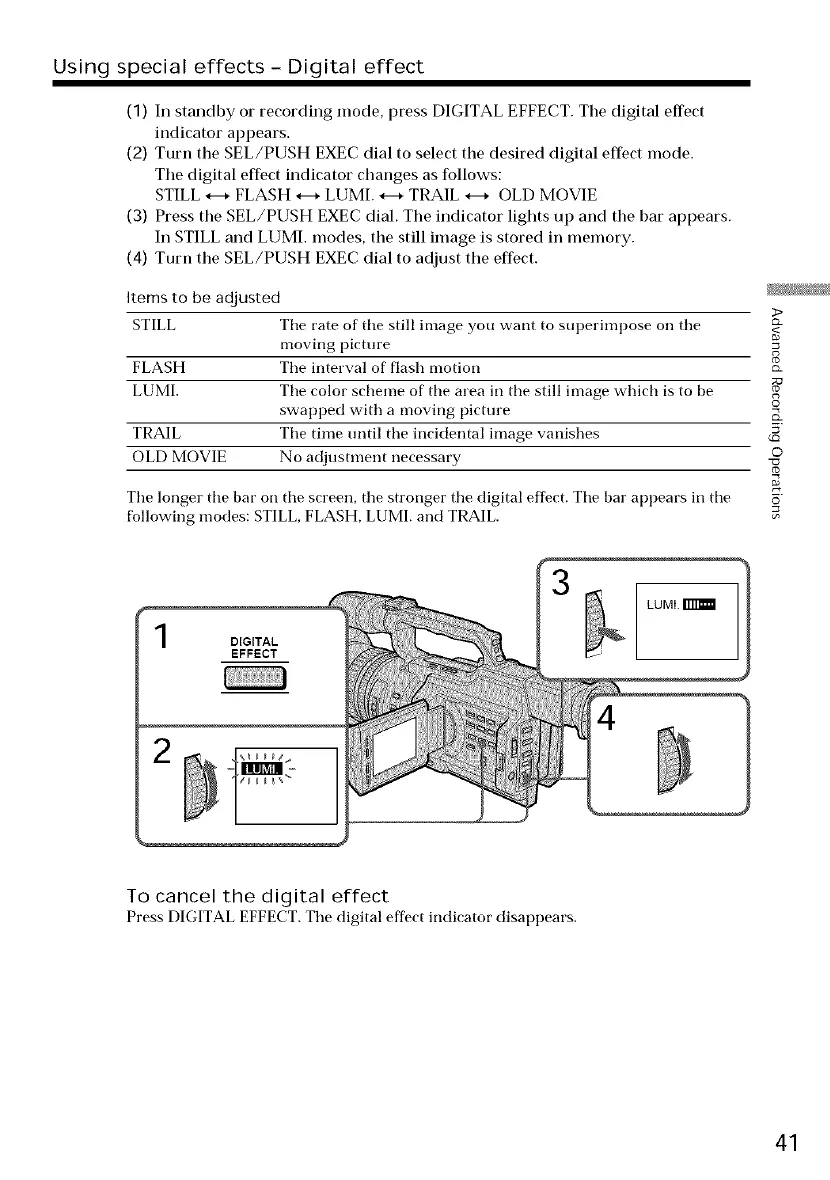
(1) In standby or recording mode, press DIGITAL EFFECT. Tile digital effect
indicator appears.
(2) Turn the SEL/PUSH EXEC dial to select the desired digital effect mode.
Tile digital effect indicator changes as follows:
STILL *--* FLASH *--* LUMI. *--* TRAIL *--* OLD MOVIE
(3) Press tile SEL/PUSH EXEC dial. The indicator lights up and the bar appears.
In STILL and LUML modes, the still image is stored in memory.
(4) Turn the SEL/PUSH EXEC dial to adjust the effect.
Items to be adjusted
STILL The rate of the still image you want to superimpose on the
moving picture
FLASH The interval of flash motion _-
LUMI. The color scheme of the area in the still image which is to be _
swapped with a moving picture o
TRAIL The time until the incidental image vanishes _5'
OLD MOVIE No adjustment necessary O
The longer the bat" on the screen, the stronger the digital effect. The bar appears in the _
following modes: STILL, FLASH, LUMI. and TRAIL.
LUMI.
2
To cancel the digital effect
Press DIGITAL EFFECT. The digital effect indicator disappears.
41















 To Next Page