Playing back images continuously
- SLIDE SHOW
You call amomatically [)lay back images ill sequence. This function is useflfl especially
when checking recorded images or during a presentation.
Before operation
Insert a "Memory Stick" into your camcorder.
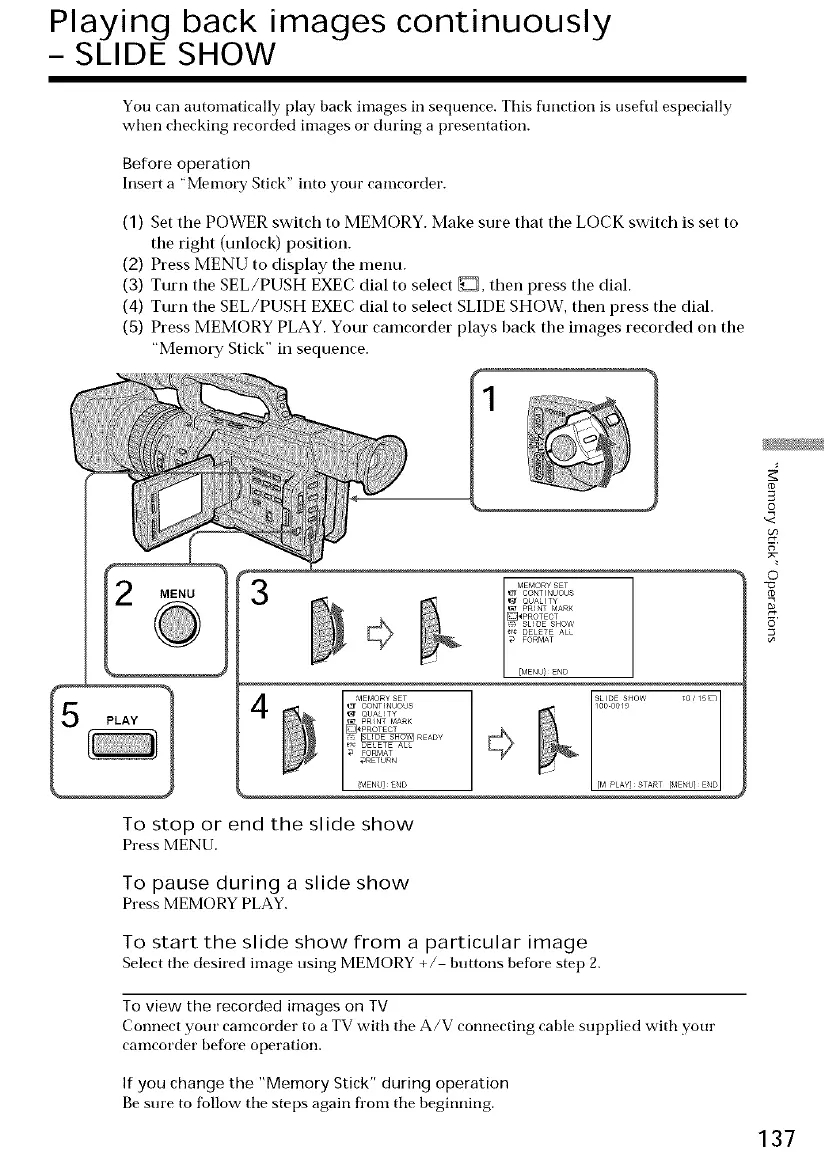
(1) Set the POWER switch to MEMORY. Make sure that tile LOCK switch is set to
the right (unlock) position.
(2) Press MENU to display the menu.
(3) Turn the SEL/PUSH EXEC dial to select _, then press the dial.
(4) Turn the SEL/PUSH EXEC dial to select SLIDE SHOW, then press the dial.
(S) Press MEMORY PLAY. Your camcorder plays back the images recorded on the
"Memoi 7 Stick" in sequence.
MEMORYSET
[]_PROTECT
& _READY
[M PLAY]START [MENU]END
To stop or end the slide show
Press MENU.
To pause during a slide show
Press MEMORYPLAY.
To start the slide show from a particular image
Select tile desired in]age using MEMORY +/ buttons before step 2.
To view the recorded images on TV
Connect your camcorder to a TV with the A/V connecting cable supplied with your
can]corder before operation.
If you change the "Memory Stick" during operation
Be sure to follow the steps again from the beginning.
o
o
"CJ
137















 To Next Page