Making your own titles
You carl make up to two titles and store them in cassette memory. Each title carl
have up to 20 characters.
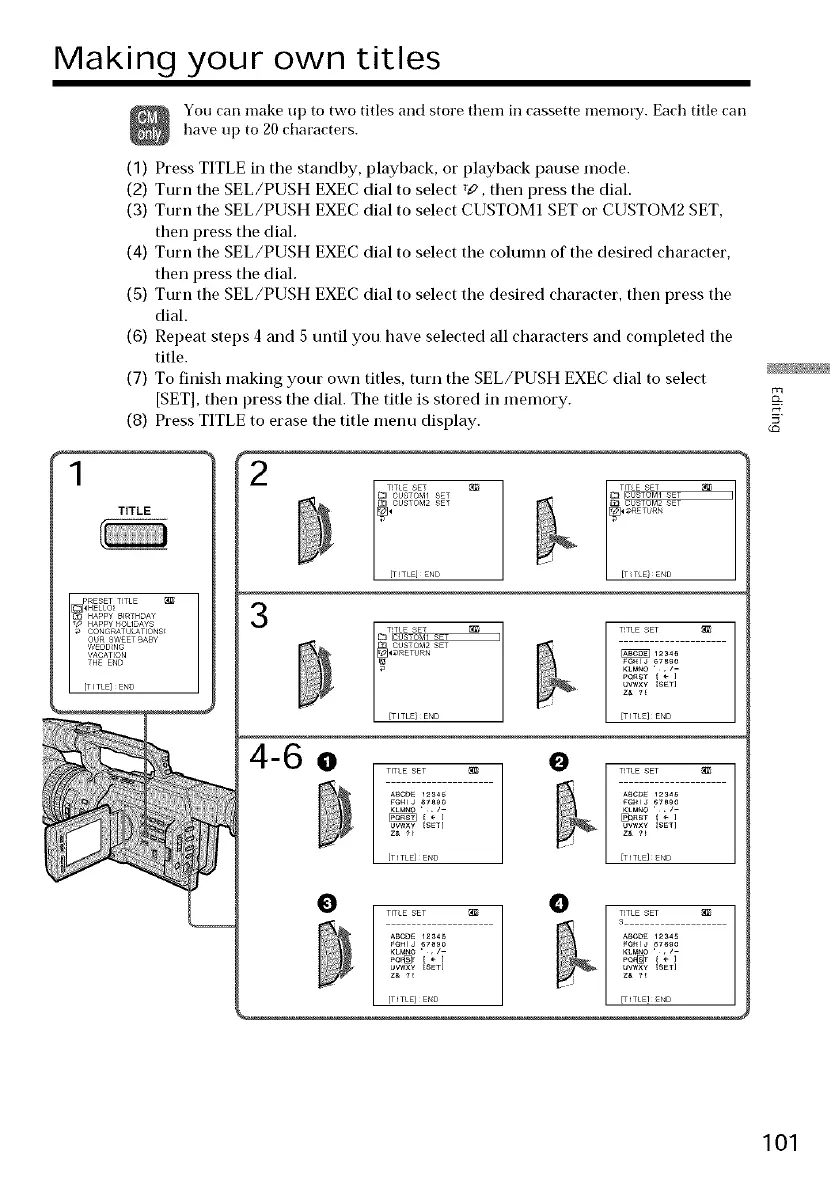
(1) Press TITLE in tile standby, playback, or playback pause mode.
(2) Turn the SEL/PUSH EXEC dial to select T_, then press the dial.
(3) Turn the SEL/PUSH EXEC dial to select CUSTOM1 SET or CUSTOM2 SET,
then press the dial.
(4) Turn the SEL/PUSH EXEC dial to select the column of the desired character,
then press the dial.
(5) Turn the SEL/PUSH EXEC dial to select the desired character, then press the
dial.
(6) Repeat steps 4 and 5 until you have selected all characters and completed the
title.
(7) To finish making your own titles, turn the SEL/PUSH EXEC dial to select
[SET], then press the dial. The title is stored in memory.
(8) Press TITLE to erase the title menu display.
TITLE
2
TITLE SET
D OUSTO_,_ISET
_OUSTOM2 SET
[TITLE]ENO
3
TITLE SET
CUSTO_,_2SET
RETURN
TITLE SET
_1234_
KLM_O ',/-
UW_X¥ {SET]
Z_ _E
FITLE}E_D
4-6 o e
TITLE SET
FeHIJ _78_0
KLM_O ',/--
UWX¥ _SET]
[TITLE}END
TITLE SET _
A_CDE 12S45
_nST } ÷ ]
UW×¥ _SET]
[TITLE}E_D
O TITLE SET _ O _
TITLE SET
_B¢_ 1234_ _BC_ 1234_
Poe[_]r [ _ J Pe_[_]r { ÷ [
uvwx¥ [SET] UWXY {S_I]
Z_ _ Z_ ?_
[TITLE}END _ITLE]END
101















 To Next Page