Recording video or TV programs
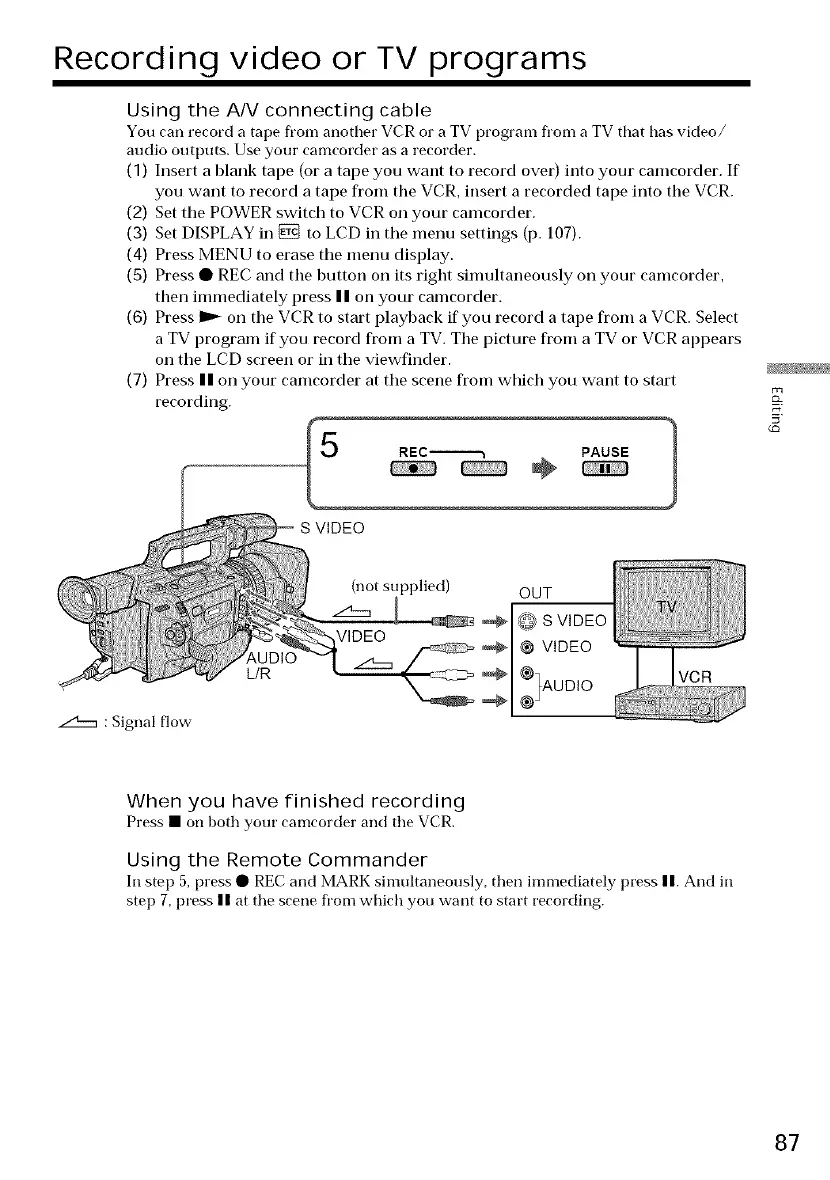
Using the A/V connecting cable
You can record a tape from another VCR or a TV program from a TV that has video/
audio outputs. Use your camcorder as a recorder.
(1) Insert a blank tape (or a tape you want to record over) into your camcorder. If
you want to record a tape fl'om the VCR, insert a recorded tape into the VCR.
(2) Set tile POWER switch to VCR on your camcorder.
(3) Set DISPLAY in _ to LCD in the menu settings (p. 107).
(4) Press MENU to erase the menu display.
(5) Press • REC and the I)utton on its right simultaneously on your camcorder,
then immediately press | | on your camcorder.
(6) Press _ on the VCR to start playback if you record a tape fl'om a VCR. Select
a TV program if you record fl'om a TV. The picture fl'om a TV or VCR appears
on the LCD screen or in the viewfinder.
(7) Press II on your camcorder at the scene fl'om which you want to start
recording.
S VIDEO
REC_ PAUSE
÷
L/R
: Signal flow
(not supplied) OUT
_ @ S VIDEO
VIDEO @ @ VIDEO
1%UD,O
_1 ®J
VCR
When you have finished recording
Press • on both your camcorder and the VCR.
Using the Remote Commander
In step 5, press • REC and MARK simultaneously, then immediately press n. And in
step 7, press n at the scene fl'om which you want to start recording.
87















 To Next Page