Using with an analog video unit and a PC
- Signal convert function
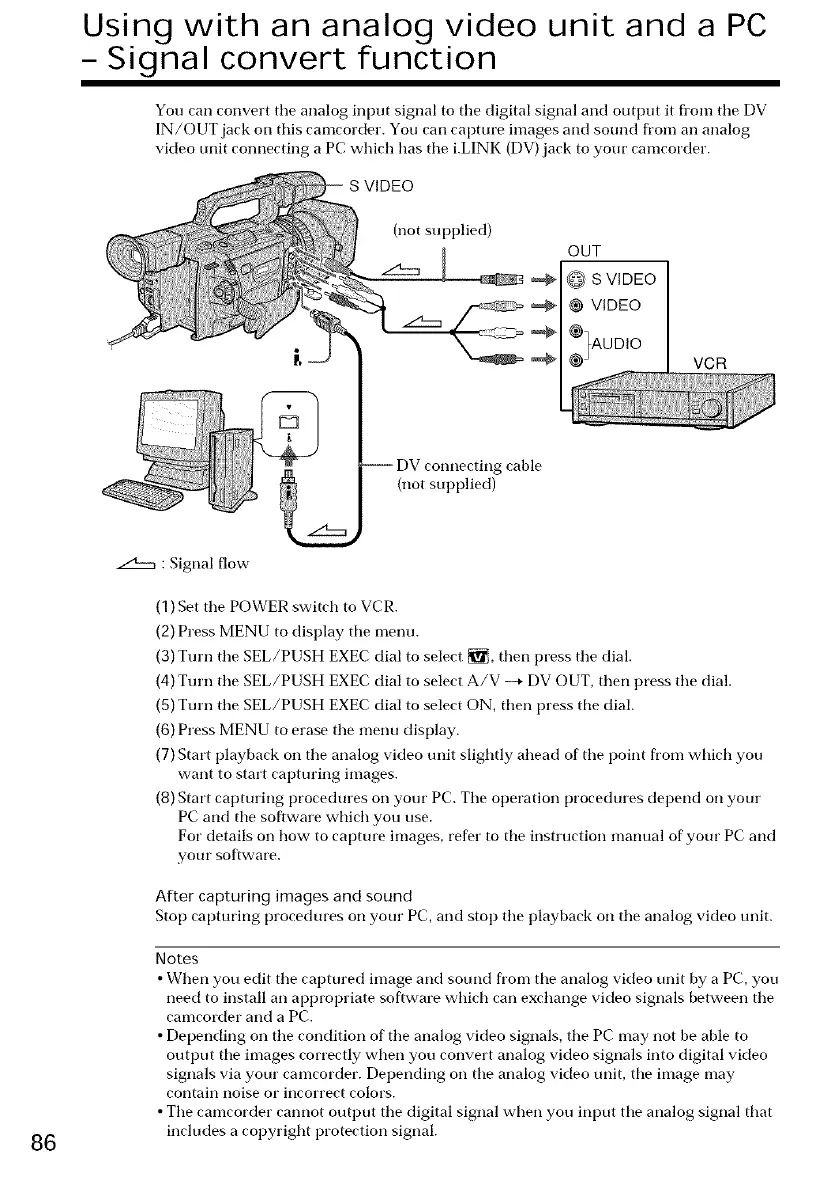
You can convert tile analog input signal to tile digital signal and output it fl'om tile DV
IN/OUT jack oil this camcorder. You can capture images and sound from an analog
video trait connecting a PC which has tile i.LINK (DV) jack to your camcorder.
(not supplied)
OUT
@ S VIDEO
@ VIDEO
_AUDIO
VCR
-- DV connecting cable
(not supplied)
86
z2h:m : Signal flow
(1) Set tile POWER switch to VCR.
(2) Press MENU to display tile olenu.
(3) Turn the SEL/PUSH EXEC dial to select _, then press the dial.
(4) Turn the SEL/PUSH EXEC dial to select A/V --* DV OUT, then press the dial.
(5) Tm'n the SEL/PUSH EXEC dial to select ON, then press the dial.
(6) Press MENU to erase the meno display.
(7) Start playback oil the analog video trait slightly ahead of the point from which you
want to start capturing images.
(8) Start capturing procedures oil your PC. Tile operation procedures depend oil your
PC and tile software which you use.
For details oil how to capture images, refer to tile instruction manual of your PC and
your software.
After capturing images and sound
Stop capturing procedures oil your PC, and stop tile playback oil tile analog video unit.
Notes
• When you edit tile captured image and sound from tile analog video onit by a PC, you
need to install an appropriate software which can exchange video signals between the
camcorder and a PC.
• Depending oil the condition of the analog video signals, the PC may not be able to
output tile images correctly when you convert analog video signals into digital video
signals via your camcorder. Depending oil tile analog video unit, tile image may
contain iloise or incorrect colors.
• The camcorder cannot output the digital signal when you input tile analog signal that
inclodes a copyright protection signal.















 To Next Page