-- Quick Reference --
Identifying the parts and controls
[]
[]
[]
[]
[]
[]
[]
[]
[]
[]
[]
162
[]
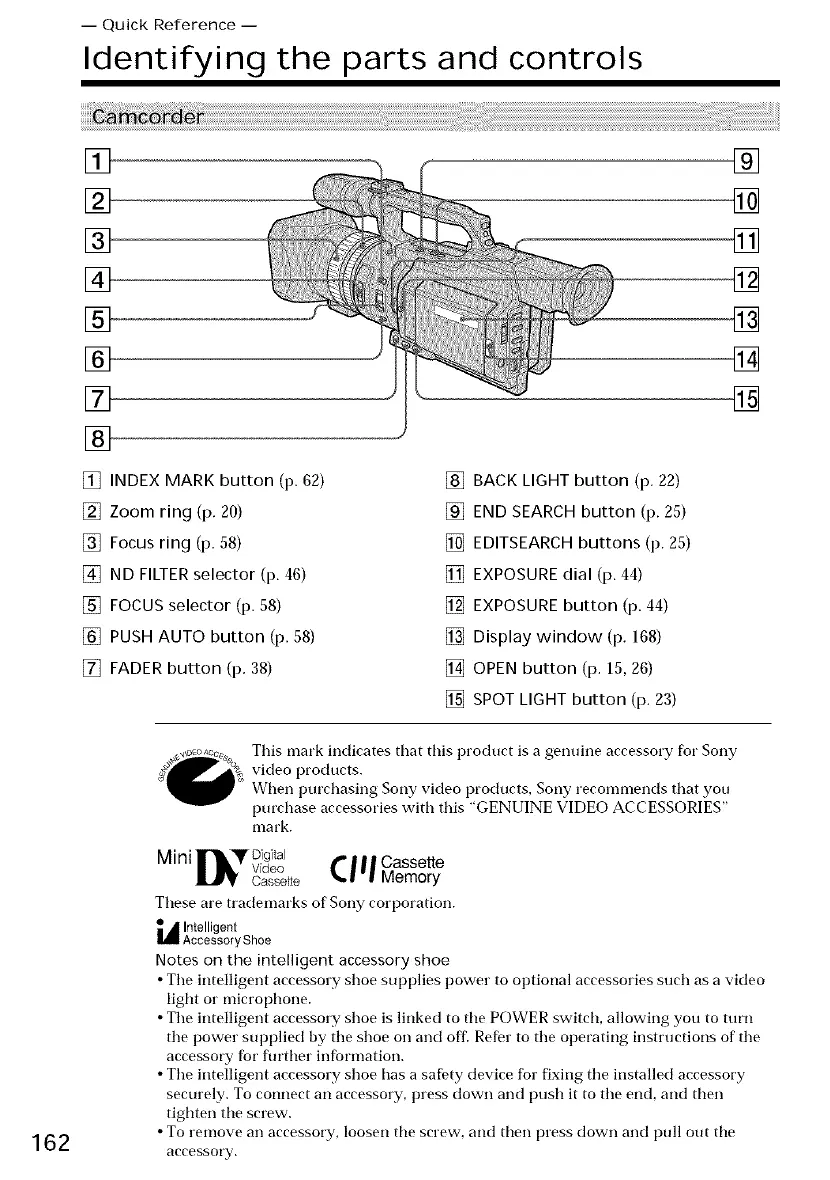
[] INDEX MARK button (p. 62)
[] Zoom ring (p. 20)
[] Focus ring (p. 58)
[] ND FILTER selector (p. 46)
[] FOCUS selector (p. 58)
[] PUSH AUTO button (p. 58)
[] FADER button (p. 38)
[] BACK LIGHT button (p. 22)
[] END SEARCH button (p. 25)
[] EDITSEARCH buttons (p. 25)
[] EXPOSURE dial (p. 44)
[] EXPOSURE button (p. 44)
[] Display window (p. 168)
[] OPEN button (p. 15, 26)
[] SPOT LIGHT button (p. 23)
This mark indicates that this product is a genuine accessory for Sony
video products.
When purchasing Sony video products, Sony recommends that you
purcrtlase accessories with this "GENUINE VIDEO ACCESSORIES"
olark,
Mini rDigital
Video _ I I I Cassette
cassette I_, I'l Memory
These are trademarks of Sony corporation.
L_ Intelligent
Accessory Shoe
Notes on the intelligent accessory shoe
• Tile intelligent accessory shoe supplies power to optional accessories such as a video
light or microprtlone.
• Tile intelligent accessory shoe is linked to the POWER switch, allowing you to turn
the power supplied by the shoe on and off. Refer to the operating instructions of the
accessory fbr flu'ther infbrmation.
• The intelligent accessory shoe has a safety device for fixing the installed accessory
securely. To connect an accessory, press down and push it to the end, and then
tighten the screw.
• To remove an accessory, loosen the screw-, and then press down and pull out the
accessory.















 To Next Page