Frame by frame recording - Cut recording
You can make a recording with a stol>motion animated effect using cut recording. To
create this effect, alternately move tile subject a little and make a cut recording. We
recommend that you use a tripod, and operate tile camcorder using the Remote
Commander after step 6.
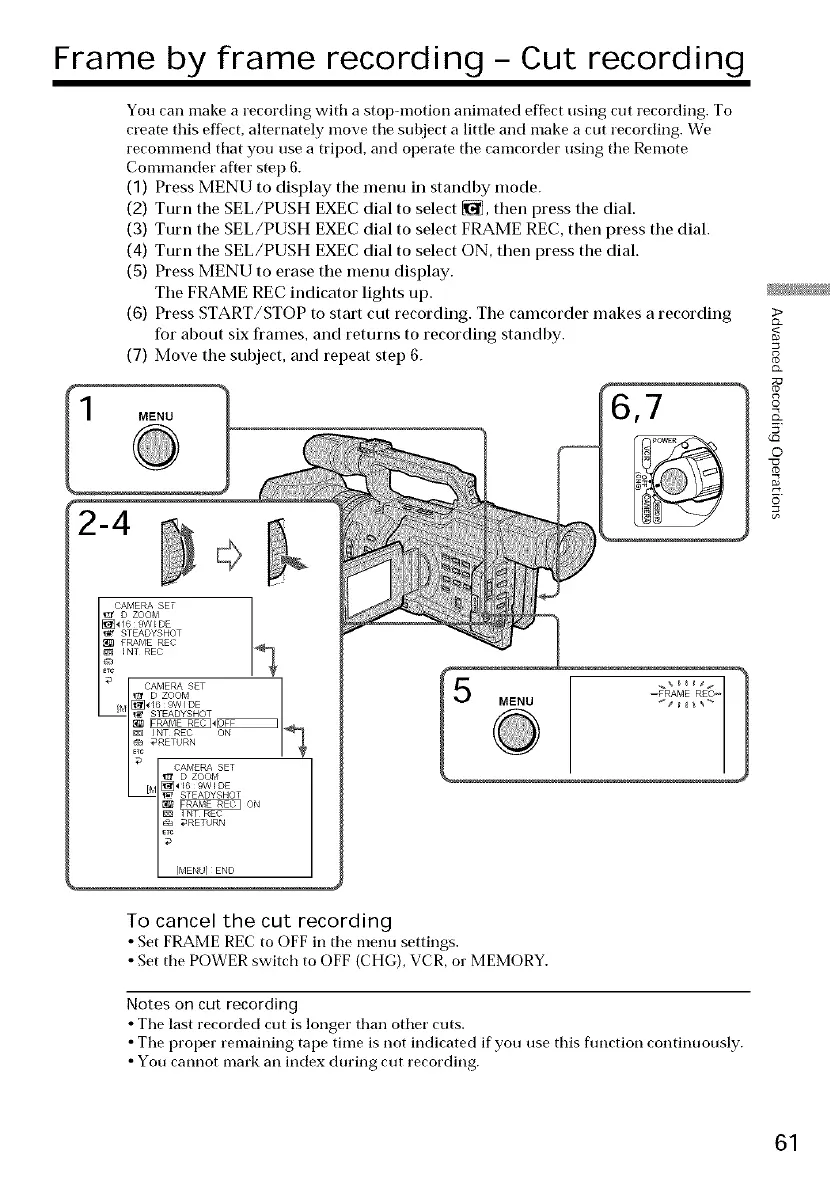
(1) Press MENU to display the menu in standby mode.
(2) Turn the SEL/PUSH EXEC dial to select _, then press the dial.
(3) Turn the SEL/PUSH EXEC dial to select FRAME REC, then press the dial.
(4) Turn the SEL/PUSH EXEC dial to select ON, then press the dial.
(5) Press MENU to erase the menu display.
The FRAME REC indicator lights up.
(6) Press START/STOP to start cut recording. The camcorder makes a recording
for about six fi'ames, and returns to recording standby.
(7) Move the subject, and repeat step 6.
MENU 7
STEADYSHOT
ON
I NT REC
_RETHRN
[MENU] END
>
<
8
©
5'
O
TO cancel the cut recording
• Set FRAME REC to OFF in the menu settings.
• Set tile POWER switch to OFF (CHG), VCR, or MEMORY.
Notes on cut recording
• Tile last recorded cut is longer than other cuts.
• The proper remaining tape time is not indicated if you use this flmction continuously.
• You cannot mark an index during cut recording.
61















 To Next Page