Searching the boundaries of recorded
tape by title - Title search
If you use a tape with cassette memory, you call search fbr tim boundaries of
recorded tape by title (Title search) (p. 143). Use tim Remote Commander for
this operation.
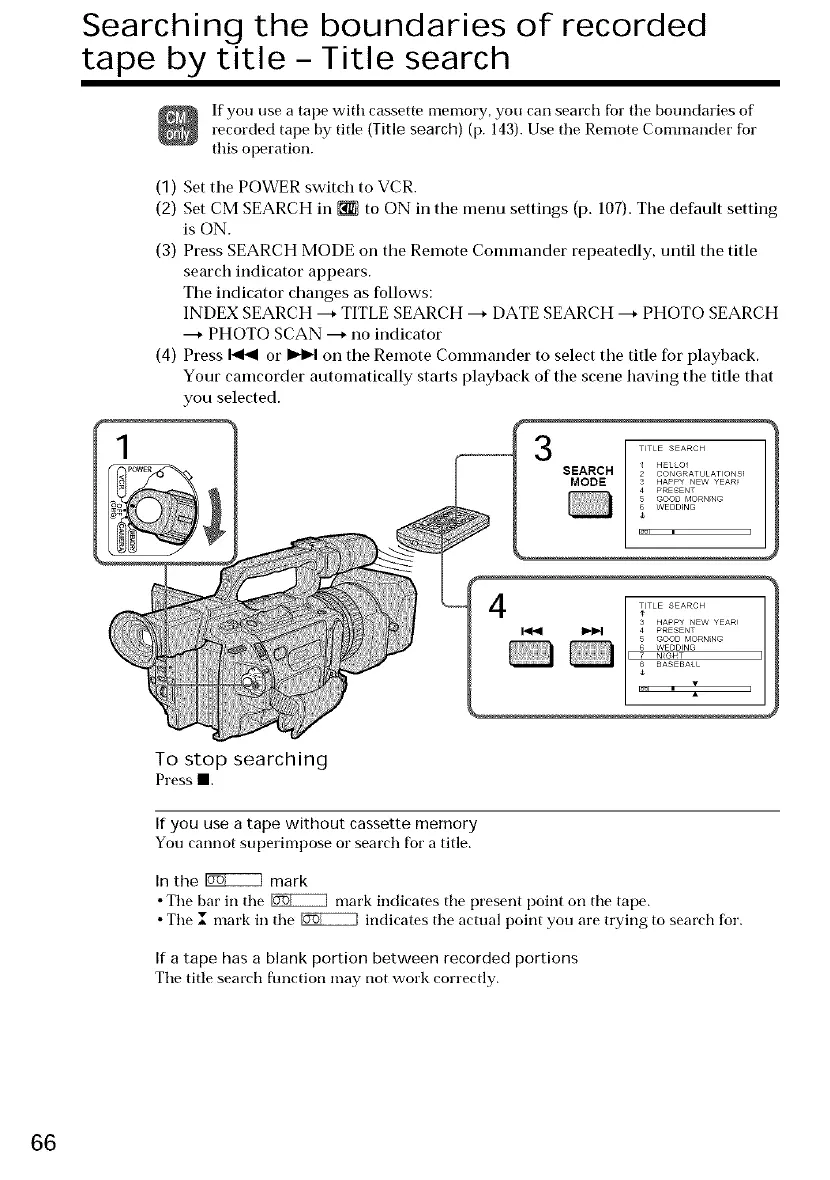
(1) Set tile POWER switch to VCR.
(2) Set CM SEARCH in _ to ON in the menu settings (p. 107). Tbe default setting
is ON.
(3) Press SEARCH MODE oil tile Remote Commander repeatedly, until the title
search indicator appears.
The indicator changes as follows:
INDEX SEARCH ---+TITLE SEARCH ---+DATE SEARCH ---+ PHOTO SEARCH
---+ PHOTO SCAN ---+no indicator
(4) Press _ or _ on the Remote Commander to select the title for playback.
Your camcorder automatically starts playback of tim scene having the title that
you selected.
3
SEARCH
MODE
4 _TLE SEARCH
HAPPY NEW YEAR!
PRESENT
5 GOOD MORNING
WEDDING
N_GHT
T BASEBAU
To stop searching
Press==.
If you use a tape without cassette memory
You cannot superimpose or search for a title.
In the _ mark
• The bar in tim _ mark indicates tim present point on tim tape.
• Tim I mark in tim _ indicates tim actual point you are trying to search for.
If a tape has a blank portion between recorded portions
The title search fimction may not work correctly.
66















 To Next Page