Inserting a scene from a VCR- Insert
editing
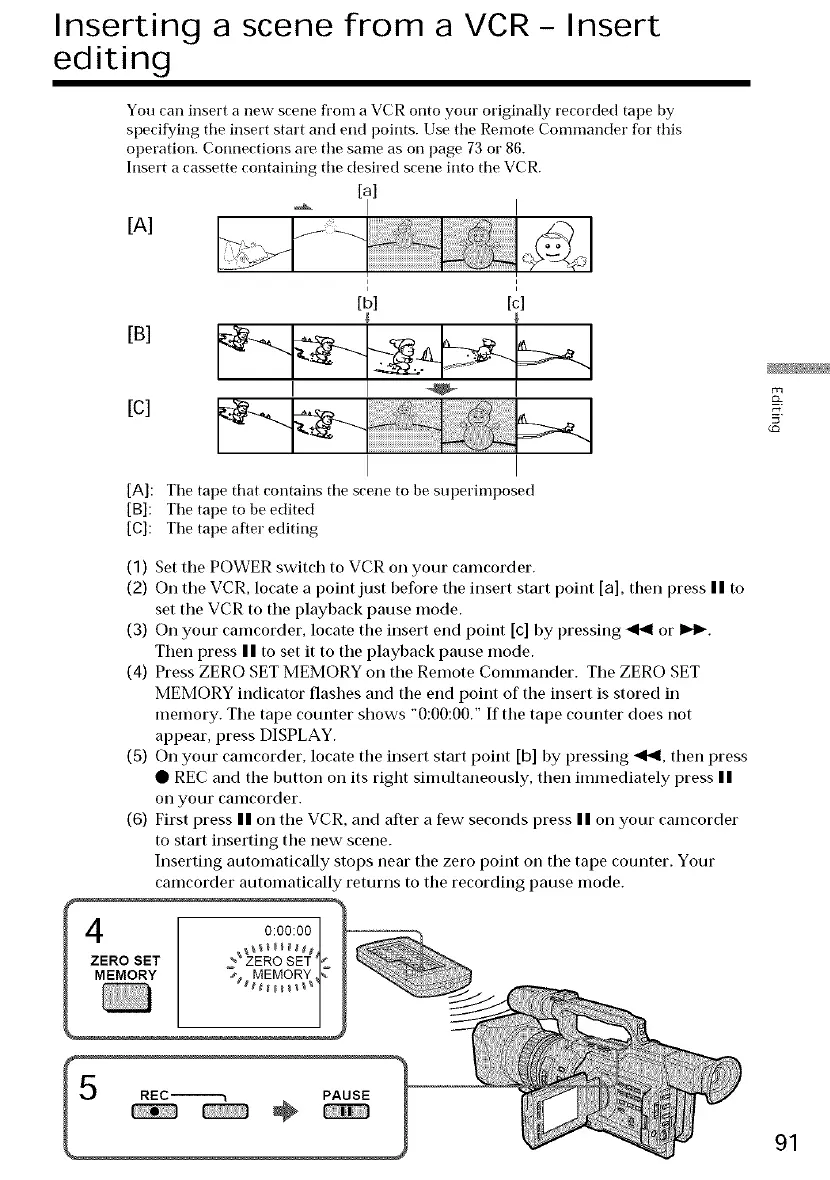
You can insert a new scene fl'om a VCR onto your originally recorded tape by
specifying tile insert start and end points. Use the Remote Commander for this
operation. Connections are the same as on page 73 or 86.
Insert a cassette containing tile desired scene into tile VCR.
[al
[A]
[B]
[c]
[bl [c]
[A]: Tile tape that contains the scene to be superimposed
[B]: Tile tape to be edited
[C]: Tile tape after editing
(1) Set the POWER switch to VCR on your camcorder.
(2) On the VCR, locate a point just before the insert start point [a], then press I I to
set the VCR to the playback pause mode.
(3) On your camcorder, locate the insert end point [c] by pressing _ or 1,,4_.
Then press I I to set it to the playback pause mode.
(4) Press ZERO SET MEMORY on the Remote Commander. The ZERO SET
MEMORY indicator flashes and the end point of the insert is stored in
memory. The tape counter shows "0:00:00." If the tape counter does not
appear, press DISPLAY.
(5) On your camcorder, locate the insert start point [b] by pressing _qt,ql,then press
• REC and the button on its right simultaneously, then immediately press I I
Oil your canlcorder.
(6) First press n on the VCR, and after a few seconds press n on your camcorder
to start inserting the new scene.
Inserting automatically stops near the zero point on the tape counter. Your
camcorder automatically returns to the recording pause mode.
4
ZERO SET
MEMORY
91















 To Next Page