Intervalrecording
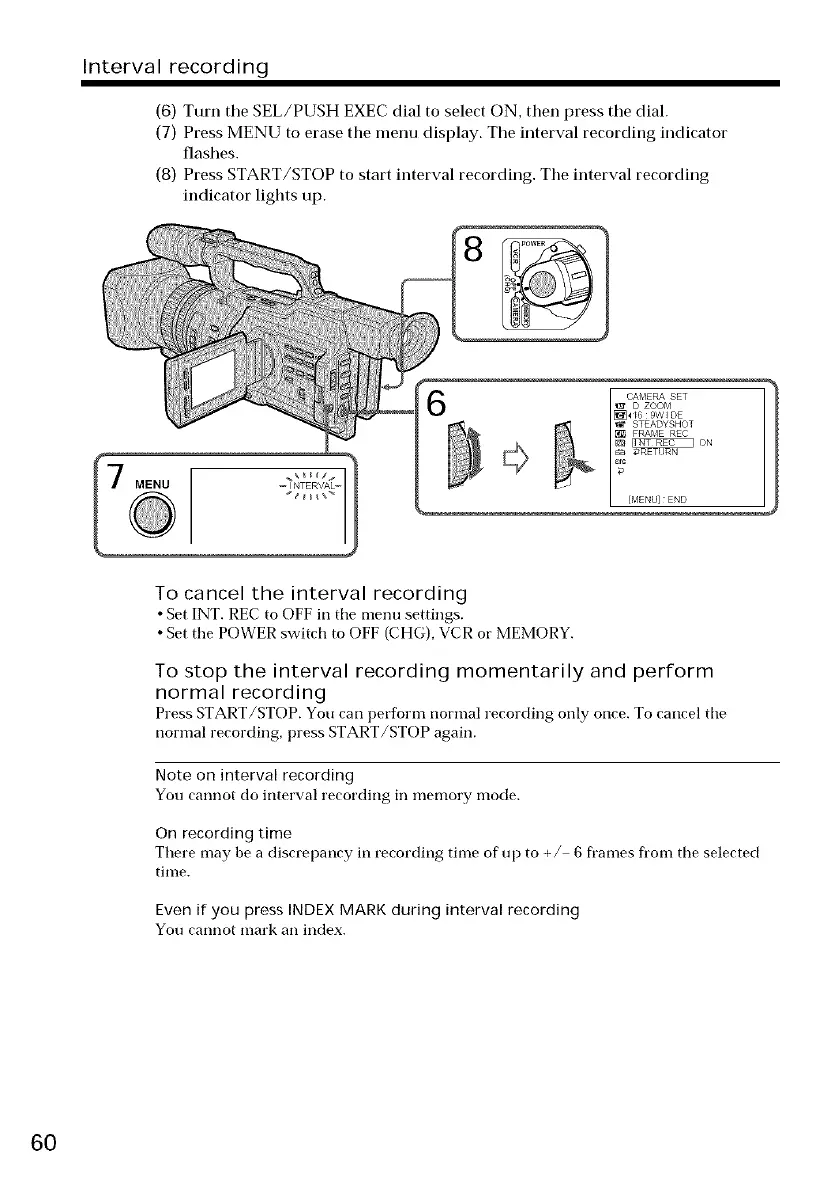
(6) Turn tile SEL/PUSH EXEC dial to select ON, then press tile dial.
(7) Press MENU to erase the menu display. The interval recording indicator
flashes.
(8) Press START/STOP to start interval recording. Tile interval recording
indicator lights up.
MENU
CAIV_ERA SET
D ZOOM
[_ _6 9W I DE
_ [_ STEADYSHOT
[E{_ FRAME REC
/g _ oN
[MENU] END
To cancel the interval recording
• Set INT. REC to OFF in tile menu settings.
• Set the POWER switch to OFF (CHG), VCR or MEMORY.
To stop the interval recording momentarily and perform
normal recording
Press START/STOP. You can perform normal recording only once. To cancel the
normal recording, press START/STOP again.
Note on interval recording
You cannot do interval recording in memory mode.
On recording time
There may be a discrepancy in recording time of up to +/ 6 frames from the selected
time.
Even if you press INDEX MARK during interval recording
You cannot mark an index.
6O















 To Next Page