Interval record ing
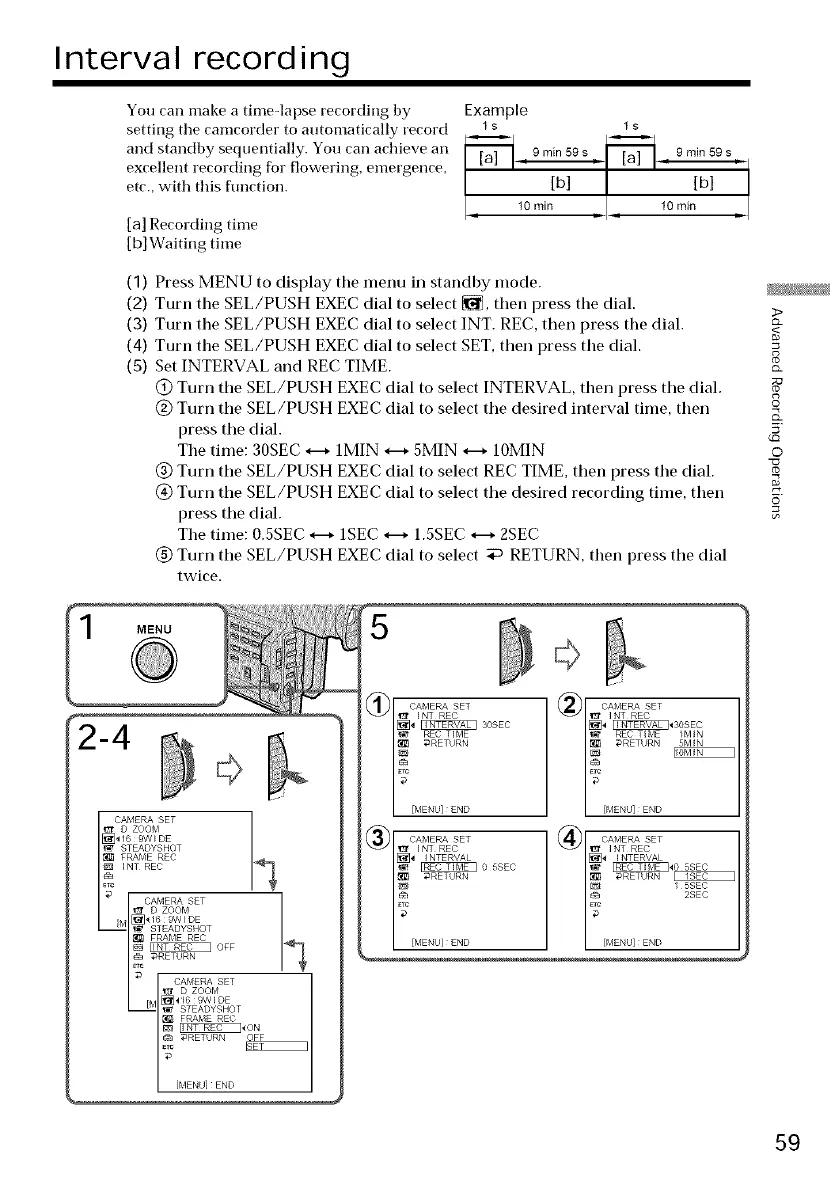
You can make a timeqapse recording by
setting the camcorder to automatically record
and standby sequentially. You can achieve an
excellent recording for flowering, emergence,
etc., with this function.
[a] Recording time
[b]Waiting time
Example
ls Is
, 9 rain 59 s _ 9 rnin 59 s
(1)
(2)
(3)
(4)
(5)
Press MENU to display the menu in standby mode.
Turn the SEL/PUSH EXEC dial to select _, then press the dial.
>
Turn the SEL/PUSH EXEC dial to select INT. REC, then press the dial.
Turn the SEL/PUSH EXEC dial to select SET, then press the dial.
Set INTERVAL and REC TIME.
@ Turn the SEL/PUSH EXEC dial to select INTERVAL, then press the dial.
@ Turn the SEL/PUSH EXEC dial to select the desired interval time, then o
press the dial. 5'
The time: 30SEC H 1MIN H 5MIN _ 10MIN O
@ Turn the SEL/PUSH EXEC dial to select REC TIME, then press the dial.
@ Turn the SEL/PUSH EXEC dial to select the desired recording time, then 6
press the dial.
The time: 0.5SEC _ 1SEC _-+ 1.5SEC _ 2SEC
@ Turn the SEL/PUSH EXEC dial to select _ RETURN, then press the dial
twice.
MENU
STEADYSHOT
FRAME REC
INT REC
[_]_169WIDE
_ STEADYSHOT
FRAblE REC
_ O_F
_RETURN
STEADYSHOT
FRAME REC
_RETURN OFF
[MENU]END
@[ CAMERA SET
_ NT REC
/J_,__ S0SEC
_ EC TIME
DRETHRN
[MENU] END
|[_ I NTERVAL
l_ _ 05SEC
7
[MENU] END
CAMERA SET
I NT REC
[_ I NTER//AL
_05SEC
I_ _RETURN
[MENU] END I 5SEC
2SEC
_2
59















 To Next Page