Focusing manually
You carl gain better results by manually adjusting tile focus in tile fbllowing cases:
• Tile autofocus mode is not effective when shooting
subjects through glass coated with water droplets
horizontal stripes
subjects with little contrast with backgrounds such as walls and sky
• When you want to change the focus from a subject in the foreground to a subject in the
background
• Shooting a stationary subject when using a tripod
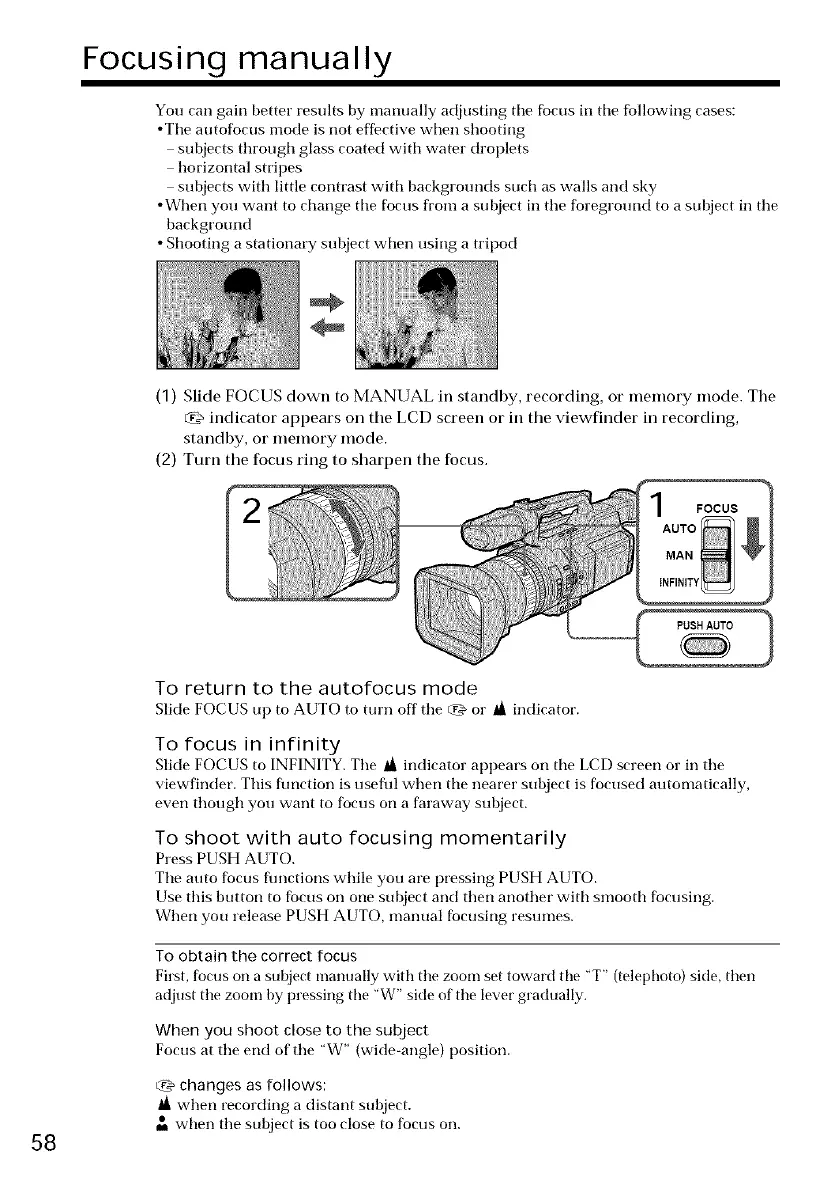
(1) Slide FOCUS down to MANUAL in standby, recording, or memory mode. The
indicator appears on the LCD screen or in the viewfinder in recording,
standby, or memory mode.
(2) Turn the focus ring to sharpen the focus.
FOCUS
58
To return to the autofocus mode
Slide FOCUS up to AUTO to turn off tile _'& or _ indicator.
To focus in infinity
Slide FOCUS to INFINITY. The _ indicator appears on the LCD screen or in the
viewfinder. This flmction is useflfl when the nearer subject is focused automatically,
even though you want to focus on a faraway subject.
To shoot with auto focusing momentarily
Press PUSH AUTO.
The auto focus flmctions while you are pressing PUSH AUTO.
Use this button to focus on one subject and then another with smooth focusing.
When you release PUSH AUTO, manual focusing resumes.
To obtain the correct focus
First, focus on a subject manually with tile zoom set toward tire "T" (telephoto) side, then
adjust tile zoom by pressing the 'W" side of tile lever gradually.
When you shoot close to the subject
Focus at the end of the "W" (wide-angle) position.
_'_ changes as follows:
when recording a distant subject.
• when tile subject is too close to focus on.















 To Next Page