Superimposing a title
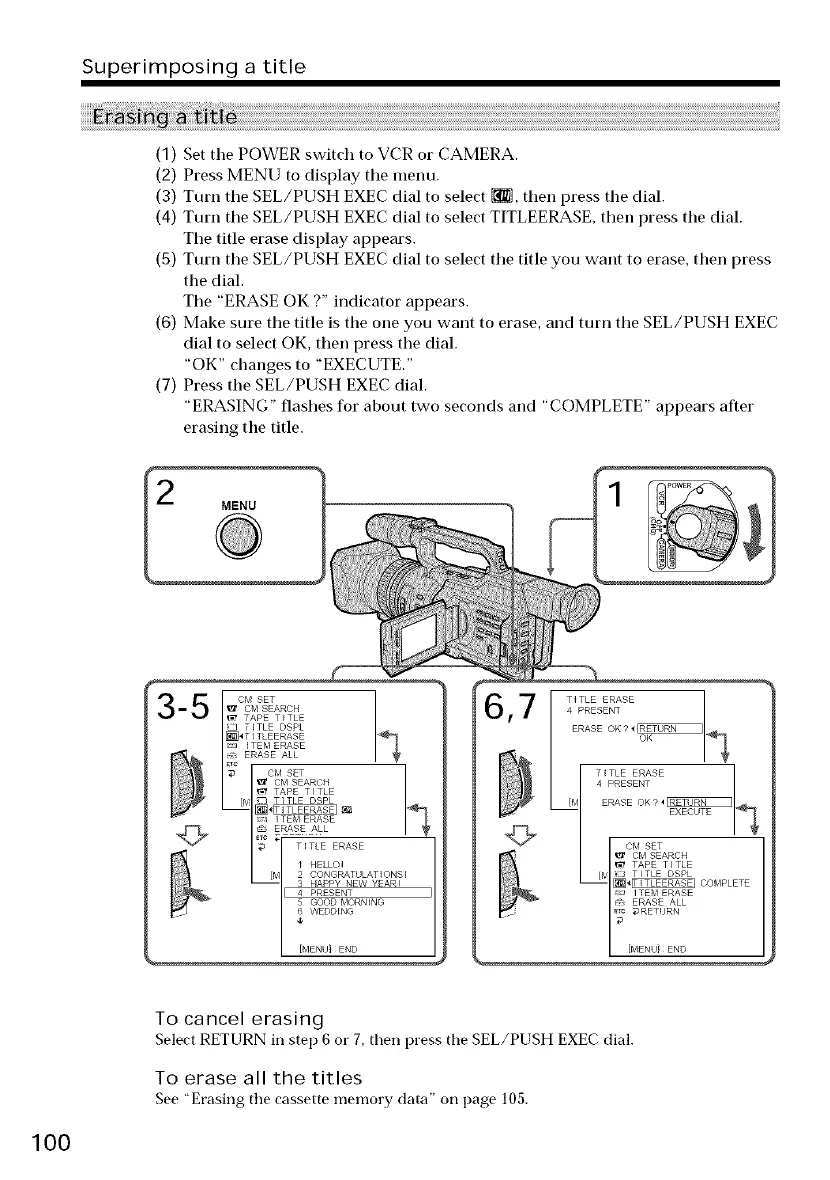
(1) Set tile POWER switch to VCR or CAMERA.
(2) Press MENU to display tile menu.
(3) Turn tile SEL/PUSH EXEC dial to select _, then press the dial.
(4) Turn tile SEL/PUSH EXEC dial to select TITLEERASE, then press the dial.
Tile title erase display appears.
(5) Turn tile SEL/PUSH EXEC dial to select tile title you want to erase, then press
the dial.
Tile "ERASE OK ?" indicator appears.
(6) Make sure tile title is the one you want to erase, and turn tile SEL/PUSH EXEC
dial to select OK, then press the dial.
"OK" changes to "EXECIJTE."
(7) Press the SEL/PUSH EXEC dial.
"ERASING" flashes for about two seconds and "COMPLETE" appears after
erasing the title.
MENU
_t CM SEARCH h
• APE TITLE
ITEM ERASE
+{*:. ERASE ALL
CM SET
I_ CM SEARCH
TAPE • I TLE
[_/ _ TITLE DSPL
i!;_ ITEM ERASE
_RAS_ _ ALL
_rc
TITLE ERASE
[M 2 CONGRATULATIONS!
3 HAPPY NEVV YEAR!
I[ 4 PRESENT
5 GOOD MORNING
_ WI DDING
lO0
To cancel erasing
Select RETURN in step 6 or 7, then press the SEL/PUSH EXEC dial.
To erase all the titles
See "Erasing the cassette memory data" on page 105.















 To Next Page