-- Editing --
Dubbing a tape
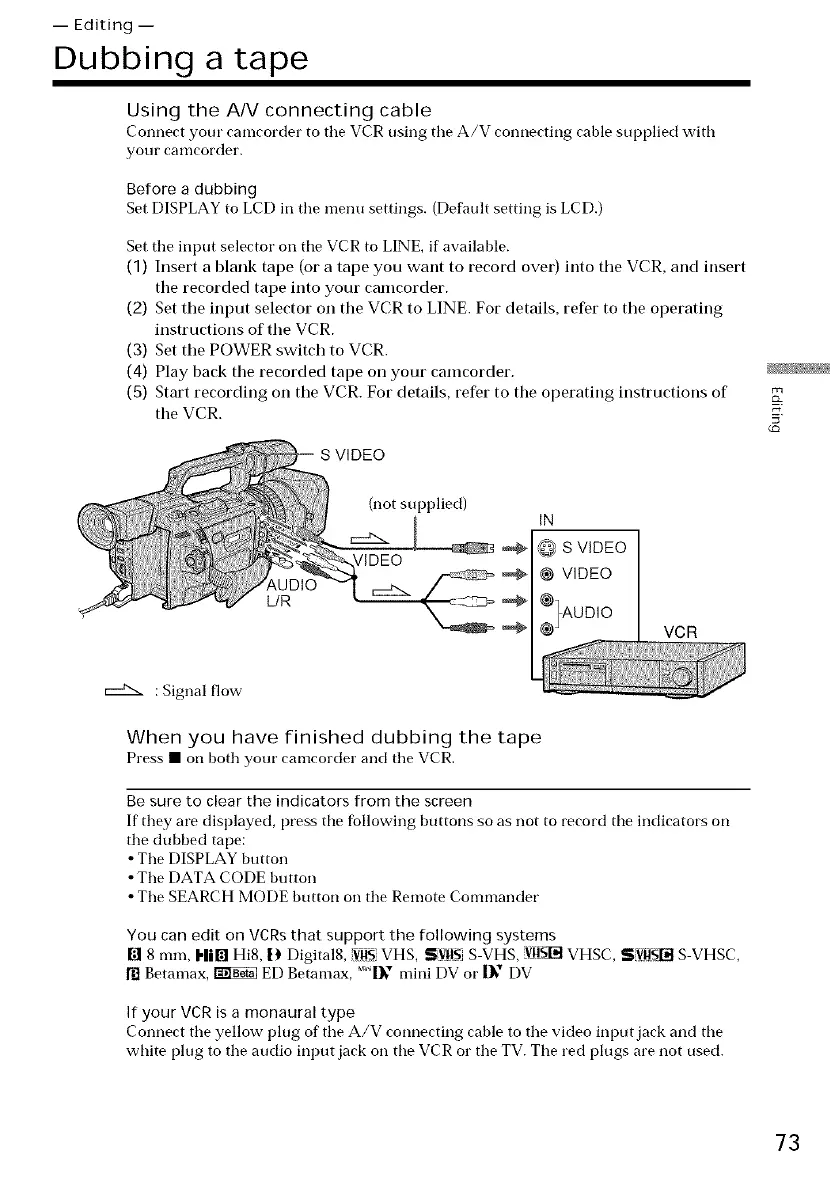
Using the A/V connecting cable
Connect your camcorder to tile VCR using tile A/V connecting cable supplied with
your canlcorder.
Before a dubbing
Set DISPLAY to LCD in tile menu settings. (Default setting is LCD.)
Set tile input selector on tile VCR to LINE, if available.
(1) Insert a blank tape (or a tape you want to record over) into tile VCR, and insert
tile recorded tape into your camcorder.
(2) Set tile input selector on the VCR to LINE. For details, refer to tile operating
instructions of tile VCR.
(3) Set tile POWER switch to VCR.
(4) Play back the recorded tape on your camcorder.
(5) Start recording on tile VCR. For details, refer to the operating instructions of
the VCR.
L/R
(not supl)lied)
IN
O S VIDEO
@ VIDEO
,%°°,o
VCR
: Signal flow-
When you have finished dubbing the tape
Press • on both your camcorder and tile VCR.
Be sure to clear the indicators from the screen
If they are disl)layed, press tile fbllowing buttons so as not to record tile indicators on
tile dubbed tape:
• Tile DISPLAY button
• Tile DATA CODE button
• Tile SEARCH MODE button oil tile Remote Commander
You can edit on VCRs that support the following systems
[] 8 ram, I-lil_! Hi8, l) Digital8, iVllSVHS, SVltS S VHS, vusl]t VHSC, SV!!_Iit S VHSC,
[] Betamax, _ ED Betamax, m1_"_mini DV or |_" DV
If your VCR is a monaural type
Connect tile yellow l)lug of tile A/V connecting cable to tile video input jack and the
white plug to the audio input jack on tile VCR or the TV. Tile red plugs are not used.
73















 To Next Page