Step 1 Preparing the power supply
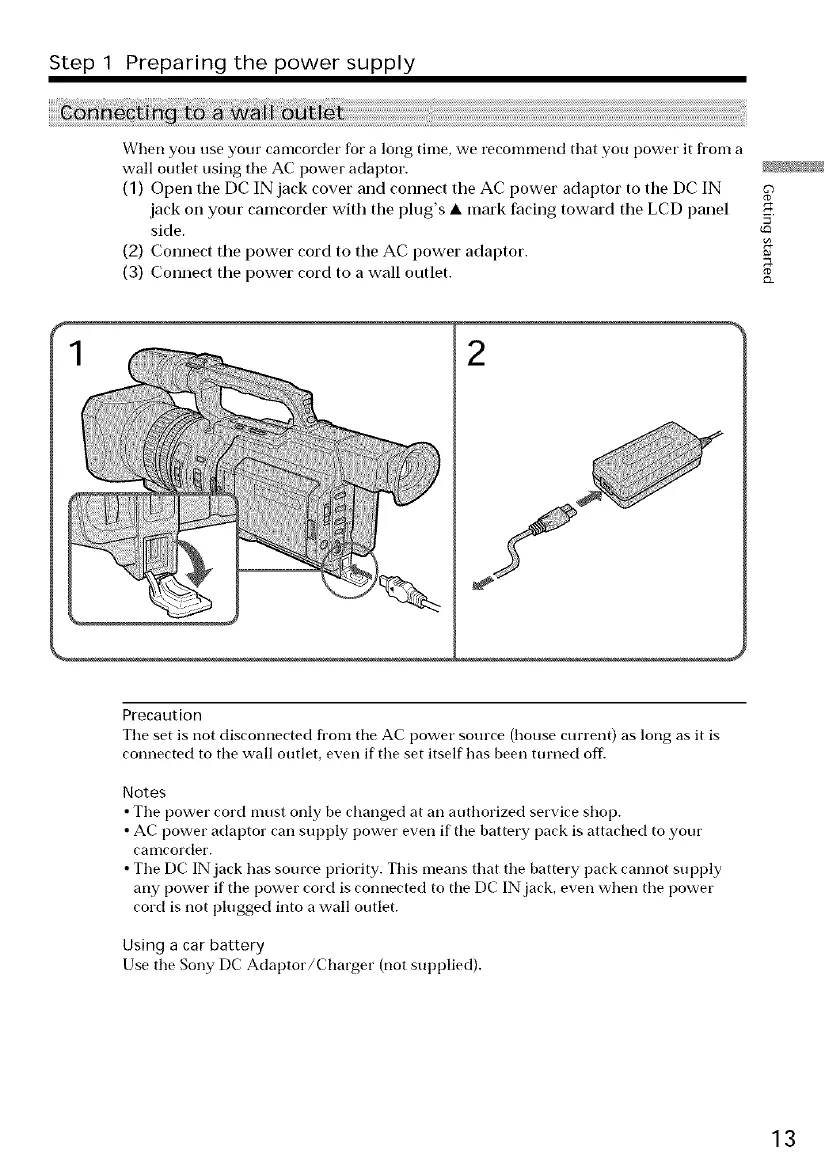
When you use your camcorder for a long time, we recommend that you power it from a
wall outlet using the AC power adaptor. _!
(1) Open tile DC IN jack cover and connect tile AC power adaptor to tile DC IN
jack oil your camcorder with the plug's • mark facing toward the LCD panel _,
side.
(2) Connect tile power cord to tile AC power adaptor.
(3) Connect tile power cord to a wall outlet. __
2
Precaution
Tile set is/lot disconnected from tile AC power source (house current) as long as it is
connected to tile wall outlet, even if tile set itself has been turned off'.
Notes
• Tile power cord must only be changed at an authorized service shop.
• AC power adaptor can supply power even if tile battery pack is attached to your
caolcorder.
• The DC IN jack has source priority. This means that the battery pack cannot supply
any power if the power cord is connected to tile DC IN jack, even when the power
cord is not plugged into a wall outlet.
Using a car battery
Use tile Sony DC Adaptor/Charger (not supplied).
13















 To Next Page