Deleting images
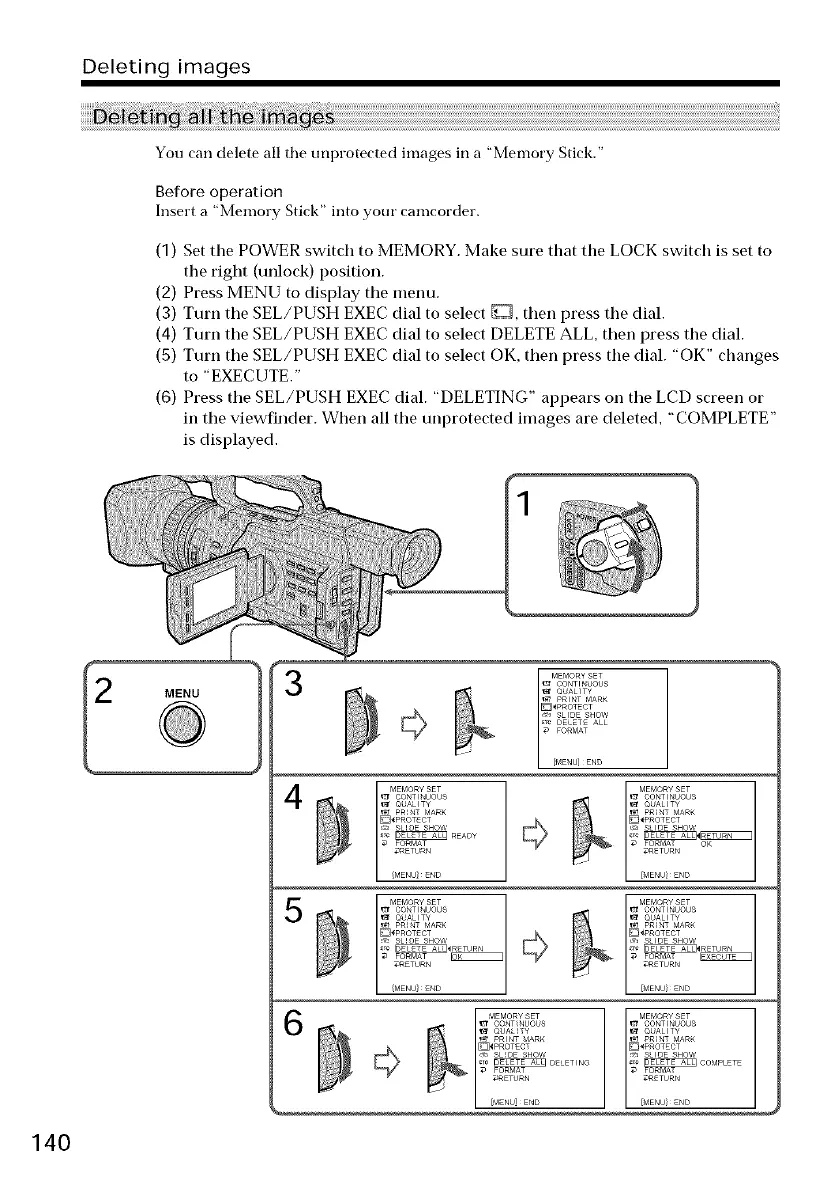
You can delete all the unprotected images in a "Memory Stick."
Before operation
Insert a "Memory Stick" into your camcorder.
(1) Set tile POWER switch to MEMORY. Make sure that tile LOCK switch is set to
the right (unlock) position.
(2) Press MENU to display the menu.
(3) Turn tile SEL/PUSH EXEC dial to select D, then press the dial.
(4) Turn tile SEL/PUSH EXEC dial to select DELETE ALL, then press the dial.
(5) Turn the SEL/PUSH EXEC dial to select OK, then press the dial. "OK" changes
to "EXECUTE."
(6) Press the SEL/PUSH EXEC dial. "DELETING" appears on the LCD screen or
in the viewfinder. When all the unprotected images are deleted, "COMPLETE"
is displayed.
140
3
4
5
MEf¢,ORYSET
CO_TI_UOUS
rlIII'TIND
P_INT _AR_
_P_OTECT
,_ SLIDE SHOW
_,_ IDELETE ALLI_IRETUR_ I
FORMAT OK
_RETUR_
MEf¢,ORYSET
CO_TI_UOUS
riiii'tlNo
r_ P_INT _AR_
_PROTECT
,_, SLIDE SHOW
_RETUR_
FORf_AT
_RETUR_
MEf_ORYSET
CO_TI_UOUS
B iilI'TINo
P_INT _AR_
_P_OTECT
SLIOE SHOW _ SLIDE SHOW
_DELET_NG _Z_]CO_PLETE
FORMAT _ FORf_AT
_ETURN _RETUR_
%ENU]E_D















 To Next Page