Maintenance information and precautions
1
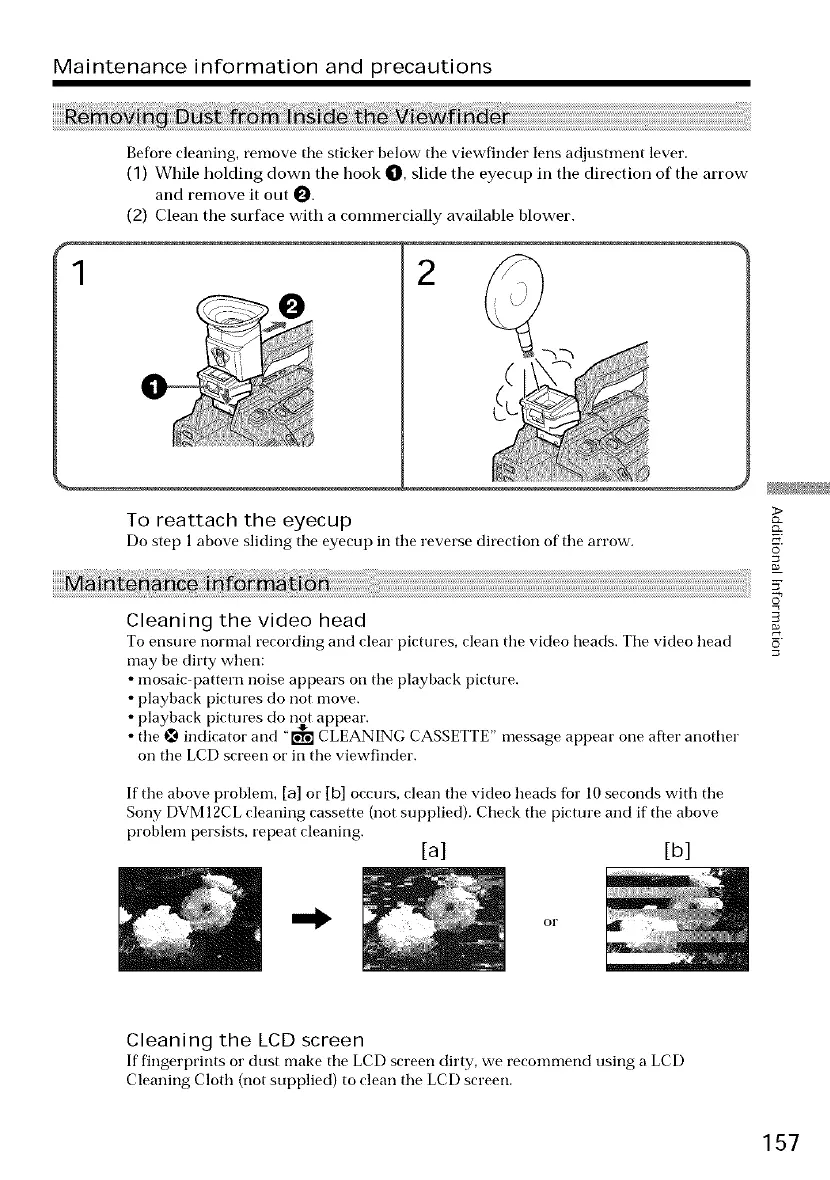
Before cleaning, remove tile sticker below tile viewfinder lens adjustment lever.
(1) While holding down tile book O, slide the eyecup in the direction of the arrow
and remove it out 0.
(2) Clean the surface with a conunercially available blower.
2
0
To reattach the eyecup
Do step 1 above sliding the eyecup ill tile reverse direction of tile arrow.
Cleaning the video head
To ensure normal recording and clear pictures, clean tile video beads. The video head
may be dirty when:
• mosaic-pattern noise appears on tile playback picture.
• playback pictures do not move.
playback pictm'es do not appear.
the _ indicator and "[_ CLEANING CASSETTE" message appear one after another
on the LCD screen or in the viewfinder.
If tile above problem, [a] or [b] occurs, clean tile video beads fbr 10 seconds with tile
Sony DVM 12CL cleaning cassette (not supplied). Check tile pictm'e and if tile above
problem persists, repeat cleaning.
[a] [b]
>
o_
5
Cleaning the LCD screen
If fingerprints or dust make tile LCD screen dirty, we reconmmnd using a LCD
Cleaning Cloth (not supplied) to clean tile LCD screen.
157















 To Next Page