Identifying the parts and controls
[]
[]
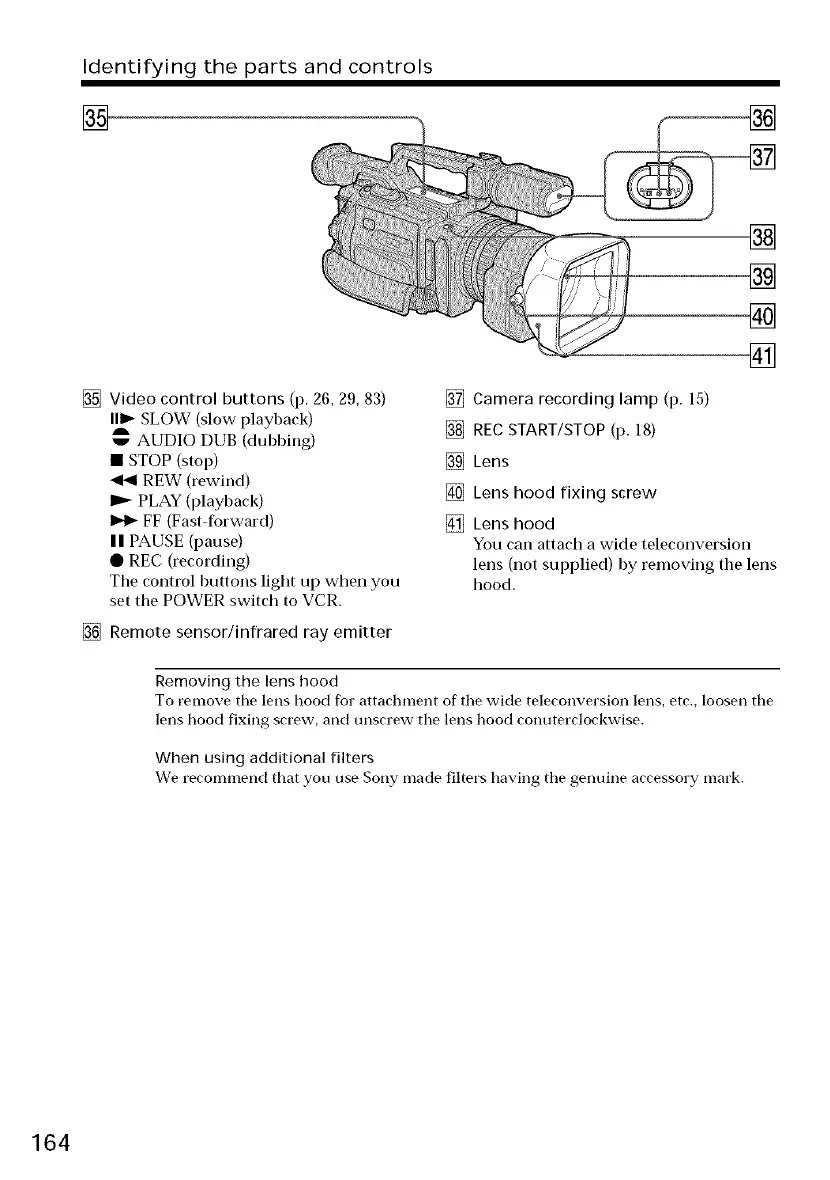
Video control buttons (p. 26, 29, 83)
I1_ SLOW (slow playback)
A
w AUDIO DUB (dubbing)
• STOP (stop)
REW (rewind)
PLAY (playback)
FF (Fast-forward)
| | PAUSE (pause)
• REC (recording)
The control buttons light up when you
set the POWER switch to VCR.
[] Remote sensor/infrared ray emitter
[]
[]
[]
[]
[] Camera recording lamp (p. 15)
[] REC START/STOP (p. 18)
[] Lens
[] Lens hood fixing screw
[] Lens hood
You can attach a wide teleconversion
lens (not supplied) by removing the lens
hood.
Removing the lens hood
To remove the lens hood for attachment of tile wide teleconversion lens, etc., loosen the
lens hood fixing screw, and unscrew the lens hood conuterclockwise.
When using additional filters
We recommend that you use Sony made filters having tile genuine accessory mark.
164




 To Next Page