Identifying the parts and controls
[]
_!ii__
[]
@
[]
[]
[]
[]
[]
[]
[]
[]
[]
166
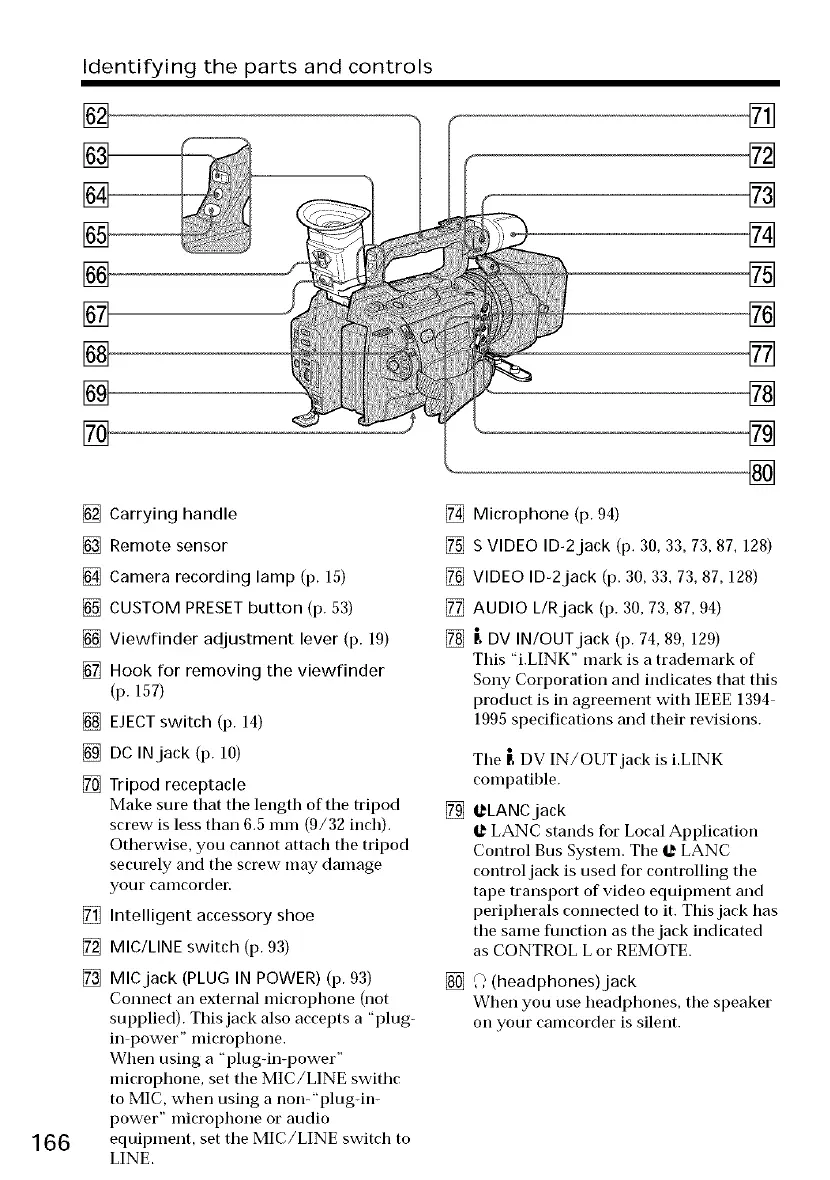
[] Carrying handle
[] Remote sensor
[] Camera recording lamp (p. 15)
[] CUSTOM PRESET button (p. 53)
[] Viewfinder adjustment lever (p. 19)
[] Hook for removing the viewfinder
(p. 157)
[] EJECT switch (p. 14)
[] DC INjack (p. 10)
[] Tripod receptacle
Make sm'e that tile length of the tripod
screw is less than 6.5 mm (9/32 inch).
Otherwise, you cannot attach the tripod
securely and tile screw may damage
your caillcordeE
[] Intelligent accessory shoe
[] MIC/LINE switch (p. 93)
[] MICjack (PLUG IN POWER) (p. 93)
Connect an external microphone (not
supplied). This jack also accepts a "plug-
in power" microphone.
When using a "plugdn-power"
microphone, set the MIC/LINE swithc
to MIC, when using a non-"plugdn-
power" microphone or audio
equipment, set tile MIC/LINE switch to
LINE.
[] Microphone (p. 94)
[] S VIDEO ID-2jack (p. 30, 33, 73, 87, 128)
[] VIDEO ID-2jack (p. 30, 33, 73, 87, 128)
[] AUDIO L/Rjack (p. 30, 73, 87, 94)
[] _, DV IN/OUT jack (p. 74, 89, 129)
This "i.LINK" mark is a trademark of
Sony Corporation and indicates that this
product is in agreement with IEEE 1394
1995 specifications and their revisions.
Tile [ DV IN/OUT jack is i.LINK
compatible.
[] l._LANCjack
@ LANC stands for Local Application
Control Bus System. Tile @ LANC
control jack is used for controlling the
tape transport of video equipment and
peripherals connected to it. This jack has
tile same function as the jack indicated
as CONTROL L or REMOTE.
[] _) (headphones)jack
When you use headphones, the speaker
on your camcorder is silent.




 To Next Page