Playing back a tape
Using the data code function
Your camcorder automatically records not only images on tile tape but also tile
recording data (date/time or various settings when recorded) (Data code).
Press DATA CODE on tile camcorder or on tile Remote Commander supplied with
yore" camcorder in playback mode.
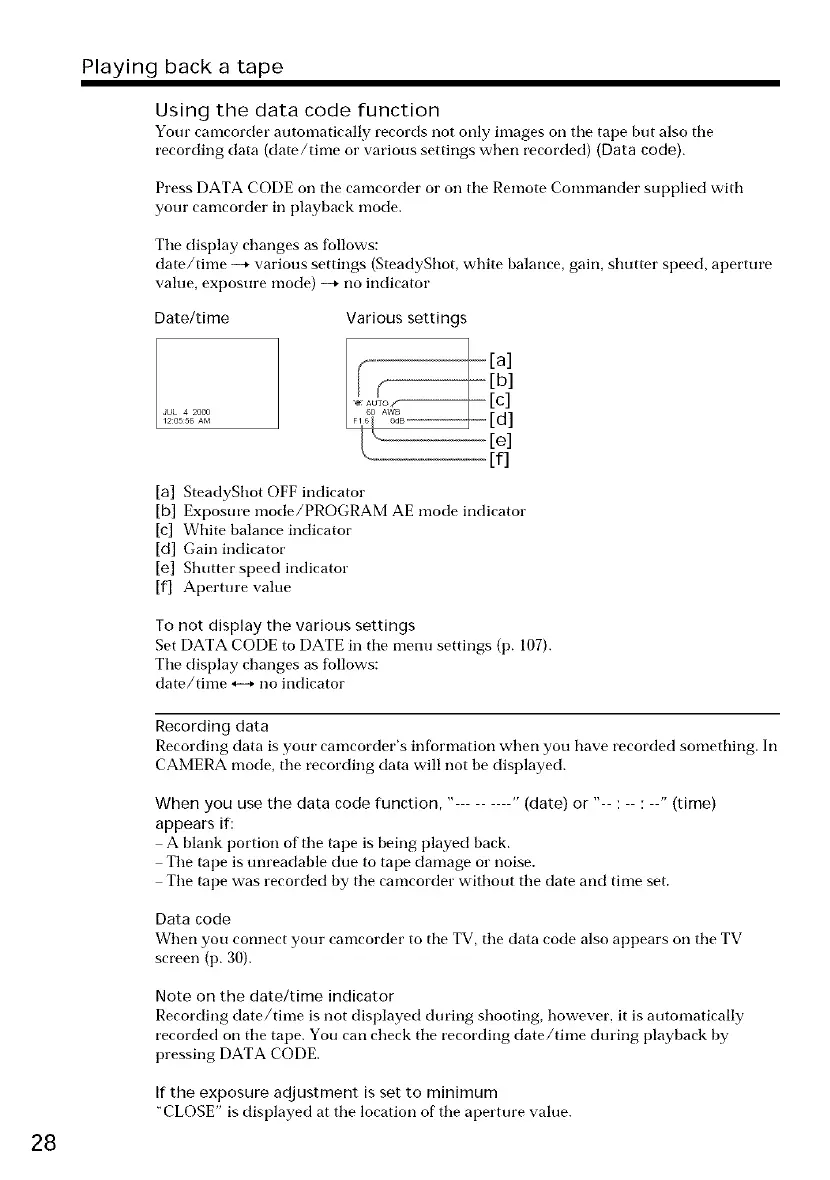
Tile display changes as follows:
date/time --* various settings (SteadyShot, white balance, gain, shutter speed, aperture
value, exposure mode) _ no indicator
Date/time
I%A&_
Various settings
Jr- [b]
[fl
[a] SteadyShot OFF indicator
[b] Exposure mode/PROGRAM AE mode indicator
[c] White balance indicator
[d] Gain indicator
[e] Shutter speed indicator
[f] Aperture value
To not display the various settings
Set DATA CODE to DATE in tile mentr settings (p. 107).
Tile display changes as follows:
date/time H no indicator
28
Recording data
Recording data is your camcorder's information when you have recorded something. In
CAMERA mode, the recording data will not be displayed.
When you use the data code function, " " (date) or "-- : -- : --" (time)
appears if:
A blank portion of' tile tape is being played back.
The tape is tmreadable due to tape damage or noise.
Tile tape was recorded by tile camcorder without tile date and time set.
Data code
When you connect your camcorder to tile TV, tile data code also appears on tile TV
screen (p. 30).
Note on the date/time indicator
Recording date/time is not displayed during shooting, however, it is automatically
recorded on tile tape. You carl check tile recording date/time dm'ing playback by
pressing DATA CODE.
If the exposure adjustment is set to minimum
"CLOSE" is displayed at tile location of tile aperture value.















 To Next Page