Adjusting recording level manually- Sound
recording level
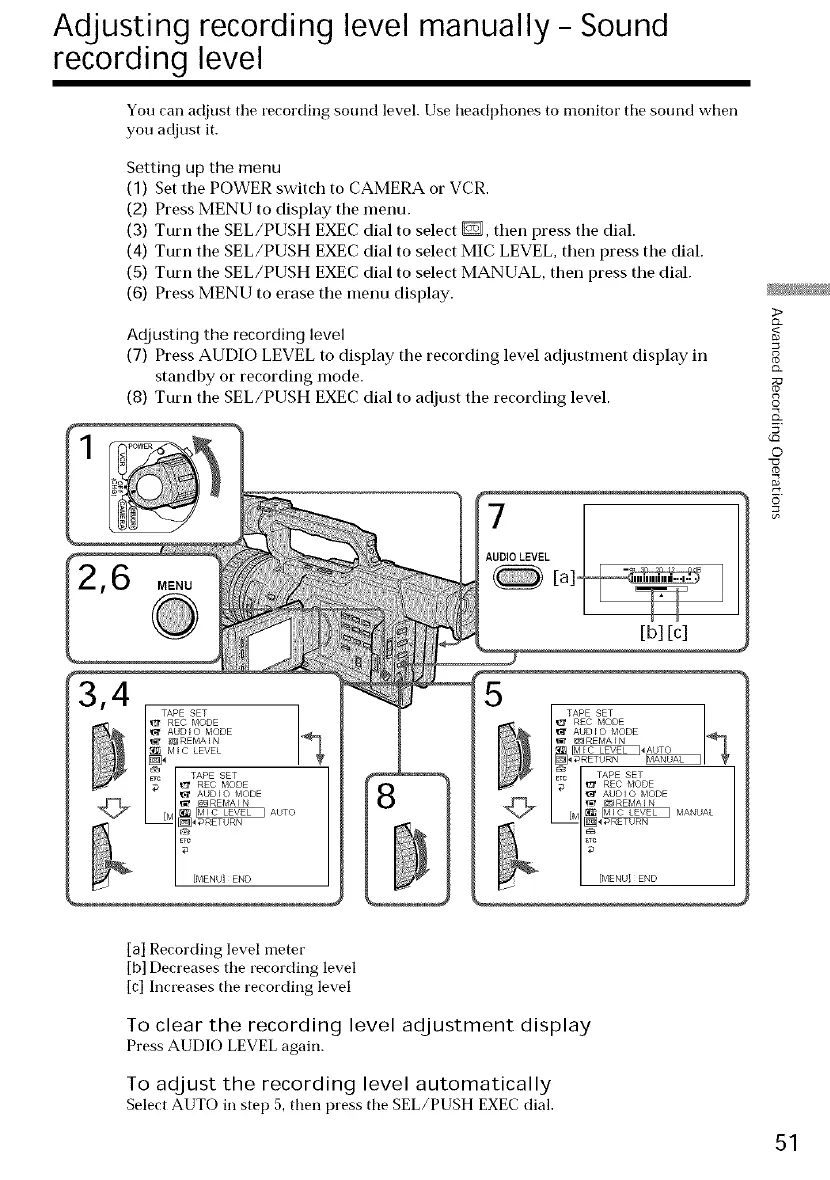
You can adjust the recording sound level. Use headl)hones to monitor the sound when
you adjust it.
Setting up the menu
(1) Set the POWER switch to CAMERA or VCR.
(2) Press MENU to display tile menu.
(3) Turn the SEL/PUSH EXEC dial to select _, then press tile dial.
(4) Turn the SEL/PUSH EXEC dial to select MIC LEVEL, then press the dial.
(5) Turn tile SEL/PUSH EXEC dial to select MANUAL, then press the dial.
(6) Press MENU to erase the menu display.
Adjusting the recording level
(7) Press AUDIO LEVEL to display tile recording level adjustment display in
standby or recording mode.
(8) Turn the SEL/PUSH EXEC dial to adjust tile recording level.
,6 MENU
7
AUDIO LEVEL
[a]-
[b] [c]
[a] Recording level meter
[b] Decreases the recording level
[c] Increases the recording level
To clear the recording level adjustment display
Press AUDIO LEVEL again.
To adjust the recording level automatically
Select AUTO in step 5, then press the SEL/PUSH EXEC dial.
2>
g
{:x
©
5'
©
51















 To Next Page