12
EN
ç
ç
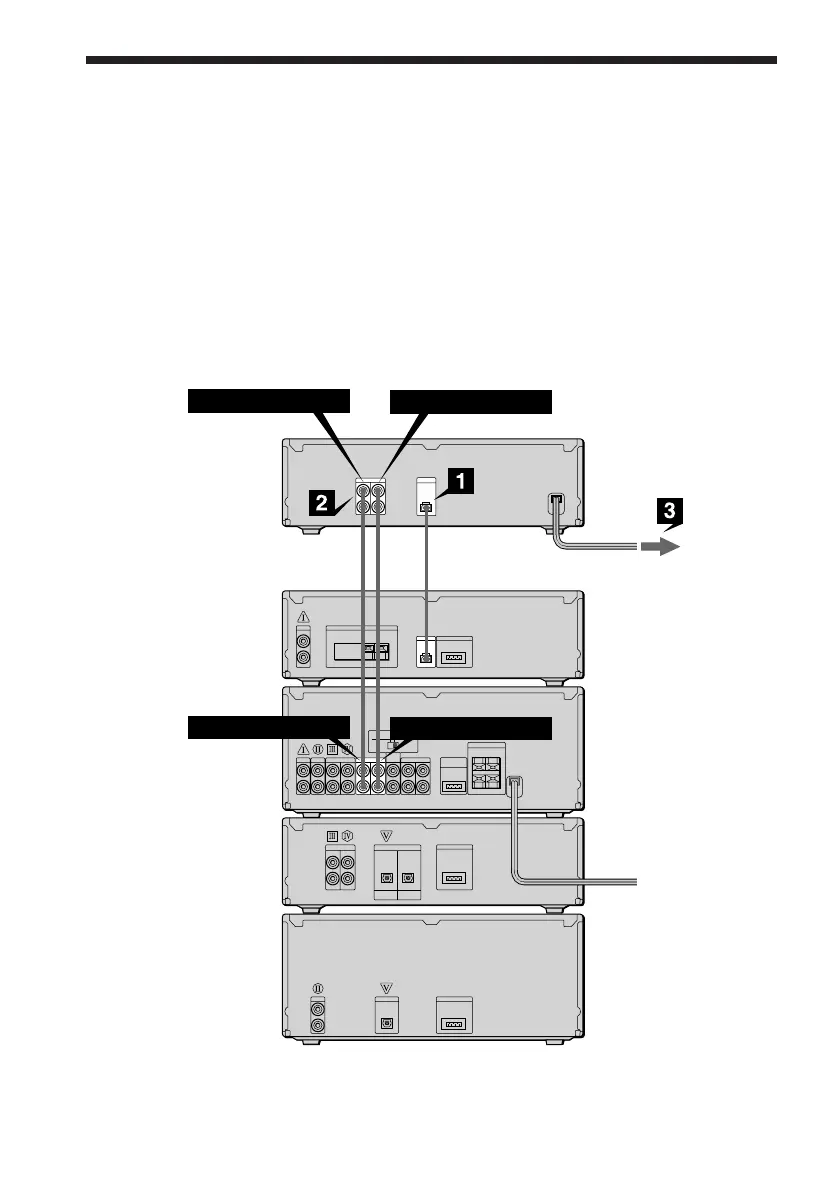
Connecting the optional TC-TX77/TX770 tape
deck
(DHC-MD77/EX77MD/EX770MD only)
ç : Signal flow
To TAPE IN
TC-TX77/
TX770
rear panel
DHC-MD77/
EX77MD/
EX770MD
rear panel
To TAPE OUT
To TAPE OUT
To TAPE IN
You can use the optional TC-TX77/TX770 tape deck, which is designed for use with the DHC-
MD77/EX77MD/EX770MD.
Perform the following procedure 1 to 3 to connect the TC-TX77/TX770 to your system using
the cords supplied on the TC-TX77/TX770.
Note
The TAPE IN/OUT and VIDEO IN/OUT jacks on the DHC-MD77/EX77MD/EX770MD are equipped with a
cap to prevent incorrect connections. Remove the cap before making connections, and keep it for future use.
You can divide the cap into two parts. If you do not use the VIDEO jacks, leave them capped.



 To Next Page