46
EN
123
1234
1234
123
DIVIDE
ERASE
COMBINE
AB
A- A- A-
B
B
B
a
c
A-
A-
a
A ( + )
a
c
c
b
r REC
=
SELECTOR
+
0)
p
· ∏
§
EJECT
•
•
•
•
•
•
•
•
•
0
10
§
OPEN/CLOSE
2,31 p
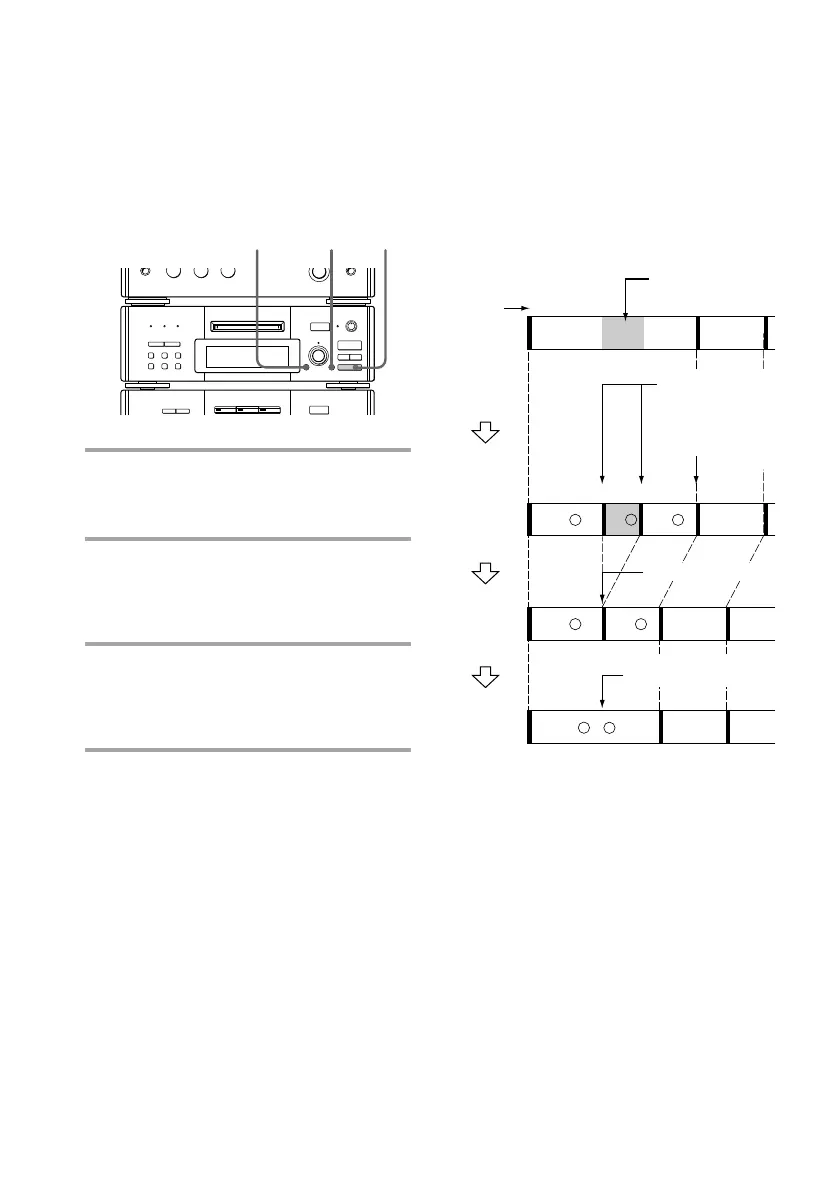
Erasing a portion of a
track
By using the Divide (see page 48), Erase (see
page 45), and Combine (see page 49)
Functions, you can erase specific portions of a
track.
Example: Erasing a portion of track A.
* The tracks are renumbered.
Tip
You can undo a track erasion.
See “Undoing the last edit” on page 51.
Erase track A-b.
Combine tracks
A-a and A-c.
Original
tracks
Track
number
Portion to be
erased.
Divide track A
into three parts.*
The track is
renumbered.
Erasing all tracks
You can erase the disc title, all recorded
tracks and their titles at once.
1 While the deck is stopped, press
EDIT/NO repeatedly until “All
Erase ?” appears.
2 Press ENTER/YES.
“All Erase ??” appears.
To cancel the Erase Function at this time,
press p.
3 Press ENTER/YES again.
“Complete” appears for a few seconds
and all recorded tracks and their titles
are erased.
(page 48)
(page 45)
(page 49)
Erasing recordings (continued)









 To Next Page