7
EN
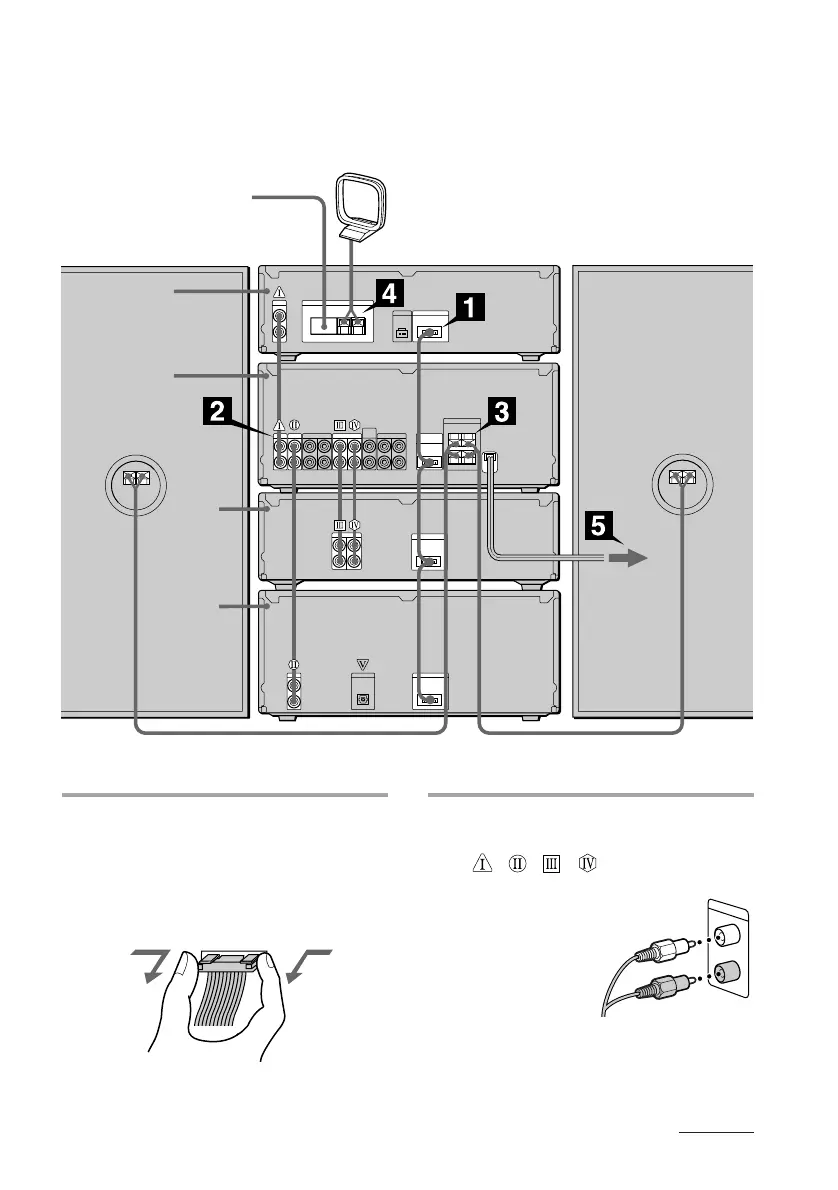
1
Connect the flat cord to the SYSTEM
CONTROL connectors on each
component with the same color
until it clicks.
To disconnect
2
Connect the audio cords to the jacks
with the same Roman numerals
(
, , , ).
Connect the amplifier to the tuner,
CD player and tape deck,
using the audio cords
(you have four).
Match the color of
the plugs and
the jacks.
For MHC-EX66/EX660
Perform the following procedure 1 to 5 to hook up your system using the supplied cords and
accessories. To complete the setup, do steps 2 and 3 also.
Left speaker
Right speaker
AM loop antenna
CD player
Tape
deck
Amplifier
Tuner
FM lead antenna
MHC-EX66/EX660
rear panel
continued









 To Next Page