29
EN
r REC
=
SELECTOR
+
0)
p
· ∏
§
EJECT
•
•
•
•
•
•
•
•
•
0
10
=
SELECTOR
+
0)
p
· ∏
§
OPEN/CLOSE
32
DISC 1 – 3CONTINUE
SELECTOR
1
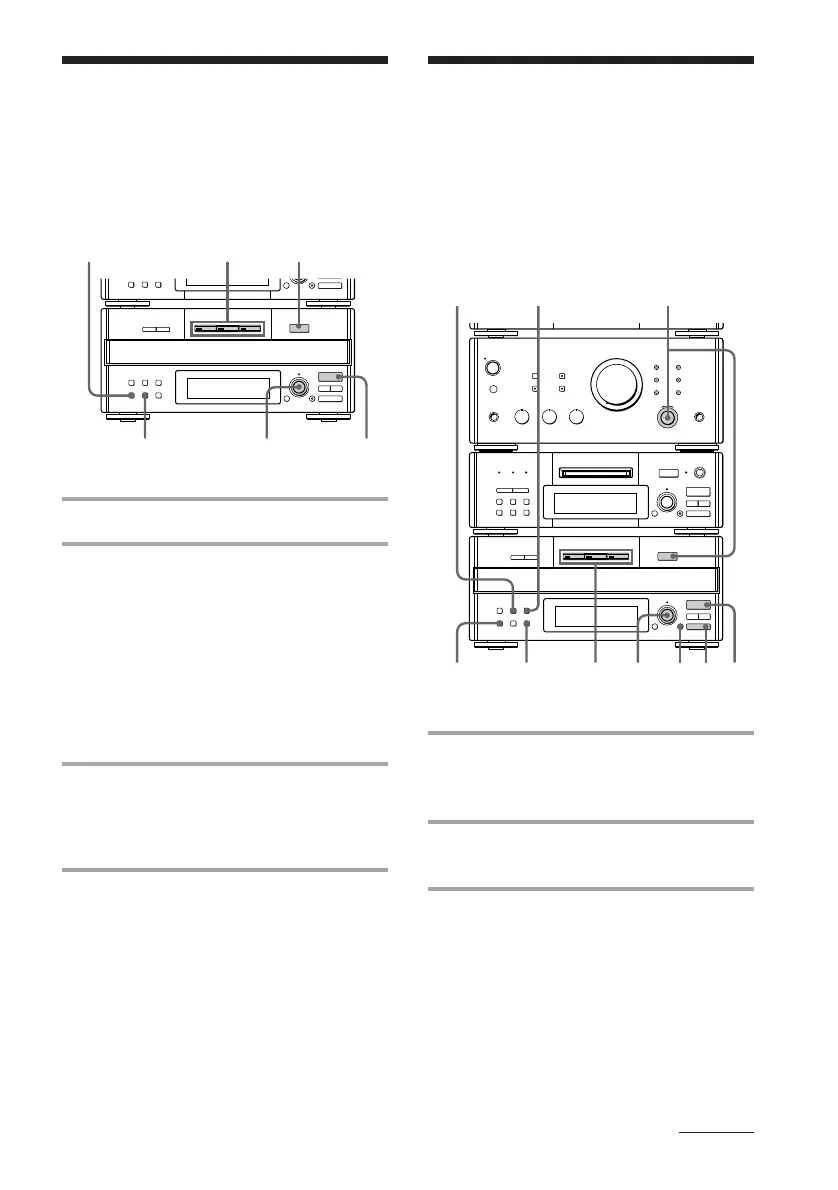
Programming the CD
tracks
–– Program Play
You can make a program of up to 32 tracks
from all the CDs in the order you want them
to be played. You can also record the
program you made.
1 Turn FUNCTION until the CD
indicator lights up, then place a CD
(CDs) on the disc tray.
2 Press PROGRAM.
“PROGRAM” appears.
3 Press one of the DISC 1 – 3 buttons
to select a CD.
r REC
=
SELECTOR
+
0)
p
· ∏
§
EJECT
•
•
•
•
•
•
•
•
•
0
10
=
SELECTOR
+
0)
p
· ∏
§
OPEN/CLOSE
1
7
p
54
3
2
TIME
CLEAR
CONTINUE
Playing the CD tracks
in random order
–– Shuffle Play
You can play all the tracks on one CD or all
CDs in random order.
1 Place a CD (CDs) on the disc tray.
2 Press SHUFFLE.
“SHUFFLE” appears.
Each time you press the button, the
display changes as follows:
“ALL DISCS”
(All the CDs play
in random order.)
3 Press · ∏ (or · on the remote).
The sound source automatically switches
to the CD player. “J” appears, then all
the tracks play in random order.
To cancel Shuffle Play
Press CONTINUE.
To select a desired CD
Press DISC 1 – 3 button while “1 DISC” is
appearing in the display.
Tips
• You can start Shuffle Play during normal play by
pressing SHUFFLE.
• To skip a track, turn SELECTOR clockwise (or
press + on the remote).
˜ “1 DISC”
(A single CD whose
DISC 1 – 3 button
lights green plays in
random order.)
continued



 To Next Page