54
EN
0)
ª·
pP
§
•
•
•
•
•
•
•
•
•
0
10
=
SELECTOR
+
0)
p
· ∏
§
OPEN/CLOSE
19
10
78
11
51
p
4
3
2
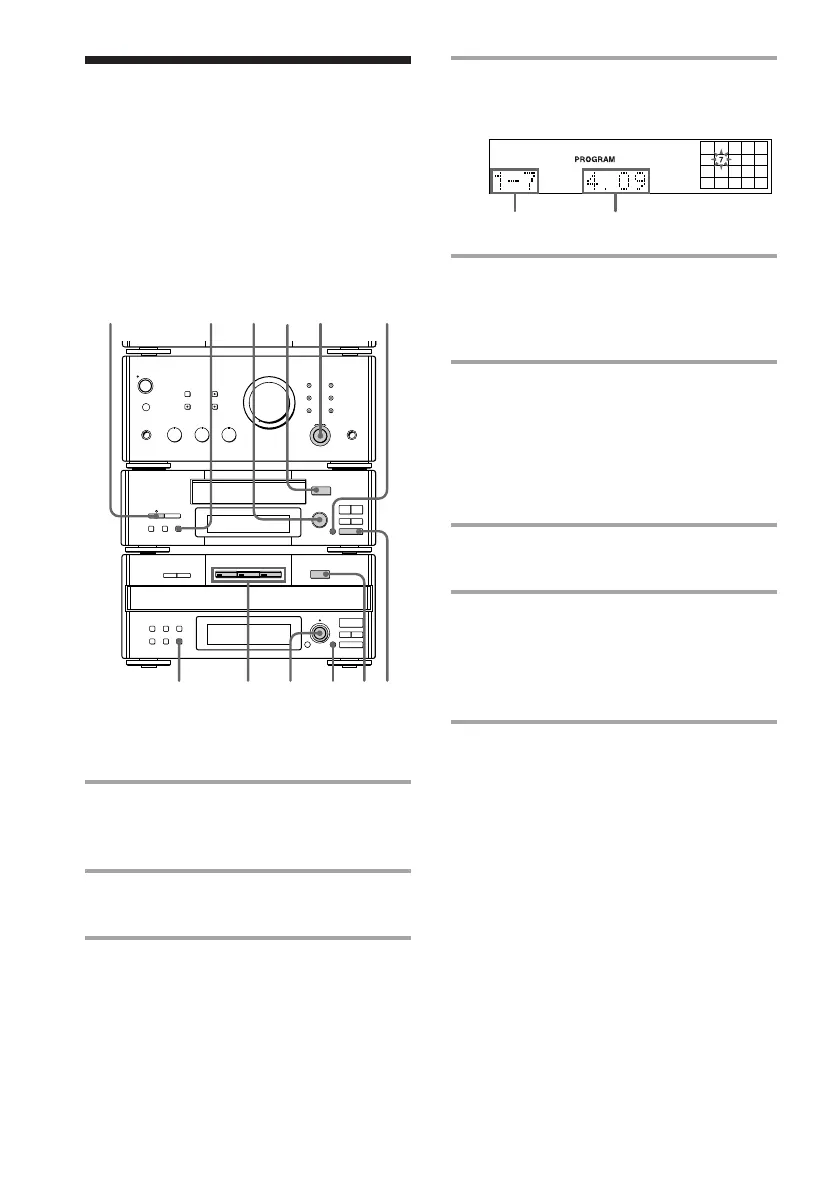
Selected track Playing time
Recording the
favorite CD tracks on
a tape
4 Turn SELECTOR until the desired
track number appears.
5 Press ENTER.
The track is programmed. The last
programmed track appears, followed by
the total playing time.
6 To program additional tracks,
repeat steps 3 to 5.
Skip step 3 if you select a track from the
same disc.
Recording on a tape
7 Insert a blank tape.
To insert a tape, see page 20.
8 Press DIRECTION repeatedly to
select the side you want to record
on.
Select A to record on one side. Select
Å or a to record on both sides.
9 Turn REC LEVEL to adjust the
recording level.
See “Recording on a tape manually” for
details.
You can select your favorite CD tracks with
the Program Play feature, then record the
program on a tape using the CD Synchro
Recording feature.
Selecting the tracks
1 Turn FUNCTION until the CD
indicator lights up, then place a CD
(CDs) on the disc tray.
2 Press PROGRAM.
“PROGRAM” appears.
3 Press one of the DISC 1 – 3 buttons
to select a CD.



 To Next Page