47
EN
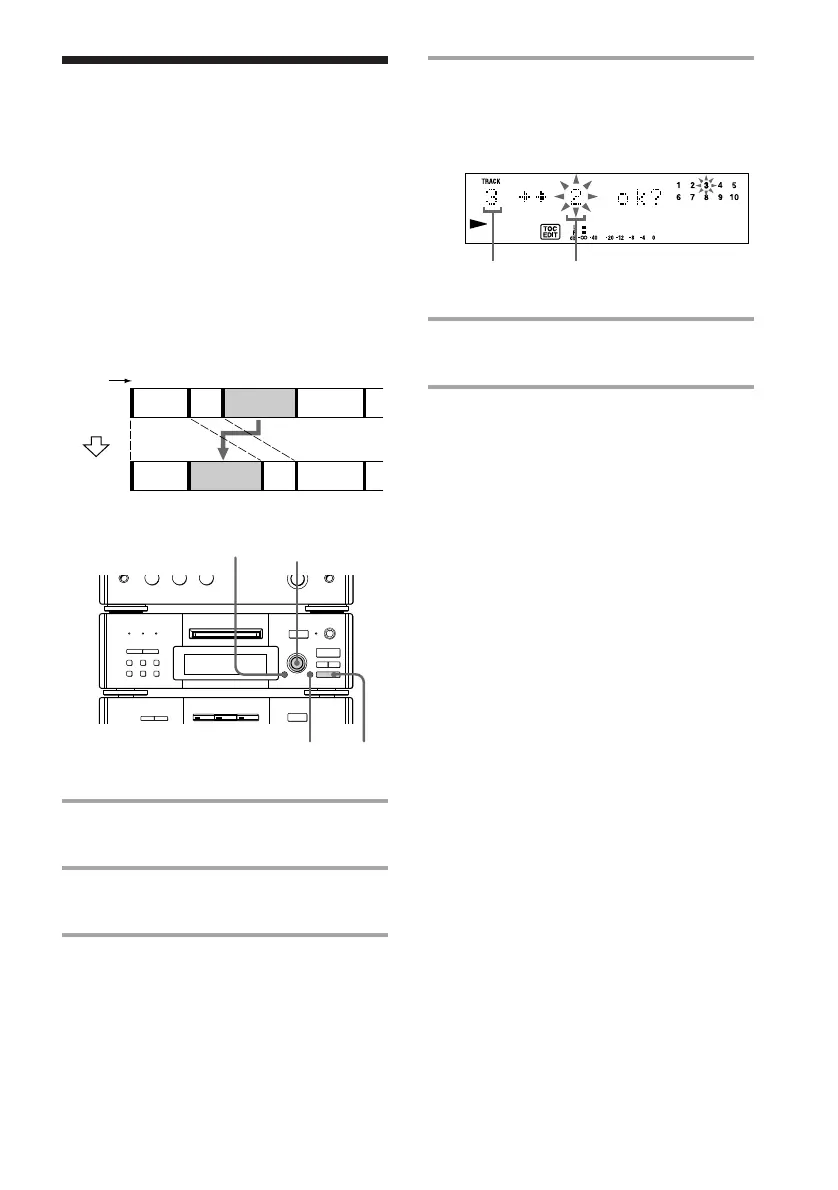
Moving recorded
tracks
— Move Function
Track
number
Original
tracks
Move track C to the
second position.
r REC
=
SELECTOR
+
0)
p
· ∏
§
EJECT
•
•
•
•
•
•
•
•
•
0
10
=
SELECTOR
+
0)
p
· ∏
§
OPEN/CLOSE
1,4
2
p
3,5
By using the Move Function, you can change
the order of any track on the disc. When you
move tracks, the tracks are automatically
renumbered.
Example: Moving track C to position 2.
1 Turn SELECTOR until the track
number you want to move appears.
2 Press EDIT/NO repeatedly until
“Move ?” appears.
3 Press ENTER/YES.
4 Turn SELECTOR until the new track
position appears.
To cancel the Move Function at this time,
press p.
5 Press ENTER/YES.
“Complete” appears for a few seconds.
Note
When “SHUFFLE” or “PROGRAM” appears in the
display, press CONTINUE so that the indication
disappears.
The original
track number
The new track
position
123
12 34
4
MOVE
AB C
D
ACBD









 To Next Page