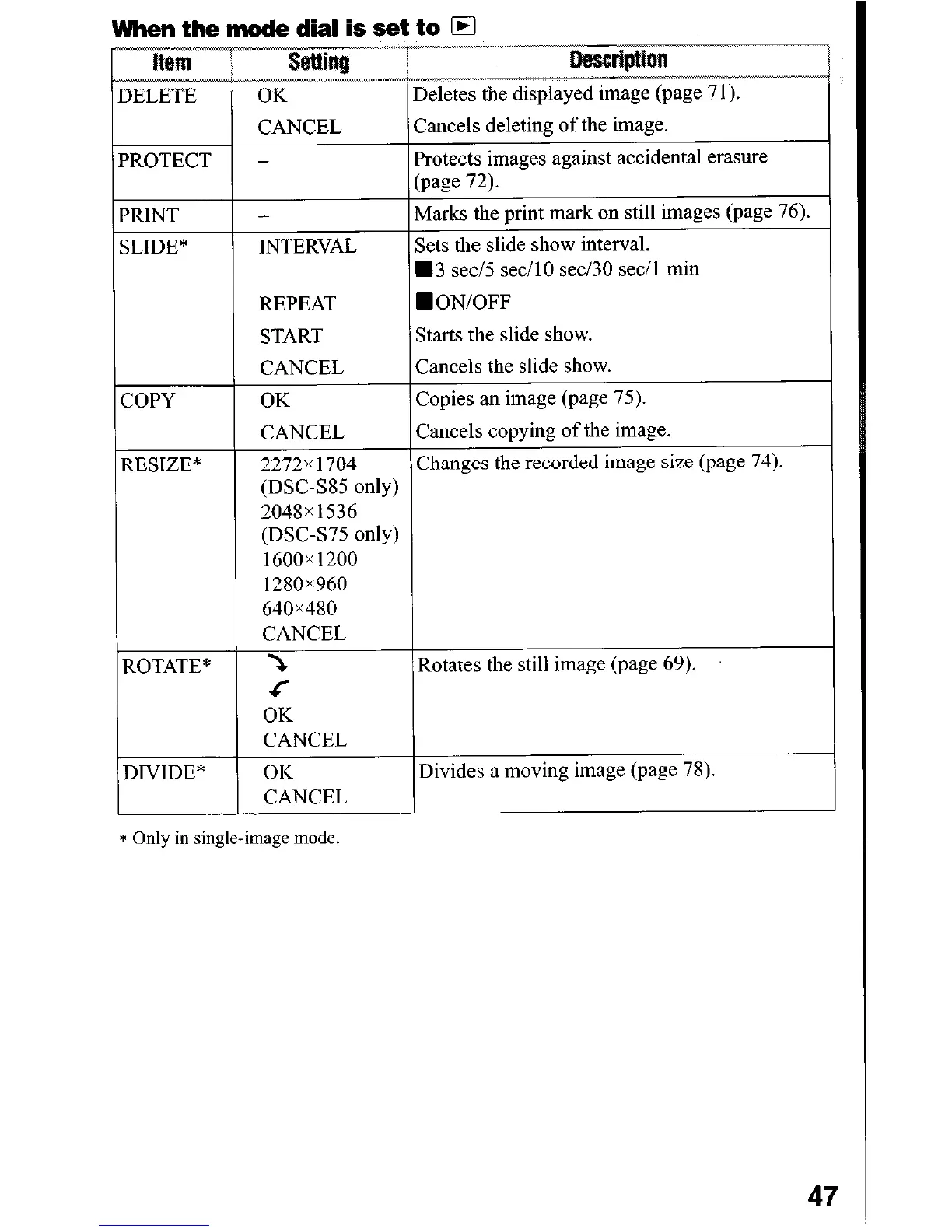
when the mode dial is set to El
T
.-
L2!!!Re “.~,
OK
Deletes the displayed image (page 7 1).
DELETE
PROTECT
PRINT
SLIDE*
COPY
RESIZE*
ROTATE*
DIVIDE*
CANCEL
-
-
INTERVAL
Cancels deleting of the image.
Protects images against accidental erasure
(page 72).
Marks the print mark on still images (page 76).
Sets the slide show interval.
H 3 set/5 secil0 set/30 set/l min
REPEAT
WON/OFF
START
Starts the slide show.
CANCEL
Cancels the slide show.
OK
Copies an image (page 75).
CANCEL
Cancels copying of the image.
2272x 1704
Changes the recorded image size (page 74).
(DSC-SS5 only)
2048x1536
(DSC-S75 only)
1600~1200
1280x960
640x480
CANCEL
5
Rotates the still image (page 69).
<
OK
CANCEL
OK
CANCEL
Divides a moving image (page 78).
* Only in single-image
mode
47












 To Next Page