Inserting the “Memory Stick”
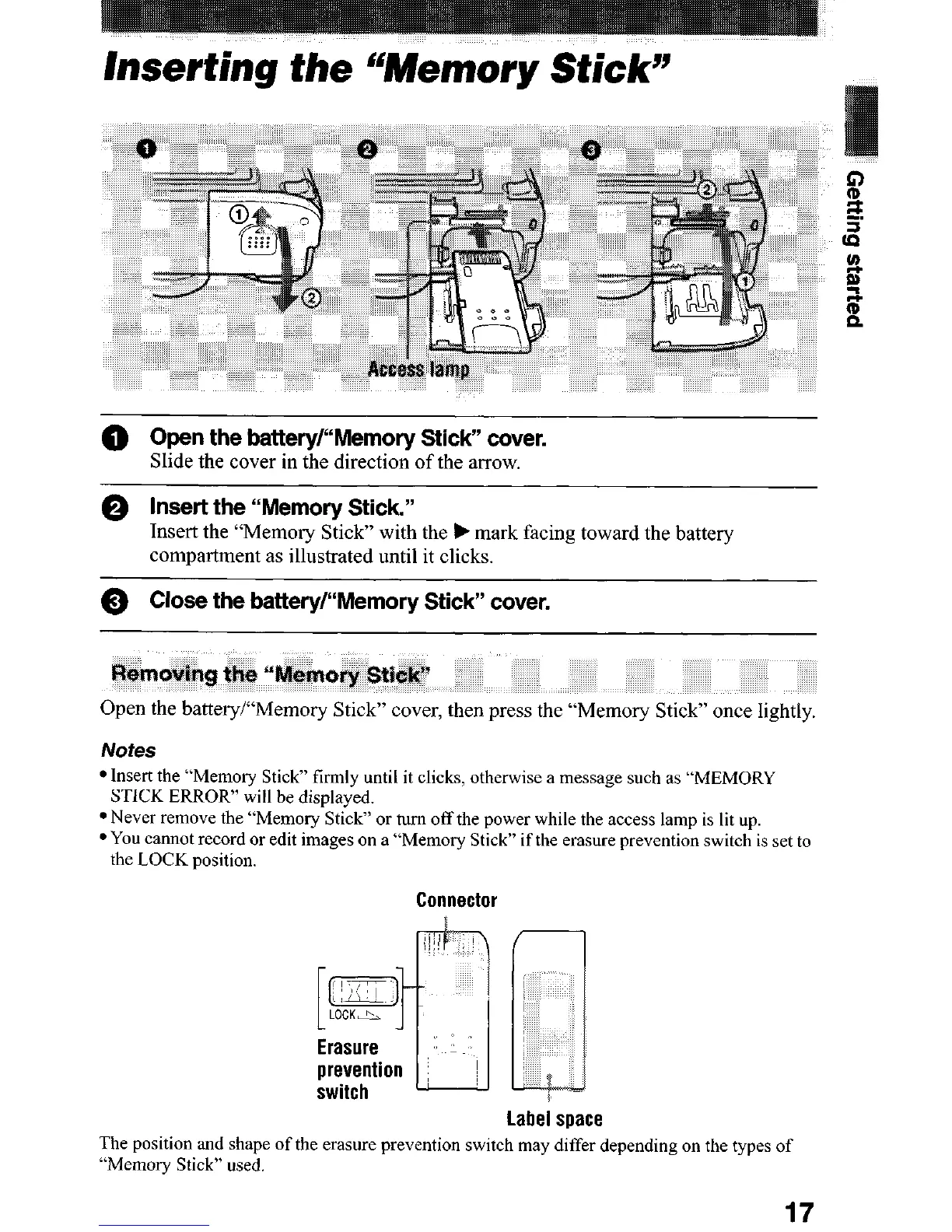
0 Open the battery/“Memory Stick” cover.
Slide the cover in the direction of the arrow.
@ Insert the “Memory Stick”
Insert the “Memory Stick” with the b mark facing toward the battery
compartment as illustrated until it clicks.
0 Close the battery/“Memory Stick” cover.
Open the battery/“Memory Stick” cover, then press the “Memory Stick” once lightly.
Notes
l Insert the “Memory Stick” firmly until it clicks, otherwise a message such as “MEMORY
STICK ERROR” will be displayed.
l Never remove the “Memory Stick” or turn off the power while the access lamp is lit up.
l You cannot record or edit images on a “Memorv Stick” if the erasure prevention switch is set to
the LOCK position.
i
Connector
Label space
The position and shape of the erasure prevention switch may differ depending on the types of
“Memoly Stick” used.
17












 To Next Page