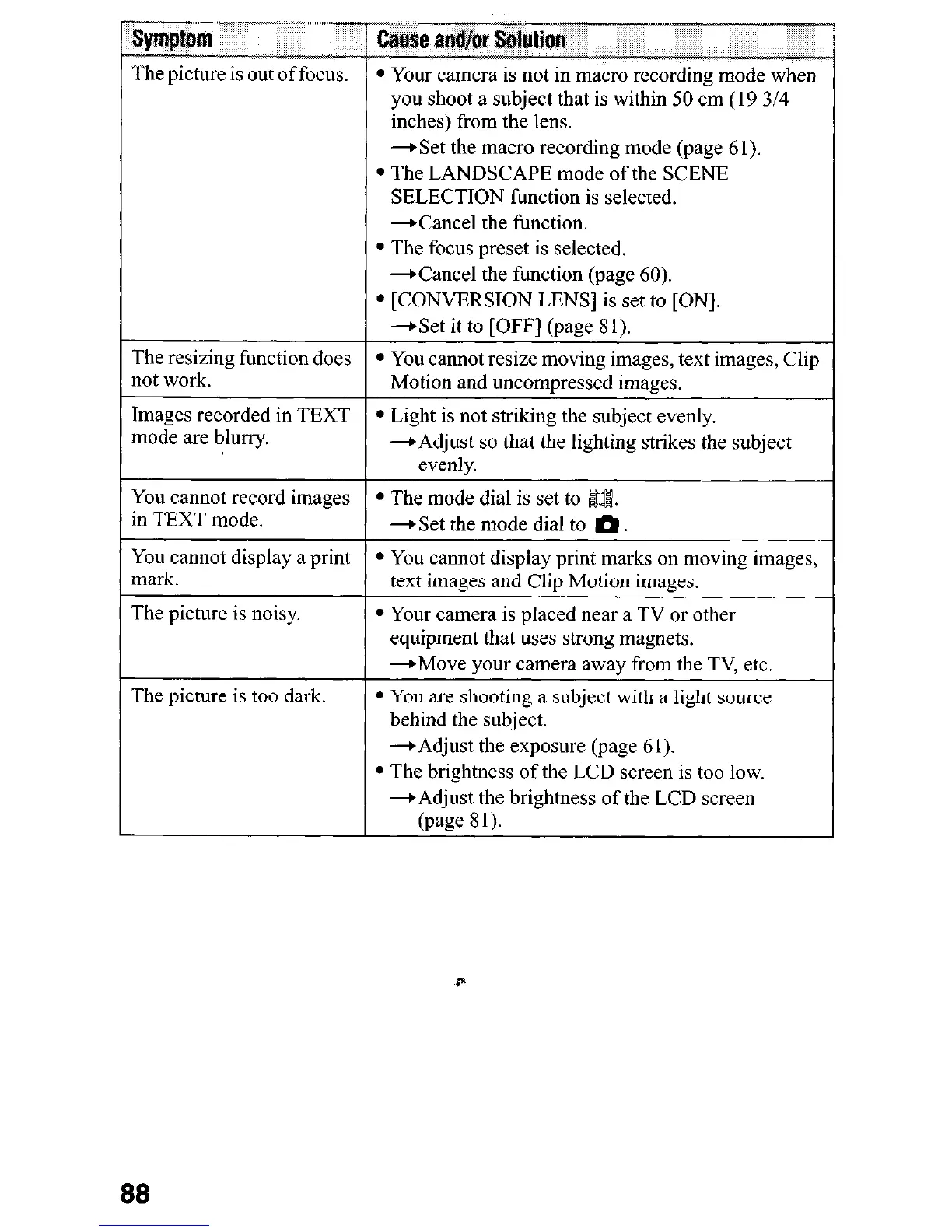
The resizing function does
not work.
you shoot a subject that is within 50 cm (19 3/4
inches) from the lens.
*Set the macro recording mode (page 61).
l
The LANDSCAPE mode of the SCENE
SELECTION function is selected.
-Cancel the function.
l
The focus preset is selected.
+Cancel the function (page 60).
l
[CONVERSION LENS] is set to [ON].
-Get it to [OFF] (page 81).
l
You cannot resize moving images, text images, Clip
Motion and uncompressed images.
Images recorded in TEXT
mode are blurry.
You cannot record images
l
The mode dial is set to Ea.
in TEXT mode.
-B Set the mode dial to m
l
Light is not striking the subject evenly.
-Adjust so that the lighting strikes the subject
evenly.
You cannot display a print
l
You cannot display print marks on moving images,
mark.
text images and Clip Motion images.
The picture is noisy.
The picture is too dark.
L--
l
Your camera is placed near a TV or other
equipment that uses strong magnets.
-Move your camera away from the TV, etc.
l
You are shooting a subject with a light source
behind the subject.
-+Adjust the exposure (page 61).
l
The brightness of the LCD screen is too low.
+Adjust the brightness of the LCD screen
(page 8 1).
88












 To Next Page