78
Menu Configuration and Basic Menu Operations
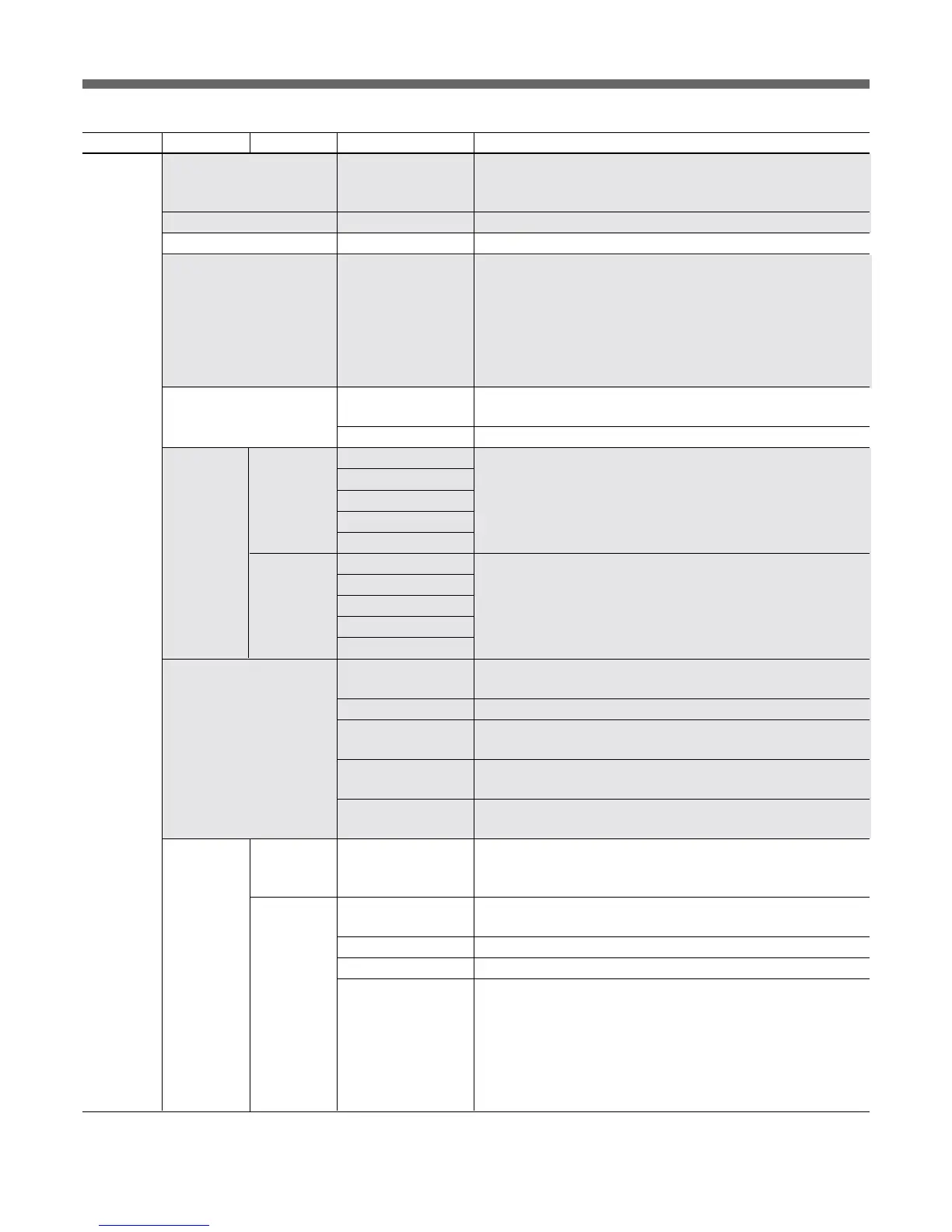
Menu 2ndary menu Submenu Control item Function
RCP Config VR Setting M. Black VR (Only available for RCP-D50) To select the response rate of the
MASTER BLACK knob (relative-value adjustment rates: 1/1, 1/2,
and 1/4, where 1/1 is the quickest response position)
Information To display the software version of the unit
Cable Comp Cable Length To set the length of the remote cable (5 m/25 m/50 m)
SW Setting • SW Assign/Sel To allocate a function to the ASSIGN button
No Assign: No assignment
Black/Flare: Switching the function of the BLACK/FLARE knobs
Black Auto: ON/OFF of the auto black
(Not operative)
ATW: ON/OFF of the auto tracing white balance
TLCS: ON/OFF of the total level control function
DynaLatitude: ON/OFF of the DynaLatitude function (Not operative)
CAM No. CAM ID->No. To switch the display of the camera number/tally indication of the
unit between camera ID and camera number
• No. To select the camera number to be displayed on the RCP
Date/Time Date • Year Date adjustment of the clock built into the unit
Set • Month
• Day
Set
Cancel
Time • Hour Time adjustment of the clock built into the unit
• Minute
• Second
Set
Cancel
Comm Link Gain To turn ON/OFF command link operation (activation of several
cameras at the same time) of the gain
Shutter To turn ON/OFF command link operation of shutter settings
R/B White To turn ON/OFF command link operation of the white R/B
adjustment
R/B Black To turn ON/OFF command link operation of the black R/B
adjustment
R/G/B Flare To turn ON/OFF command link operation of the flare R/G/B
adjustment
Security
Engineer Mode
To set whether to display “Status”, “Menu Set”, and “Code No.” or
not (With Engineer Mode ON, all operative menu items are
displayed regardless of the Advance Mode setting.)
Status Advance Mode To switch between the Normal Setting mode and Advanced Setting
mode of the menu
Screen Md Enable To set whether switching between 4:3 and 16:9 is enabled or not
Pan/Tilt Enable To set whether panning/tilting adjustment is enabled or not
Power On Active To specify the Panel Active and Iris/Master Black Active statuses
when the unit is started up
Full Active: To set the unit to the Panel Active status when started up
IRIS/M.Black: To set the unit to the Iris/Master Black Active
status when started up
Lock: To set the unit to the Panel Lock status when started up
Keep state: To set the unit to the previous state when started up
(cont.)
(cont.)
The item “Status” is displayed only in Engineer Mode.



 To Next Page