Chapter 2 Fitting and Connections
Chapter 2 Fitting and Connections 31
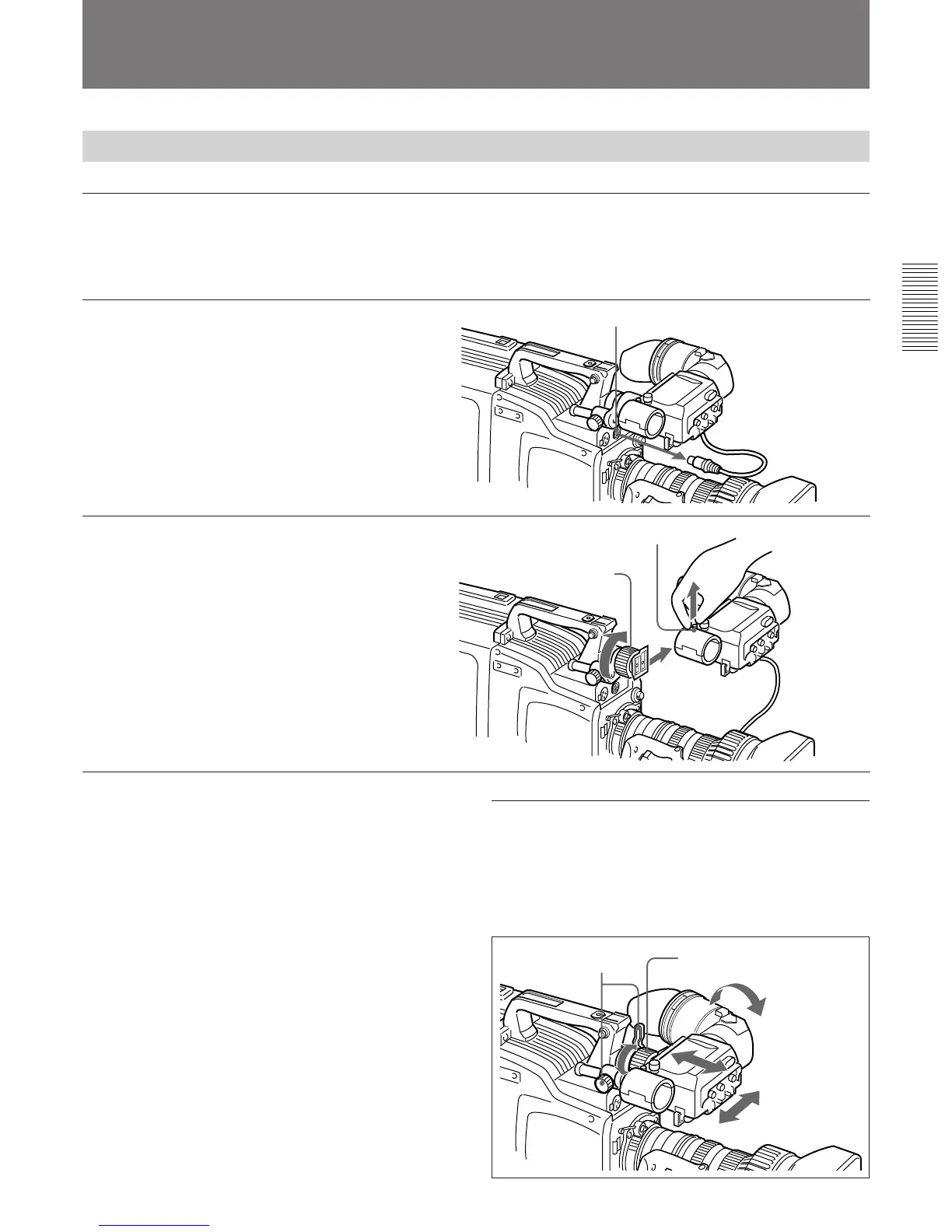
Viewfinger front-to-back
position locking lever
and knob
Viewfinder left-to-right
position fixing ring
Using the Viewfinder
Removing the Viewfinder
Remove any microphone from the viewfinder before
beginning.
1 Pull the viewfinder connector
out of the VF connector on the
front of the camera head.
2 Loosen the viewfinder left-to-
right position fixing ring, then
pulling up the retaining catch,
slide the viewfinder out.
VF connector
Retaining catch
To fit the viewfinder
Reverse the removal procedure.
Using Accessories
Viewfinder left-to-right
position fixing ring
Adjusting the viewfinder position
To adjust the viewfinder left-to-right position, loosen
the left-to-right fixing ring, and to adjust the front-to-
back position loosen the front-to-back position locking
lever and knob.



 To Next Page