Self-Diagnostics
16
Self-Diagnostics
The unit allows you to display the status of the unit and
the results of a self-diagnosis is of the internal boards of
the unit on the screen of a picture monitor connected to
the unit.
You can display the following status items:
• Settings of the camera
• Status display of the unit
• Results of a self-diagnosis of the internal boards
• Self-diagnostics of the camera system
Entering the Self-diagnostics Mode
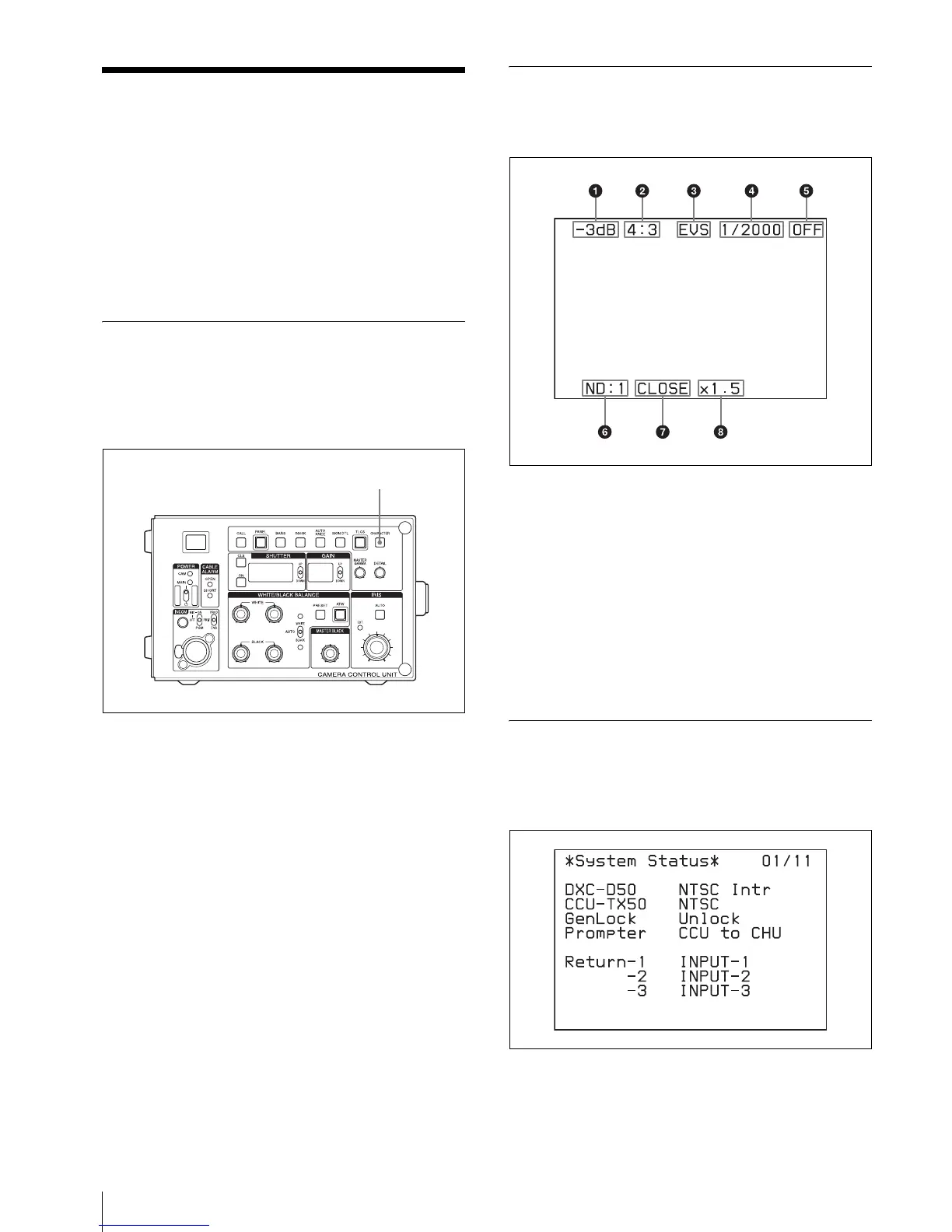
The unit enters the self-diagnostics mode, by pressing
the CHARACTER button on the front panel of the unit.
Each time you press the CHARACTER button, the
display changes.
Settings of the Camera
The settings and operations status of the camera are
displayed.
1 Master gain
2 “4:3” is displayed when the images recorded in 16:9
format are output after converted to the images of
the 4:3 mode.
3 “EVS” is displayed when EVS of the electrical
shutter is on.
4 Shows the shutter speed currently selected.
5 Shows the on/off setting of the shutter.
6 Shows the type of ND filter currently selected.
7 Shows the F-stop (iris setting) of the lens.
8 EX is displayed when a lens extender is used.
Status Display of the Unit
Press the CHARACTER button when the screen of the
camera settings is displayed. The status of the unit is
displayed.
DXC-D50: Model name and format of the connected
camera
CHARACTER button
Setting change and adjustment
progress message display area



 To Next Page