Chapter 4 Viewfinder Screen Indications and Menus
Chapter 4 Viewfinder Screen Indications and Menus 63
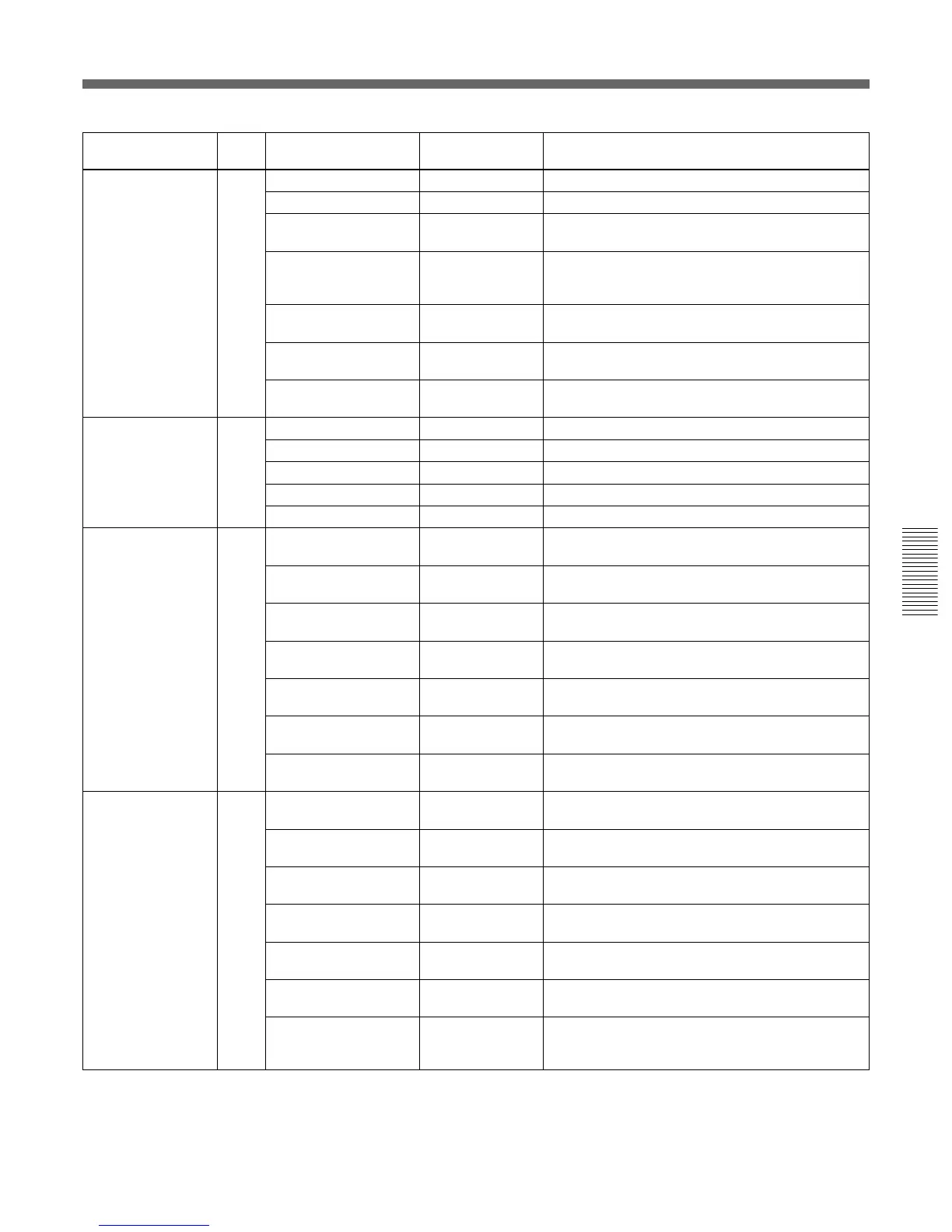
Submenu title Page Setting item: Selectable Remarks
Initial value values
<VF/MARKER> 5 SAFETY ZONE: ON ON, OFF To turn the safety-zone display on/off
90% 80%, 90% To select the size of the safety zone
NORMAL
a)
NORMAL, To select if the safety zone is to change in
ASPECT accordance with the aspect ratio
ASPECT IND: OFF
a)
LINE, MASK, To select the aspect indication: by line (LINE)
LINE&MASK, or masking off a portion (MASK)
OFF
(- -)
a)
15:9, 14:9, 13:9, To select the aspect ratio for aspect indication
4:3 (available only when ASPECT IND is set to LINE)
CENTER MARKER: ON, OFF To turn the center marker on/off
ON
VF SCAN: AUTO
a)
AUTO, 16:9, 4:3 To select if the aspect ratio of the camera is
to apply to the viewfinder
<BOX CURSOR> 6 CURSOR: OFF ON, OFF To turn the box cursor display on/off
H POSITION: 50 0 to 50 to 99 To adjust the horizontal position of the box cursor
V POSITION: 50 0 to 50 to 99 To adjust the vertical position of the box cursor
H WIDTH: 50 0 to 50 to 99 To adjust the horizontal width of the box cursor
V WIDTH: 50 0 to 50 to 99 To adjust the vertical width of the box cursor
<VF DISPLAY1> 7 IRIS: ON ON, OFF To turn on/off the display of IRIS setting value
on the viewfinder
GAIN: ON ON, OFF To turn on/off the display of GAIN setting value
on the viewfinder
WHITE: ON ON, OFF To turn on/off the display of WHITE setting value
on the viewfinder
ND FILTER: ON ON, OFF To turn on/off the display of FILTER setting value
on the viewfinder
5600K: ON ON, OFF To turn on/off the 5600K indication on the
viewfinder
SHUTTER: ON ON, OFF To turn on/off the display of SHUTTER setting
value on the viewfinder
SKIN DTL: ON ON, OFF To turn on/off the display of SKIN DTL setting
value on the viewfinder
<VF DISPLAY2> 8 AUDIO: ON ON, OFF To turn on/off the display of AUDIO setting
value on the viewfinder
TAPE REMAIN: ON ON, OFF To turn on/off the tape remaining time display
on the viewfinder
VTR STATUS: ON ON, OFF To turn on/off the VTR status display on the
viewfinder
VTR ALARM: ON ON, OFF To set if VTR warning indications are displayed on
the viewfinder or not
TIME CODE: ON ON, OFF To set if time code is displayed on the viewfinder or
not
RETURN: ON ON, OFF To set if the return video indication is displayed on
the viewfinder or not.
VF TALLY: ×1 ×1, ×2 To select if both the upper and lower tally
lamps (×2) in the viewfinder are to function or only
the upper lamp (×1) functions
a) - -: Not available for the DXC-D50/D50P



 To Next Page