Chapter 4 Viewfinder Screen Indications and Menus
Chapter 4 Viewfinder Screen Indications and Menus 67
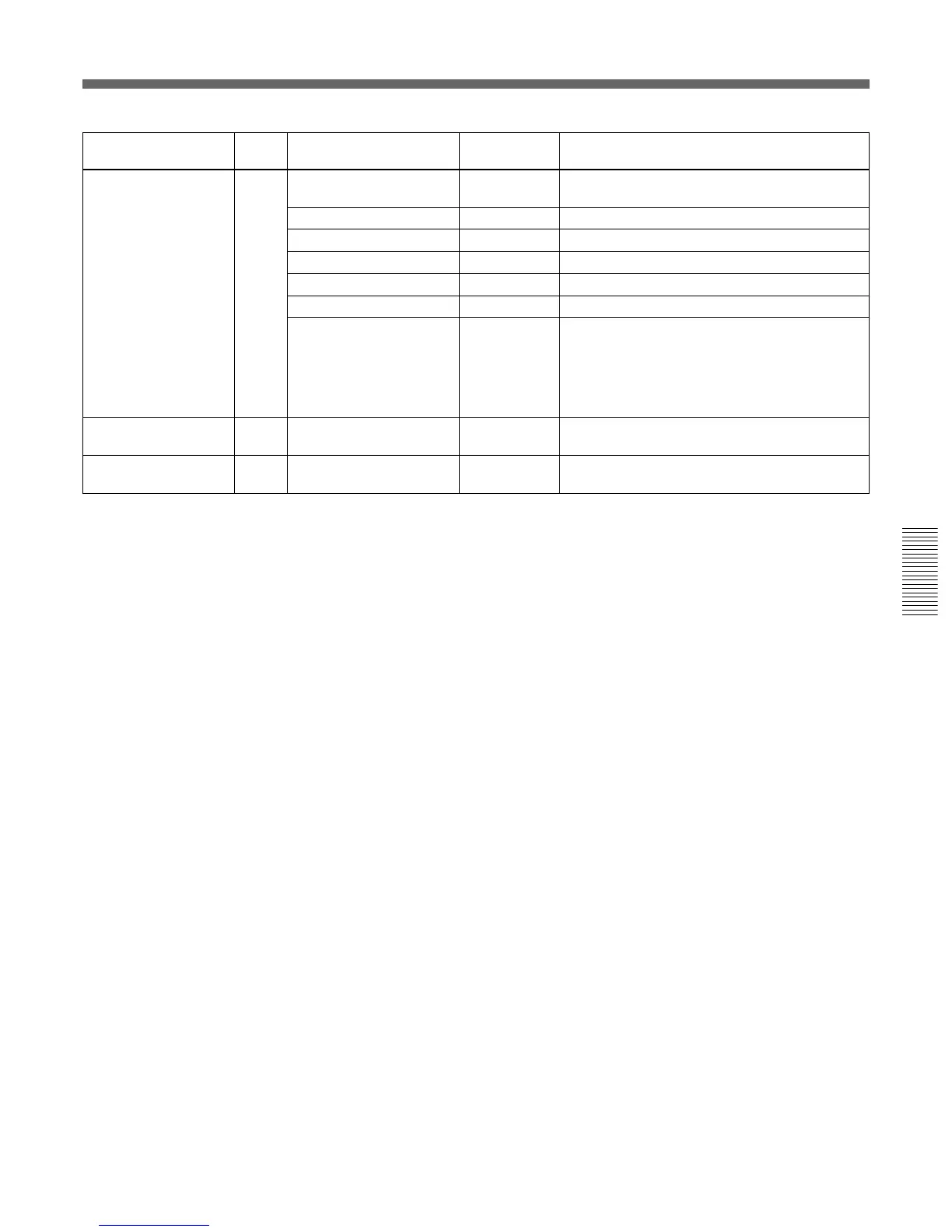
Submenu title Page Setting item: Selectable Remarks
Initial value values
<USER MATRIX> P8 SATURATION: 0 –99 to 0 to 99 To adjust the color saturation (color intensity) of
the whole picture
HUE: 0 –99 to 0 to 99 To adjust the hue of the whole picture
[-R] [-G] [-B] — To adjust the matrix
R: – 0 0 –99 to 0 to 99 To adjust the R-G, R-B axes
G: 0 – 0 –99 to 0 to 99 To adjust the G-R, G-B axes
B: 0 0 – –99 to 0 to 99 To adjust the B-R, B-G axes
PRESET MATRIX: STD STD, HI SAT, To adjust the preset matrix
FL STD: Standard color tone
HI SAT: For more vivid picture (The color
intensity increases a little.)
FL: For shooting under fluorescent light, to
prevent the skin color’s becoming greenish
<LOW KEY P9 LEVEL: 0 –99 to 0 to 99 To correct the color saturation (color intensity)
SATURATION> in dark areas
<CROSS COLOR> P10 SUPPRESSION: 0 0 to 99 To reduce coloring caused by cross color when
a fine pattern is shot



 To Next Page