10
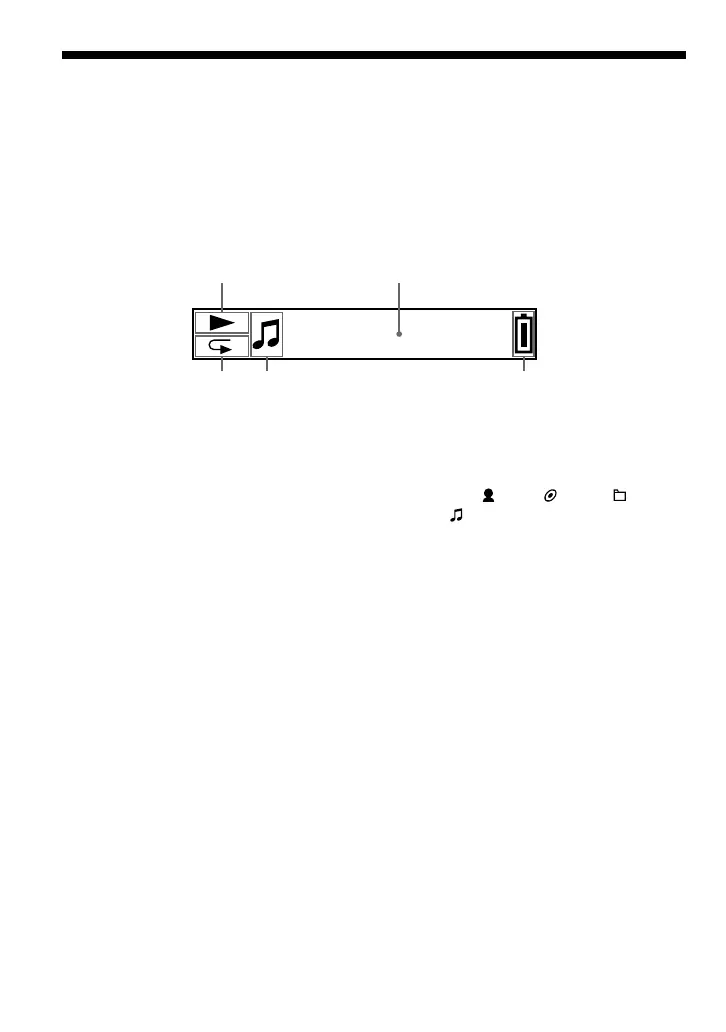
1 Play status indicator
Displays current playback mode (N:
playback, x: stop).
2
Text/graphic information display (page
17)
Displays a track/artist name, time (pages
26 to 28, 32), Message (page 56) and
menu.
To switch display mode (pages 26 to
28): Press the DISP/FM button (NW-
E303/E305/E307), or press the DISP
button (NW-E205/E207). Switch the
display to Power Save mode when you
do not operate the unit for a while (page
36).
3 Repeat mode indicator (page 24)
Displays the current repeat mode icon.
4 Displays : artist, : album, : group
and : track (page 16).
5 Remaining battery indicator (page 13)
Displays the remaining battery power.
z Tip
For information on the FM tuner display, see “FM
Tuner” (NW-E303/E305/E307 only) (page 45).
Display
Locating controls
Track1
2
3
1
45



 To Next Page