18
Album Artist
…
Track
Album 1 Artist A Track01
Album 1 Artist A Track02
Album 1 Artist A Track03
Album 2 Artist A Track04
Album 2 Artist A Track05
Album 2 Artist A Track06
Album 3 Artist B Track07
Album 3 Artist B Track08
Album 3 Artist B Track09
Album 4 Artist C Track10
Album 4 Artist C Track11
Album 4 Artist D Track12
Album 5 Artist A Track13
Album 5 Artist B Track14
Album 5 Artist B Track15
Album 5 Artist B Track16
Artist Album
Artist B Album 3
Artist B Album 3
Artist B Album 3
Artist B Album 5
Artist B Album 5
Artist B Album 5
Album Track
Album 5 Track14
Album 5
Tra ck15
…
Album 5 Track16
Listening to music with your Network Walkman
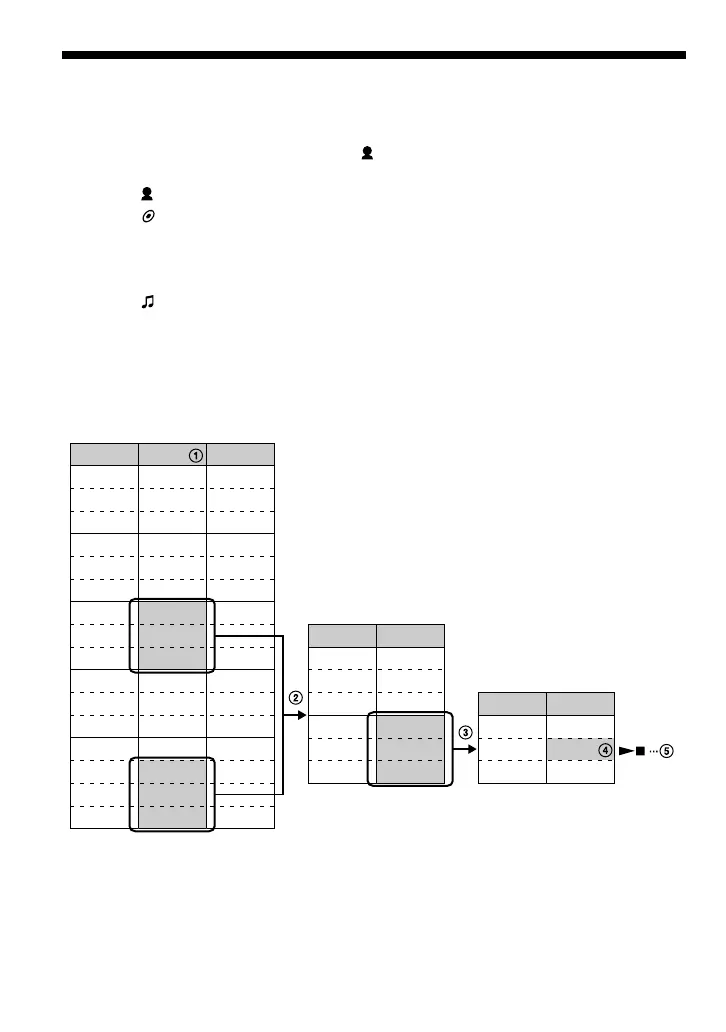
Example of searching
1 Display the search menu screen to select “ Artist”, and then press i (VOL) of the 5
Direction JOG.
2 Select “ Artist B” from the artist list and press i (VOL) of the 5 Direction JOG.
3 Select “ Album5” from the album list of Artist B and press i (VOL) of the 5 Direction
JOG.
The track list of Album5 appears.
In this case, the track list becomes the Play Range.
4 Select “ Track15” from the track list.
5 Press the center of the 5 Direction JOG (Nx).
Playback starts from Track15.
Playback will stop automatically at the end of Track16 (in this case, the end of the Play
Range).
All tracks in the built-in flash
memory
Album lists of Artist B
Tracks in Album 5



 To Next Page