9
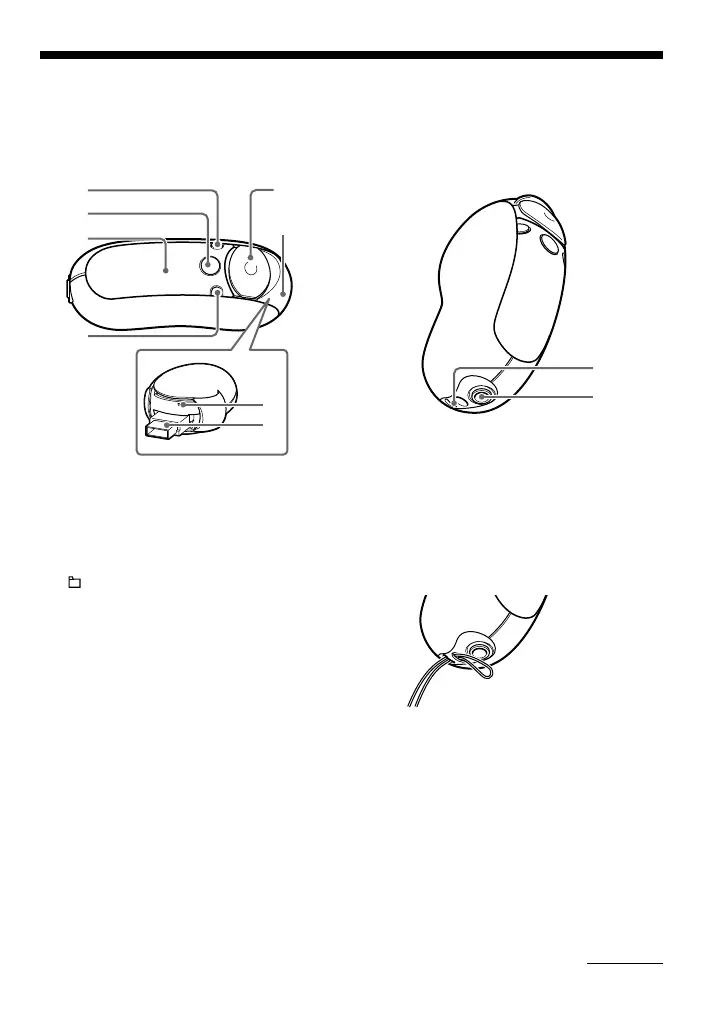
Locating controls
For details about each part, refer to the pages in parentheses.
Rear sideFront side
1
2
3
4
5
6
7
8
9
q;
1 DISP/FM button (NW-E303/E305/
E307)
DISP button (NW-E205/E207) (pages
27, 45)
2 /MENU button
(pages 19, 21 to 22, 28 to 29, 32 to 34,
36 to 44, 46, 48 to 49)
3 Display (pages 10, 17, 24, 26 to 27, 43,
45)
For details on the display and icons,
refer to page 10.
4 REP/SOUND button
(pages 24 to 25, 29)
5 5 Direction JOG
(pages 19, 21 to 22, 24 to 25, 28 to 29,
32 to 34, 36 to 44, 46, 48 to 49)
6 Slide Cover (pages 12 to 13)
7 Reset button (page 52)
8 USB A plug (pages 12 to 13)
9 Strap hole
Put on a strap as shown below.
0 Headphone jack (page 15)
continued



 To Next Page