12
Transferring audio files from the computer to your Network Walkman/
Charging
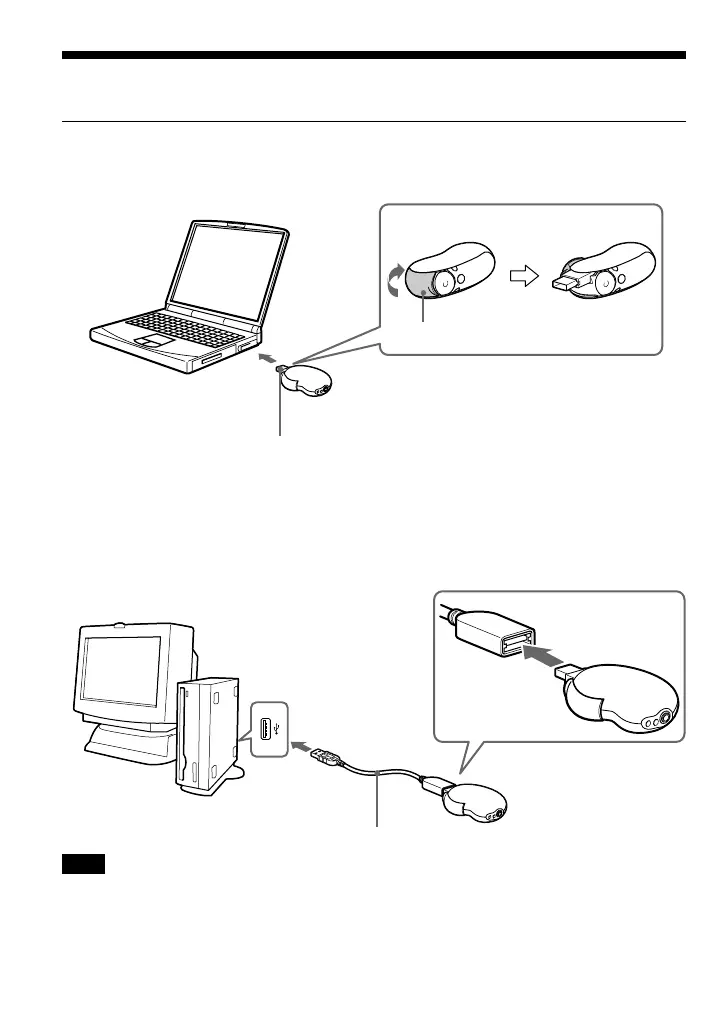
3 Connect your Network Walkman to your computer and charge it.
Open the Slide Cover of the Network Walkman, then connect the USB A plug to a USB port
on your computer. “USB Connect” appears in the display.
If the USB A plug cannot be connected to your computer
Some PCs may not accept direct connection of the Network Walkman’s USB A plug. In this
case, use the supplied USB connection support cable to connect the Network Walkman to your
computer. Use the supplied USB connection support cable, even when the USB A plug can be
connected but is unstable with that the Network Walkman/computer may be burdened.
Note
The USB connection support cable should be used only for connecting with the Network
Walkman.
USB connection support cable (supplied)
Slide Cover
USB A plug
To a USB
port



 To Next Page