ID: SCR-SONY-11NI-AA-MUSIC-PORTAL
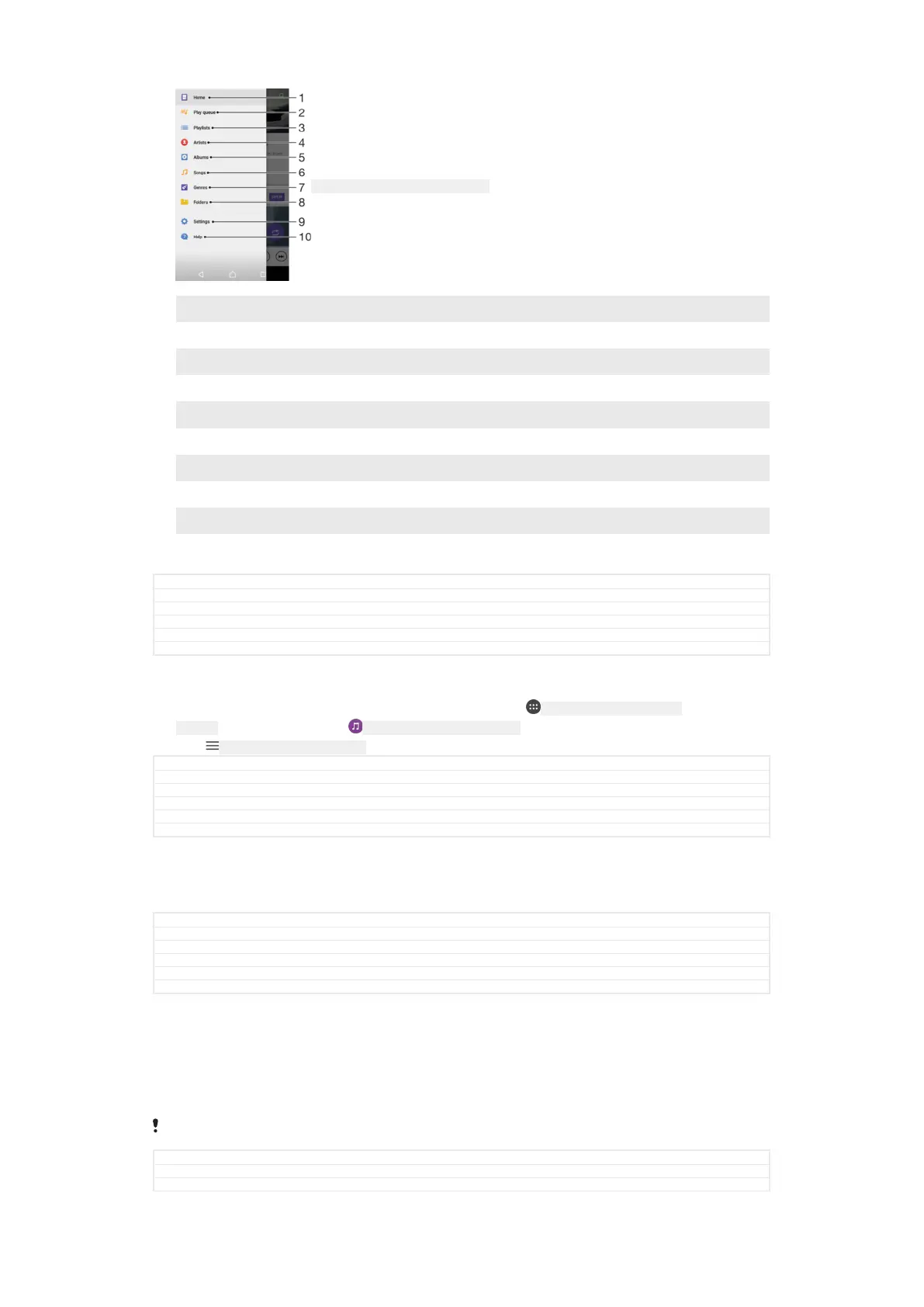
1 Return to the Music home screen
2 View the current play queue
3 Browse all playlists
4 Browse all artists
5 Browse all albums
6 Browse all songs
7 Browse all genres
8 Browse all folders
9 Open the settings menu for the Music application
10 Open the support menu for the Music application
GUID GUID-D9CE57C5-B9B0-451E-A430-1C9B527FF2DA
Title Your music library
Changes Hinoki - no home network
Version 17
Author AdelK
Status Draft
To open the Music menu
1
From your Home screen [preference_title_home_wallpaper] , tap ID: ICN-SONY-HOME-APPTRAY-
NORMAL , then find and tap ID: ICN-SONY-APP-MUSIC-PLAYER .
2
Tap
ID: ICN-SONY-APP-CALENDAR-L .
GUID GUID-A22272B3-4642-4F2E-9B58-CDC380B6D11E
Title To open the Music menu
Changes label fix due to resource file update
Version 4
Author zzCynthiaH
Status Released
To return to the Music home screen
•
When the Music menu is open, tap Home [music_home] or simply tap on the screen
to the right of the menu.
GUID
GUID-2402F482-9434-4988-ABF7-C12A3DB65FAE
Title To return to the Music home screen
Changes ed comments update, valid for all projects onwards
Version 3
Author AdelK
Status Released
To delete a song
1
From the Music menu, browse to the song that you want to delete.
2
Touch and hold the song title, then tap Delete from storage [music_menu_delete] in the
list that appears.
3
Tap DELETE [delete_profile] to confirm.
You cannot delete a song that is currently playing.
GUID GUID-22F57582-7488-484D-B95E-28258A48B894
Title To delete a track
Changes N update and above
142
This is an internet version of this publication. © Print only for private use.



 To Next Page