37
9. Press the ENTER/YES “R” button, and save the adjustment
results in the non-volatile memory. (“EFB = SAVE” will be
displayed for a moment.)
10. “EFB = MO-P”. will be displayed.
The optical pick-up moves to the pit area automatically and
servo is imposed.
11. Press the =0/MD/CD/TUNING – button or )+/
MD/CD/TUNING + button until the waveform of the oscillo-
scope moves closer to the specified value.
In this adjustment, waveform varies at intervals of approx. 2%.
Adjust the waveform so that the specified value is satisfied as
much as possible.
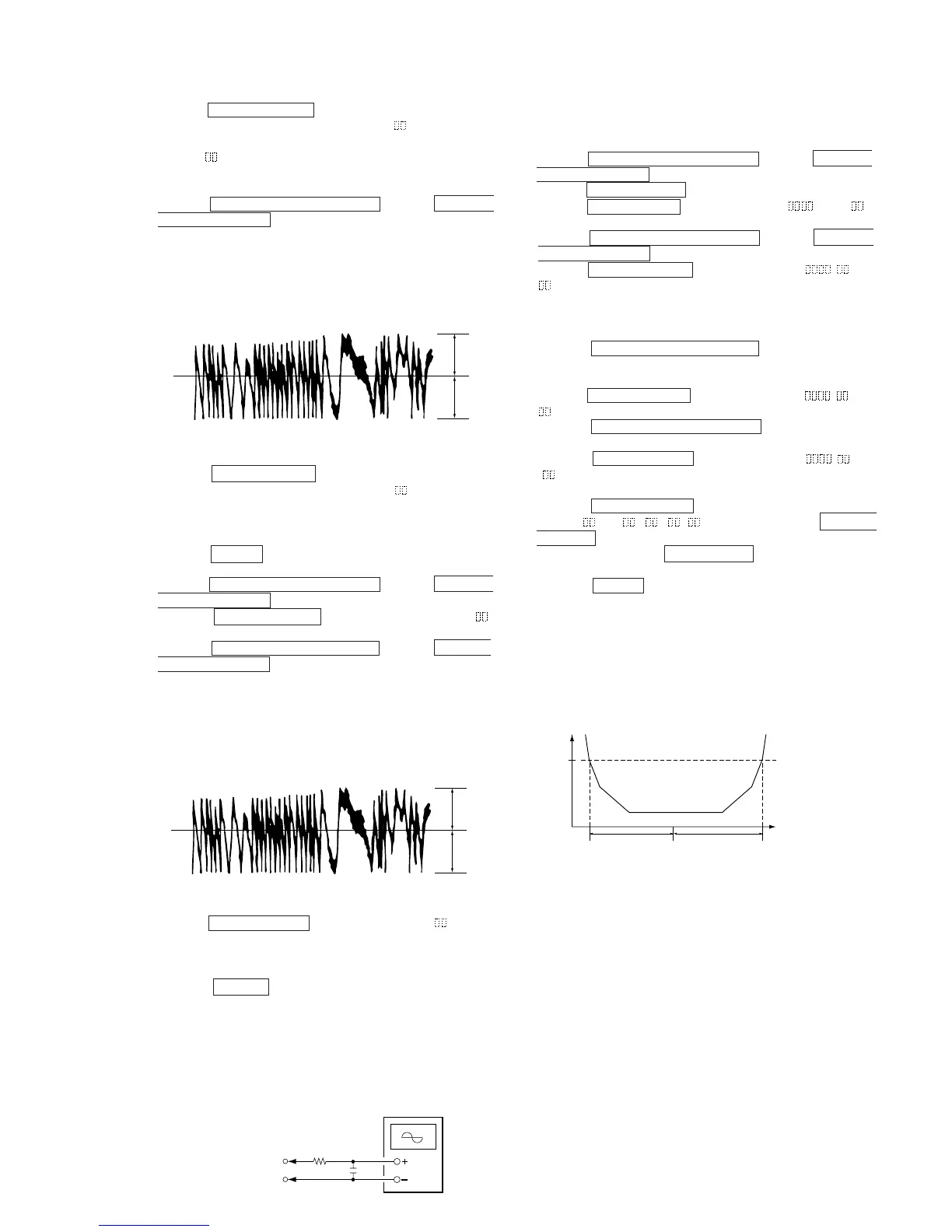
(Traverse Waveform)
12. Press the ENTER/YES “R” button, and save the adjustment
results in the non-volatile memory. (“EFB =
SAVE” will be
displayed for a moment.)
Next “EF MO ADJUST” is displayed. The disc stops rotating
automatically.
13. Press the 6 (MD) button and remove the disc.
14. Load the check disc (MD) TDYS-1.
15. Press the =0/MD/CD/TUNING – button or )+/
MD/CD/TUNING + button and display “EF CD ADJUST”.
16. Press the ENTER/YES “R” button and display “EFB =
CD”. Servo is imposed automatically.
17. Press the =0/MD/CD/TUNING – button or )+/
MD/CD/TUNING + button so that the waveform of the oscil-
loscope moves closer to the specified value.
In this adjustment, waveform varies at intervals of approx. 2%.
Adjust the waveform so that the specified value is satisfied as
much as possible.
(Traverse Waveform)
18. Press the ENTER/YES “R” button, display “EFB = SAVE”
for a moment and save the adjustment results in the non-vola-
tile memory.
Next “EF CD ADJUST” will be displayed.
19. Press the 6 (MD) button and remove the check disc (MD)
TDYS-1.
Note 1 : MO reading data will be erased during if a recorded disc is
used in this adjustment.
Note 2 : If the traverse waveform is not clear, connect the oscillo-
scope as shown in the following figure so that it can be
seen more clearly.
5-12. FOCUS BIAS ADJUSTMENT
Adjusting Procedure :
1. Load a test disk (MDW-74/AU-1).
2. Press the =0/MD/CD/TUNING – button or )+/
MD/CD/TUNING + button and display “CPLAY MODE”.
3. Press the ENTER/YES “R” button and display “CPLAY MID”.
4. Press the MENU/NO “R” button when “C1 = AD = ”
is displayed.
5. Press the =0/MD/CD/TUNING – button or )+/
MD/CD/TUNING + button and display “FBIAS ADJUS”.
6. Press the ENTER/YES “R” button and display “ / a =
”.
The first four digits indicate the C1 error rate, the two digits
after [/] indicate ADER, and the 2 digits after [a =] indicate the
focus bias value.
7. Press the )+/MD/CD/TUNING + button and find the
focus bias value at which the C1 error rate becomes about 200
(Refer to Note 2).
8. Press the ENTER/YES “R” button and display “ / b =
”.
9. Press the =0/MD/CD/TUNING – button and find the
focus bias value at which the C1 error rate becomes about 200.
10. Press the ENTER/YES “R” button and display “ / c =
”.
11. Check that the C1 error rate is below 50 and ADER is 00. Then
press the ENTER/YES “R” button.
12. If the “( ” in “ - - ( ” is above 20, press the ENTER/
YES “R” button.
If below 20, press the MENU/NO“R” button and repeat the
adjustment from step 2.
13. Press the 6 (MD) button to remove the test disc.
Note 1 : The relation between the C1 error and focus bias is as
shown in the following figure. Find points a and b in the
following figure using the above adjustment. The focal
point position C is automatically calculated from points a
and b.
Note 2 : As the C1 error rate changes, perform the adjustment us-
ing the average vale.
VC
A
B
Specification A = B
VC
A
B
Specification A = B
330 k
Ω
Oscilloscop







 To Next Page