HCD-SHAKE7
15
To release from this mode, press [\/1] button.
[PROTECT KIND CHECK TEST MODE]
This mode is used to check types of protect occurred during
protector on.
Procedure:
1. During protection on, fl uorescent indicator tube shows blinking
message “PROTECT EXX” where “EXX” represent the error
code.
2. Press [] and [- / ] button simultaneously.
3. Fluorescent indicator tube display will toggle between
“PROTECT” message and protector kind message display.
Below table explains on protector kind.
Error
Code
Protector
Message
Description
E01 “AMP OCP” The over current condition to
MOSFET occurs by defect of
MOSFET or defect of PS output
line.
E03 “POWER
SUPPLY”
Defect of power supply circuit
to AMP
E04 “DC DETECT” DC appears in SP terminal by
defect of AMP IC and MOS-
FET.
E05 “THERMISTOR” Unusual heat up of MOSFET by
improper assembly of heat sink,
destruction of MOSFET etc.
E06 “FAN BLOCK” Defect of DC FAN and DC FAN
driver circuit
To release from this mode:
Press [] and [- / ] button simultaneously again or unplug &
re-plug in the power cord.
If speaker does not have output even if the set status is not in
PROTECT mode, the following defect might be possible:
Defects Possible cause
RESET defect Reset signal status from micom is not ‘H’.
If the PROTECT mode is “POWER SUPPLY”, there is
possibility of unusual power supply of any of the AMP IC or
Pre-amplifi er.
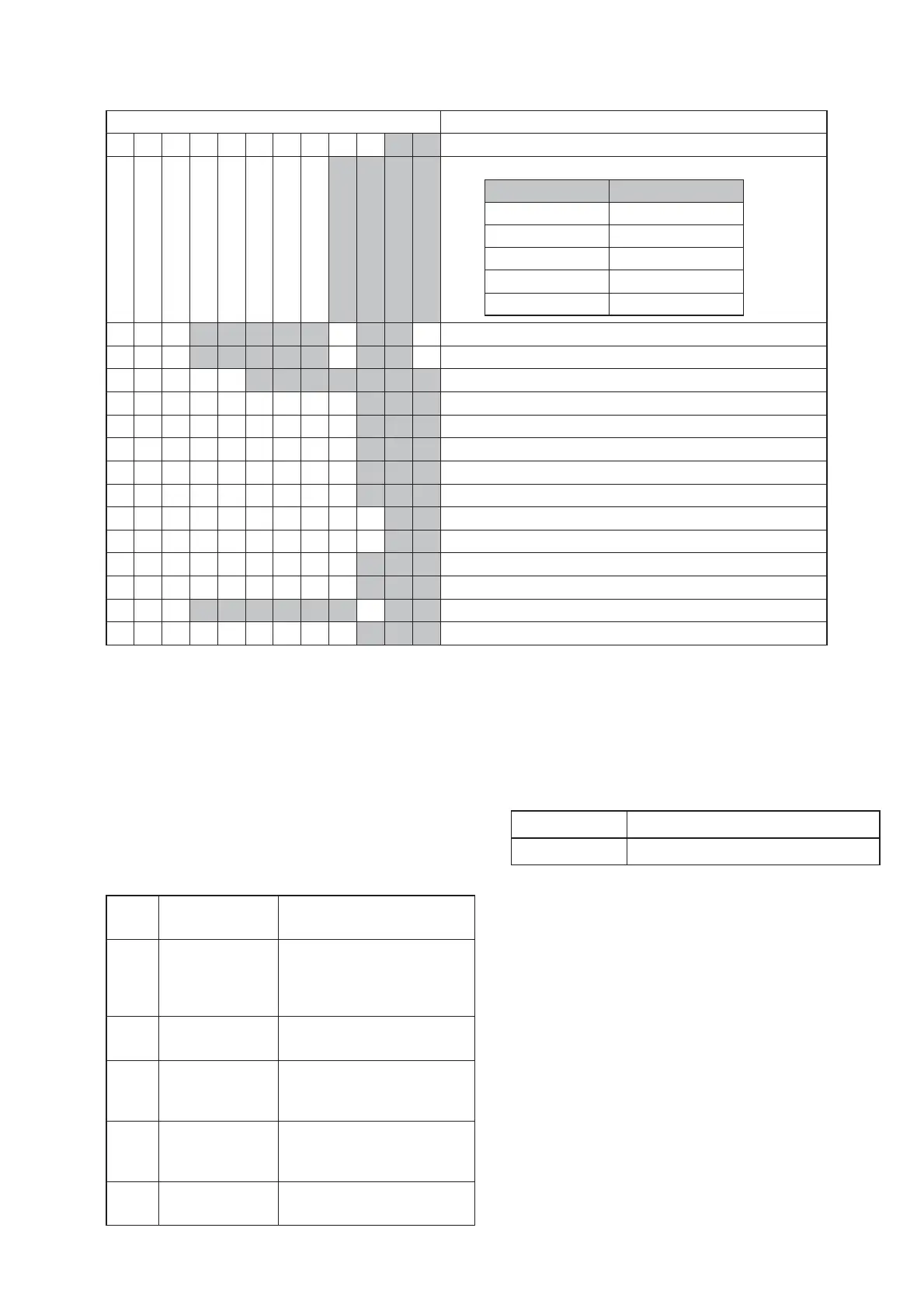
Display Item
PROCOUNT
※※
Protector Count
PROTYPE
※※※※
Protector Type (refer PROTECTOR KIND CHECK TEST MODE)
Protector type Protector Error Code
AMPL E01
PWR2 E03
SPK E04
TEMP E05
FAN E06
T1
※※※※※
H
※※
M
Single Power On Time
T2
※※※※※
H
※※
M
Total Power On Time
FUNC
※※※※※※※
Input Function
VOL
※※※
Volume
ATT
※※※
Actual Attenuation
EQ LOW
※※※
Low EQ Level
EQ MID
※※※
Mid EQ Level
EQ HIGH
※※※
High EQ Level
VACS
※※
VACS Level
APVACS
※※
AP VACS Level
SW
※※※
Subwoofer Setting
SURR
※※※
Surround Setting
DJ
※※※※※※ ※※
DJ Effect Setting
BAZUCA
※※※
Bass Bazuca Setting







 To Next Page