141
L:\SONY\PV\CX91030\1130insatuPDF\2887521121_GB\2887521111HVRV1UVIN\01GB12QUI.f
m
HVR-V1E/V1P
2-887-521-12(1)
Quick Reference
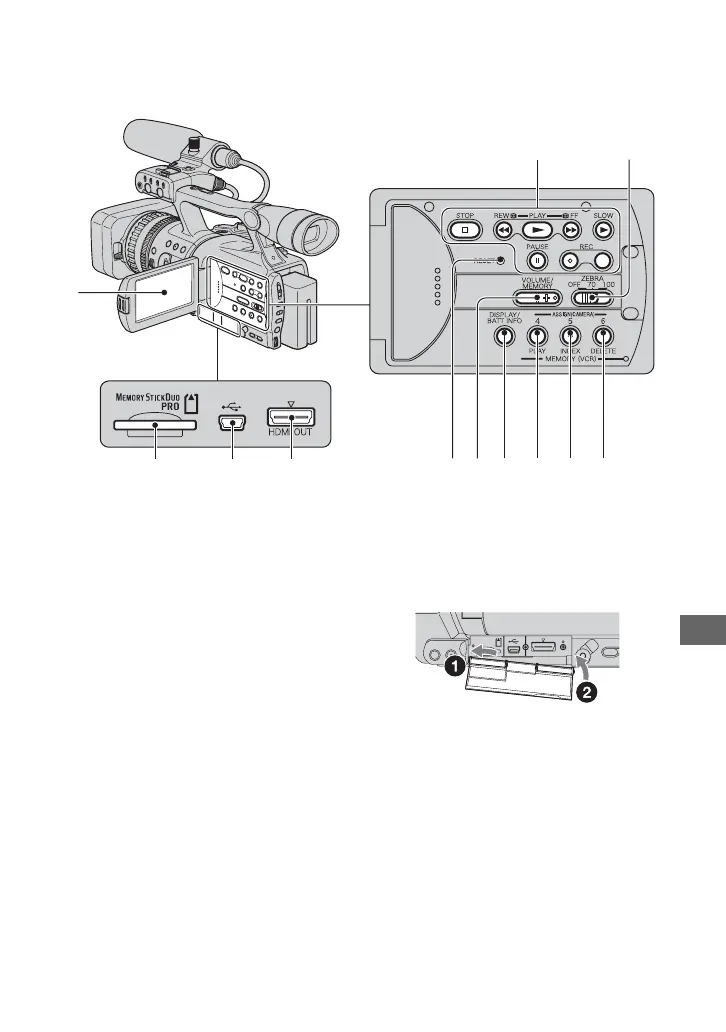
A LCD screen (26)
B Video control buttons (REW, PLAY*,
FF, PAUSE, STOP, SLOW, REC) (35)
C ZEBRA switch (41)
D ASSIGN 6, MEMORY/DELETE
button (49, 99)
E ASSIGN 5, MEMORY/INDEX button
(35, 49)
F ASSIGN 4, MEMORY/PLAY button
(35, 49)
G DISPLAY/BATT INFO button (54, 55)
H VOLUME/MEMORY button* (36)
I RESET button
If you press the RESET button, all
settings including the clock setting
(except the Picture profile and Camera
profile settings) return to the default.
J HDMI OUT jack (58)
K USB jack (100)
L “Memory Stick Duo” slot (30)
* Each of the PLAY button, VOLUME/
MEMORY button and MEMORY/INDEX
button has a raised tactile dot (the INDEX
button has it on the + side). Use it to identify the
location of the buttons.
To attach the jack cover
Attach the jack cover as shown in the
illustration.
1
2
456789
3
qaqs 0
Continued ,



 To Next Page