Help Guide
IC Recorder
ICD-UX570F / ICD-UX575F
Using/Charging the IC recorder with the USB AC adaptor
You can charge the battery by connecting the USB AC adaptor to a household power outlet.
Being able to use the IC recorder while it is charging is useful when recording for a long time.
When using a USB AC adaptor (commercially available), use one that can supply an output current of 500 mA or more.
Charging from other devices is not guaranteed.
Connect the USB AC adaptor to an outlet.
1
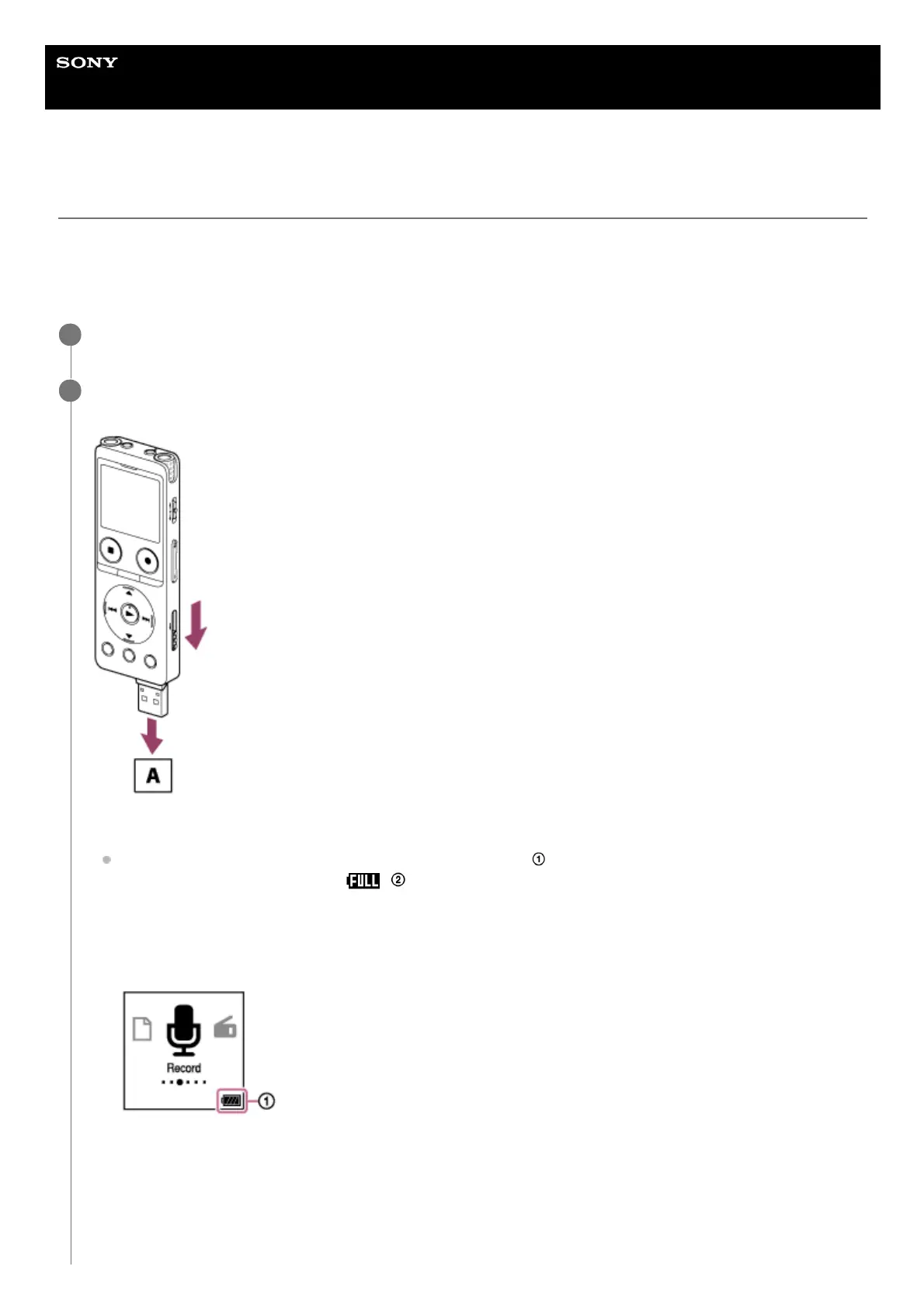
Slide the USB slide lever on the side of the IC recorder downward and connect the USB connector to the
USB AC adaptor.
A: USB AC adaptor (commercially available)
While the battery is charging, the battery indicator animation (
) appears on the display window.
When the battery is fully charged,
( ) appears on the display window. After 1 hour passes, the display
window turns off.
You can use the IC recorder while charging the battery.
Charging
Fully charged
2



 To Next Page