EasyManua.ls Logo

Sony IT-A100 - Preparation; Inserting the Microcassette; Types of Greetings

Sony IT-A100
58 pages
Print Icon
To Next Page IconTo Next Page
To Previous Page IconTo Previous Page
Loading...
Preparation
abte1adialeMdal-menllagele-y1-1
ac:
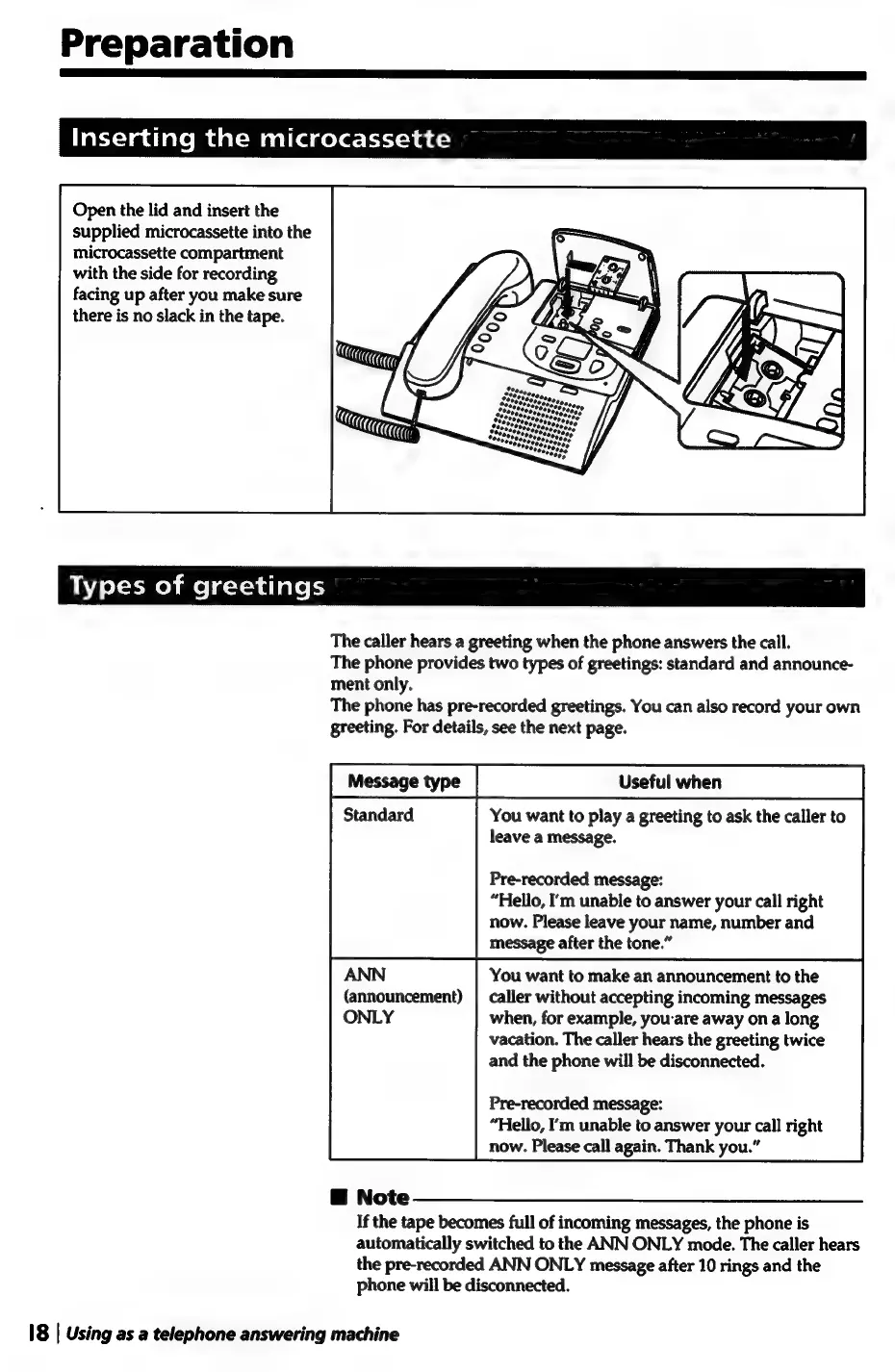
Open
the
lid
and
insert
the
supplied
microcassette
into
the
microcassette
compartment
with
the
side
for
recording
facing
up
after
you
make
sure
there
is
no
slack
in
the
tape.
WAZ
eX-1-Mohmme|q-t-a
alates
The
caller
hears
a
greeting
when
the
phone
answers
the
call.
The
phone
provides
two
types
of
greetings:
standard
and
announce-
ment
only.
The
phone
has
pre-recorded
greetings.
You
can
also
record
your
own
greeting.
For
details,
see
the
next
page.
[message
ype
|
—CUaefulwhen
Standard
You
want
to
play
a
greeting
to
ask
the
caller
to
leave
a
message.
Pre-recorded
message:
“Hello,
I'm
unable
to
answer
your
call
right
now.
Please
leave
your
name,
number
and
message
after
the
tone.”
ANN
You
want
to
make
an
announcement
to
the
(announcement)
|
caller
without
accepting
incoming
messages
ONLY
when,
for
example,
you-are
away
on
a
long
vacation.
The
caller
hears
the
greeting
twice
and
the
phone
will
be
disconnected.
Pre-recorded
message:
“Hello,
I’m
unable
to
answer
your
call
right
now.
Please
call
again.
Thank
you.”
@
Note
If
the
tape
becomes
full
of
incoming
messages,
the
phone
is
automatically
switched
to
the
ANN
ONLY
mode.
The
caller
hears
the
pre-recorded
ANN
ONLY
message
after
10
rings
and
the
phone
will
be
disconnected.
18
|
Using
as
a
telephone
answering
machine

Related product manuals