EasyManua.ls Logo

Sony IT-A100 - Recording a Telephone Conversation

Sony IT-A100
58 pages
Print Icon
To Next Page IconTo Next Page
To Previous Page IconTo Previous Page
Loading...
Recording
a
telephone
conversation
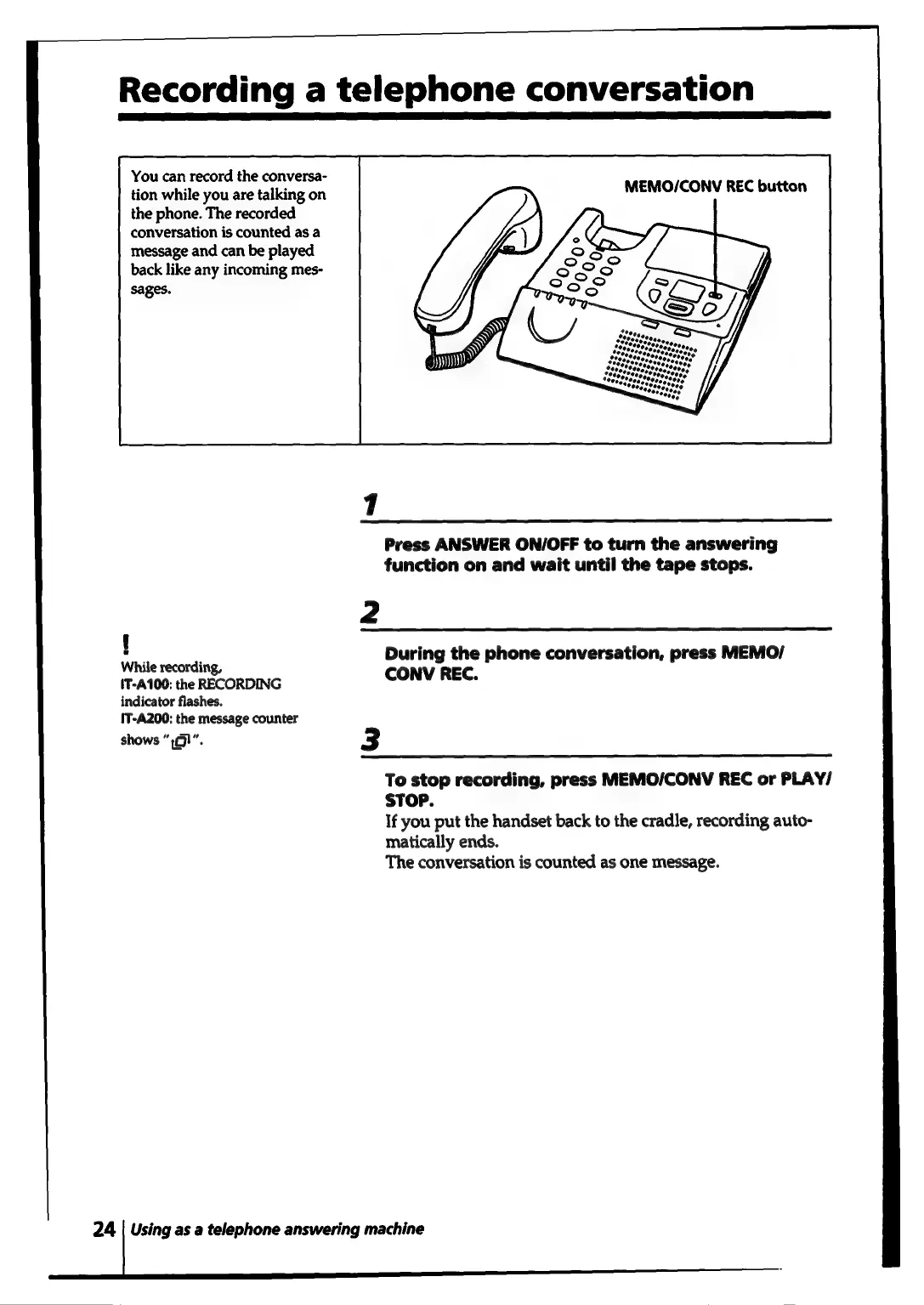
You
can
record
the
conversa-
tion
while
you
are
talking
on
the
phone.
The
recorded
conversation
is
counted
as
a
message
and
can
be
played
back
like
any
incoming
mes-
sages.
1
Press
ANSWER
ON/OFF
to
turn
the
answering
function
on
and
wait
until
the
tape
stops.
2
!
While
recording,
pera
Msg
phone
conversation,
press
MEMO/
IT-A100:
the
RECORDING
indicator
flashes.
{T-A200;
the
message
counter
shows
“:¢!”".
3
To
stop
recording,
press
MEMO/CONV
REC
or
PLAY/
STOP.
If
you
put
the
handset
back
to
the
cradle,
recording
auto-
matically
ends.
The
conversation
is
counted
as
one
message.
24
|
Using
as
a
telephone
answering
machine

Related product manuals