EasyManua.ls Logo

Sony IT-A100 - Playing Back Messages; Clearing Messages

Sony IT-A100
58 pages
Print Icon
To Next Page IconTo Next Page
To Previous Page IconTo Previous Page
Loading...
Playing
back
messages
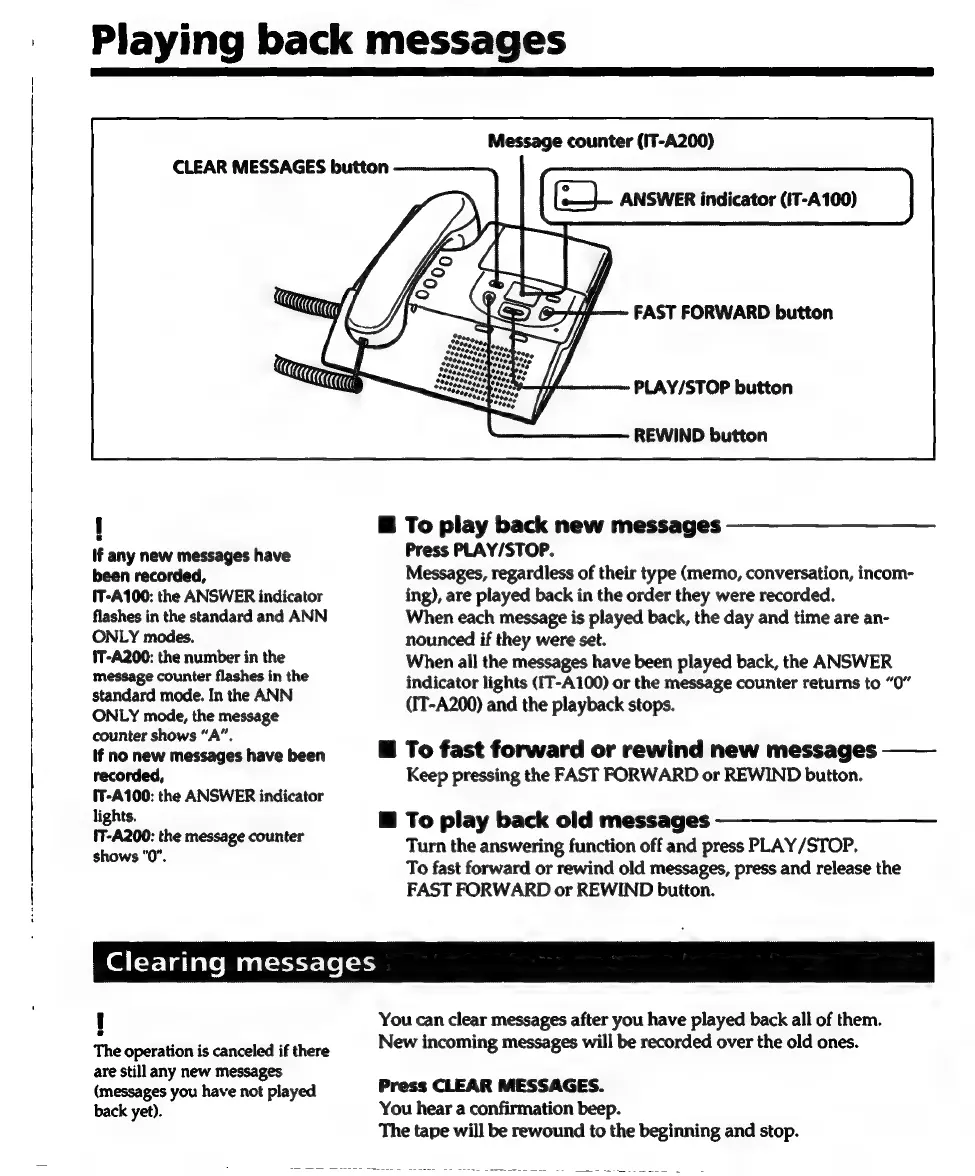
Message
counter
(IT-A200)
(fe).
ANSWER
indicator
(IT-A100)
CLEAR
MESSAGES
button
FAST
FORWARD
button
PLAY/STOP
button
REWIND
button
J
@
To
play
back
new
messages
If
any
new
messages
have
Press
PLAY/STOP.
been
recorded,
Messages,
regardless
of
their
type
(memo,
conversation,
incom-
IT-A100:
the
ANSWER
indicator
ing),
are
played
back
in
the
order
they
were
recorded.
flashes
in
the
standard
and
ANN
When
each
message
is
played
back,
the
day
and
time
are an-
ONLY
modes.
nounced
if
they
were
set.
1T-A200:
the
number
in
the
When
all
the
messages
have
been
played
back,
the
ANSWER
message
counter
flashes
in
the
standard
mode.
In
the
ANN
ONLY
mode,
the
message
counter
shows
“A”,
If
no
new
messages
have
been
@
To
fast
forward
or
rewind
new
messages
——
indicator
lights
(IT-A100)
or
the
message
counter
returns
to
“0”
(IT-A200)
and
the
playback
stops.
recorded,
Keep
pressing
the
FAST
FORWARD
or
REWIND
button.
§T-A100:
the
ANSWER
indicator
lights.
Hi
To
play
back
old
messages
'T-A200:
the
message
counter
shows
"0".
Turn
the
answering
function
off
and
press
PLAY/STOP.
To
fast
forward
or
rewind
old
messages,
press
and
release
the
FAST
FORWARD
or
REWIND
button.
Clearing
messages
|
You
can
clear
messages
after
you
have
played
back
all
of
them.
The
operation
is
canceled
if
there
New
incoming
messages
will
be
recorded
over
the
old
ones.
are
still
any
new
messages
(messages
you
have
not
played
Press
CLEAR
MESSAGES.
back
yet).
You
hear
a
confirmation
beep.
The
tape
will
be
rewound
to
the
beginning
and
stop.

Related product manuals